Model Context Protocol (MCP): Unlocking Smarter AI Integration for Your Business


(If you prefer video content, please watch the concise video summary of this article below)
Modern enterprises are eager to use artificial intelligence, but plugging the technology into data, tools, and workflows they use every day isn’t always as simple. Custom integrations of chatbots, assistants, or analytics models to internal company systems often mean spending time (and budget) on patchwork APIs and workarounds that don’t scale.
Model Context Protocol (MCP) is emerging as a solution to this problem.
This article introduces MCP in accessible terms, explains how it works, and shows why it’s showing up in more and more enterprise AI solutions. We’ll explore MCP’s core concepts, business benefits, real-world examples, and how organizations can get started.
Get AI software built for your business by SaM Solutions — and start seeing results.
What is Model Context Protocol (MCP)?
Model Context Protocol (MCP) is a new, open standard that provides a universal method for connecting AI tools (chatbots, large language models (LLMs), analytics assistants, etc.) to business data sources (CRMs, databases, file storage, etc.). It allows these tools to retrieve relevant data, respond with context-aware answers, or perform actions such as sending emails or updating records.
Model Context Protocol was introduced by Anthropic (an AI research leader) in late 2024. Its release as an open-source framework signaled a push for industry-wide collaboration. Anthropic’s own AI assistant, Claude, uses MCP to integrate with tools, and the concept has been embraced by AI developers as a way to make assistants more useful.
What is MCP in its essence? Model Context Protocol offers a new approach to how artificial intelligence solutions “talk” to other software systems, fetching live data or triggering actions.
Rather than building one-off, custom integrations for each AI tool to connect with each software system, Model Context Protocol offers one common “language” that any compliant AI application and data source can use to communicate. This protocol allows chatbots, digital assistants, etc. to retrieve information or perform actions on various platforms through a single interface.
How MCP solves the integration challenge
Traditionally, connecting N AI models to M different systems required M×N bespoke connectors — an exponential integration headache.
MCP tackles this by acting as a hub: any AI that speaks MCP can interact with any service that speaks MCP. This dramatically simplifies architecture by replacing many custom APIs with one standardized protocol.
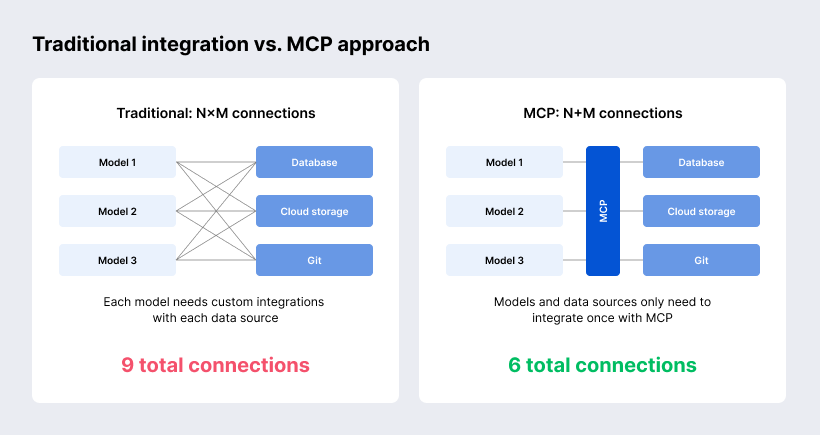
It’s like giving your AI solution a universal adapter. It doesn’t matter whether it’s connecting to a database, a file server, or a business app — the process looks the same.
To put it simply:
- MCP helps AI understand what tools and data it can use.
- It’s a layer that sits between AI and your internal systems, translating requests back and forth.
- It works with existing tools, so you don’t need to rebuild your stack.
The result? Your AI solution becomes more useful, faster to deploy, and easier to manage across the organization.
Model Context Protocol is a simple idea with a lot of power behind it: it gives AI systems a standard way to access tools, data, and services, without the mess of custom-built integrations.
How MCP Works in Practice
Model Context Protocol sounds technical, but the way it works is surprisingly straightforward, especially compared to traditional integrations.
Core components of Model Context Protocol
MCP is not a single tool but a framework made up of three core parts that work together.
This is where the AI gets its bearings. The context management layer gathers all the relevant information the model needs to respond intelligently, for instance sales data, support history, company guidelines, or user preferences.
This layer is where the AI gets to work. It takes the user’s request, combines it with the available context, and decides what to do (generate a response, summarize data, or trigger an action).
This is the bridge between your AI and your tools. It handles the actual exchange of information — requests going out, data coming back. On one end, you have the MCP client, which sends structured requests from the AI. On the other, the MCP server, which responds with just the right data or tools the AI is allowed to use.
Protocol handshake and communication flow
When an AI system first connects to a tool using MCP, there’s a quick introduction called a handshake.
During this step, the AI learns what the connected system can do:
- What kind of data it offers
- What tasks it can perform
- What rules apply for access
This means the AI doesn’t need hardcoded knowledge of every service it talks to. It can dynamically discover what’s available and use it as needed.
From user request to external data
For example, a user asks an AI assistant: “What’s the status of our top sales leads this week?” For the AI to answer accurately, it needs to pull data from your CRM.
Instead of being pre-programmed with specific instructions for that one CRM system, the AI routes the request through its MCP client. This client acts as a middleman, it doesn’t guess or improvise. It checks which data sources or tools are available via MCP, figures out which one has the info it needs, and then calls it through a standard interface.
The CRM, now functioning as an MCP server — sends back the data in a format the AI understands. The AI processes the response and delivers a clear answer to the user.
Model Context Protocol acts as a bridge: the AI stays decoupled from the intricacies of each external system, talking only through the MCP interface. This ensures interoperability — the AI doesn’t need custom code for, say, Salesforce, SAP or SQL database. As long as those systems have MCP servers, the AI can interact with all of them in the same uniform way.
Inside the MCP Ecosystem: Clients and Servers
MCP uses a client–server architecture to mediate between AI models and external systems.
Examples of MCP clients
MCP client (AI side) is a gateway that sends requests and receives results, acting on behalf of the user. When the AI app needs information or to execute an operation, it doesn’t call an API directly, it asks the MCP client.
- A virtual assistant that answers employee questions using live data
- An AI chatbot that pulls order status updates from your back-end systems
- A code assistant embedded in a developer tool, helping teams retrieve documentation or generate snippets based on internal standards
- A business analytics dashboard that lets users ask natural-language questions powered by AI and live enterprise data
Any AI-powered tool that needs access to real-time data or functions can become an MCP client, as long as it speaks the protocol.
Examples of MCP servers
MCP server (data/tool side) is installed on or connected to your business systems. It defines what is accessible (data, actions, tools) and responds to incoming requests.
- A CRM system offering lead data and contact histories
- A file storage service making internal documents searchable
- A knowledge base that allows AI to retrieve step-by-step procedures or HR policies
- A custom database exposing real-time sales or inventory data
- A cloud integration platform which can wrap multiple enterprise services into a single MCP-compatible interface
In most cases, these servers are lightweight adapters or plugins added to existing systems, not full rewrites.
How MCP Is Different from Traditional APIs
At first glance, Model Context Protocol might sound a lot like an API, but the difference lies in how it simplifies and standardizes AI integration. If you’ve ever dealt with a stack of APIs, each with its own rules and quirks, you’ll immediately see why MCP is a game changer.
One protocol, not many APIs
In a typical setup, every tool or service you use (CRM, database, document storage) comes with its own API. And if you want your AI assistant to interact with them, you need to build a separate integration for each one. That’s a lot of work, and it doesn’t scale well.
MCP offers a single way for AI systems to interact with all of these tools. Instead of writing custom code for every connection, you use one protocol that works everywhere MCP is supported.
Smarter discovery, less guesswork
Traditional APIs are usually static. If you want to use one, you need to read the documentation, figure out what endpoints to call, and hardcode the logic into your app.
With MCP, AI systems can automatically discover what capabilities a system provides. During the initial handshake, the MCP client learns what data or tools are available and how to use them, without needing a developer to spell it all out.
Two-way conversations, not one-way requests
Most APIs work like a one-way street: you send a request, get a response, and that’s it.
MCP is designed for back-and-forth interaction. It allows AI systems to ask follow-up questions, combine multiple actions, or adjust their behavior based on the server’s response. It’s closer to a conversation than a transaction.
While APIs are still important, MCP is designed specifically for AI; it solves problems that traditional APIs were never built to handle. It brings consistency, discovery, and dialogue to the table, making it much easier to implement artificial intelligence features into your business.
Model Context Protocol Examples in Action
MCP may be a technical protocol behind the scenes, but its impact shows up in practical, everyday ways.
AI-powered trip planning
Let’s say you’re using a smart assistant to plan a business trip. You type, “Book me a flight to Berlin and find a hotel near the venue.”
The assistant uses MCP to connect with multiple services: your calendar, a travel booking platform, maybe even your company’s travel policy database. Instead of jumping between apps or relying on a travel coordinator, the assistant gathers everything (flights, hotels, availability, approval workflows) through MCP and delivers one clear suggestion.
Intelligent code editors
In a software team, developers often waste time searching for the right code snippet, checking internal documentation, or figuring out which standards apply.
With MCP, an AI assistant embedded in the code editor can connect to documentation portals, version control systems, or even issue trackers. Developers can ask questions like, “What’s our logging standard for microservices?” and get instant, relevant answers pulled from inside the company’s own tools.
Business data analytics
Business leaders often need quick, data-backed answers, but waiting on dashboards or reports can slow decision-making.
An AI assistant with MCP access can retrieve and analyze data on demand. Ask it, “What were our top-performing regions last quarter?” and it connects to your analytics database, pulls the numbers, and gives a summary in plain language. No waiting, no digging through dashboards.
Security Considerations for MCP Servers
When it comes to AI and enterprise data, security is a requirement. Business leaders need confidence that their systems, data, and workflows won’t be compromised by a powerful but overly curious assistant.
Unlike many traditional integrations that expose large parts of a system through open APIs, MCP takes a more structured and cautious approach. It works on the principle of explicit permission and local control, meaning your organization decides exactly what the AI can see and do.
You control what the AI can access
Every MCP server defines its own set of tools and data that it makes available. Nothing is exposed by default.
For example:
- You can allow the AI to read customer data from your CRM but not update it.
- Or you can grant access to a document library but block confidential files based on metadata.
- You can even set time-based or role-based access rules depending on the context of the request.
This level of control means you’re always in charge of what the AI assistant can reach.
Runs inside your own environment
Another major advantage: MCP servers typically run inside your existing infrastructure. That means data stays where it already is, on your own servers, behind your firewall, or within your secure cloud environment. There’s no need to expose internal systems or send sensitive information to third-party services.
And thanks to growing MCP support from integration platforms and enterprise tools, it’s getting easier to deploy these secure connections without starting from scratch. Platforms like MuleSoft, for instance, now offer modules for MCP, helping businesses turn existing APIs into secure, MCP-compatible interfaces quickly.
SaM Solutions has expertise in creating MCP services and integrating them with large language models (LLMs). We’ve developed a prototype based on the Model Context Protocol (MCP): a chatbot widget for websites. Clients can register on our platform, link their preferred LLM and MCP server, and receive a unique integration link. Once embedded on their website, a popup chatbot appears, ready to assist visitors.
Built-in transparency and logging
Every interaction between the MCP client and server can be logged. You’ll have a full record of what the AI accessed, when, and why. This is useful for audits and also helps you fine-tune permissions and monitor for unusual behavior. For compliance-driven industries, that’s a big plus.
MCP gives your AI more power without giving up control. You decide what’s visible, what’s allowed, and where everything runs. Security and AI don’t have to be at odds. With MCP, they can go hand in hand.
Getting Started with MCP: Basic Implementation Steps
You don’t need to overhaul your entire tech stack to start using the Model Context Protocol. One of the strengths of MCP is that it’s designed to work with your existing systems. Here’s what a basic implementation might look like.
Install the required libraries
The first step is to install the MCP client library into your AI-powered application. These libraries are available as open-source packages and integrate easily into most modern development environments. If you’re using a platform that already supports MCP, some of this may be built in.
Configure the MCP client
The MCP client needs to know where to look. You’ll set up its connection to one or more MCP servers, which act as gateways to your tools and data. This includes defining endpoints, authentication methods, and context types the AI will use.
Set up server connection
The MCP server is the component that sits alongside your internal system. It tells the AI what functions or data it can access, and under what conditions. You can create your own MCP server using open-source tools, or take advantage of growing MCP support in integration platforms. Some third-party connectors are already available for common systems, speeding up this step significantly.
Define context handlers
Context handlers are small pieces of logic that determine how incoming requests are processed. For example, if the AI wants to “fetch top leads,” the handler decides how that maps to your actual CRM queries. This is where you align MCP behavior with your business logic.
Implement the protocol handshake
Once the client and server are set up, they’ll go through a handshake process. This is how the client learns which tools, resources, and actions are available. It’s automatic and once it’s done, the intelligent solution is ready to operate with clear boundaries and full awareness of what it can use.
Test the data flow
Before going live, test everything. Make a few requests through the AI interface and check that the MCP client is connecting correctly, retrieving data, and following the rules you’ve set.
You’ll want to verify:
- The right data is being accessed
- Sensitive information is protected
- All interactions are logged properly
Monitor and expand
Once MCP is running, monitor how it performs. Use logs to track usage and identify areas for improvement. You can start with just one tool or data source and expand gradually as your needs grow. Many businesses begin with a single use case (e.g. AI access to internal documentation) and then add more MCP servers over time.
Getting started with MCP is more about smart configuration than complex development. With the right setup, your AI tools can quickly become much more useful, tapping into live business data without compromising control or security.
If your organization lacks in-house AI integration expertise, consider partnering with SaM Solutions’ AI specialists. They can help design the architecture, develop custom MCP connectors if required, and integrate the AI assistant smoothly into your workflows. They can also train your staff on maintaining and extending the MCP setup.
What’s Next: The Future of MCP
Model Context Protocol is still new, but it’s already showing signs of becoming a basic piece of how AI connects to the business world.
Wider industry support
We’re already seeing platforms adding MCP support, and more enterprise software vendors are likely to follow. This means businesses won’t need to build everything from scratch; MCP-ready connectors and services will become part of the ecosystem, much like APIs are today.
Standardization efforts
Because MCP addresses common pain points, there’s a push to include it in AI development toolkits. For instance, some AI SDKs and frameworks now have MCP client libraries, and discussion is underway about aligning similar initiatives (like OpenAI’s plugins or other RPC mechanisms) with MCP’s standards. While MCP is still evolving, the trend suggests it could become the “universal adapter” for AI integrations in the near future.
More autonomous AI agents
As MCP adoption increases, we’ll likely see AI assistants doing more than just answering questions. They’ll be able to complete multi-step workflows, retrieve and analyze real-time data, and even take proactive steps based on what they find.
A growing community and open innovation
Because MCP is open and community-driven, developers around the world are already contributing tools, examples, and improvements. That’s helping MCP evolve quickly and it gives businesses access to a growing pool of resources, connectors, and best practices.
MCP is a bridge to the next phase of practical, business-ready AI. For companies investing in AI today, keeping an eye on MCP means staying ahead of the curve.
Why SaM Solutions Is Your Trusted Partner for AI and MCP Integration
At SaM Solutions, we help companies move from AI curiosity to AI capability.
We’ve worked with organizations across industries to develop custom artificial intelligence solutions that integrate cleanly into their existing environments. And now, with growing interest in Model Context Protocol (MCP), we’re helping clients take advantage of this new standard to reduce integration complexity and speed up time to value.
Here’s how we can help you:
- MCP readiness assessment: We evaluate how your current systems can support or adopt MCP
- Custom server development: We build lightweight MCP servers that wrap around your existing tools
- Secure deployment: We help you set guardrails, permissions, and monitoring so AI access stays under control
- End-to-end integration: From proof of concept to full rollout, we manage the entire lifecycle
Whether you’re just exploring MCP or already planning to integrate AI deeper into your workflows, SaM Solutions is here to help you do it right.
To Sum Up: Connect AI to Your Business with Confidence
Model Context Protocol is likely to become the key enabler for AI-driven businesses, that’s why leaders should keep an eye on MCP as part of their digital strategy.
The benefits are clear: faster integration times, richer intelligent capabilities, consistent and controlled interactions, and a growing support ecosystem ensuring longevity. Early adopters are already showcasing what’s possible, from AI assistants that pull real-time enterprise data to agents that execute multi-step tasks autonomously. As MCP matures, it could become as ubiquitous for AI connectivity as USB is for device connectivity.
FAQ
Yes. MCP can handle different types of data, depending on the capabilities of the connected tools and AI models.