Delphi to .NET Migration: A Practical Guide


Key Takeaways
- Delphi to.NET migration is reasonable when the benefits of maintenance, integration and future development are commensurate with the cost of rebuilding. But it’s worth looking at a Delphi upgrade in some cases.
- For migration, you need a detailed analysis of business rules, dependencies, data, and user workflows. A pilot project helps validate estimates of scope, cost and timeline.
- Migration tools and local AI models help reduce repetitive conversion work, but human control and testing remain obligatory.
Ask five enterprise software architects about Delphi, and you will likely get a nuanced answer. Unlike legacy platforms such as Visual FoxPro, the Embarcadero company continues to actively develop and support RAD Studio (IDE and umbrella software suite that contains Delphi as its primary programming language option). Because there is no artificial end-of-life cliff forcing an immediate shutdown, organizations running core Delphi applications rarely face an urgent vendor ultimatum.
The pressure appears organically: maintenance costs creep upward, experienced Object Pascal developers become increasingly scarce on the hiring market, legacy desktop architectures can’t normally integrate with modern cloud ecosystems, REST APIs, or AI-driven workflows. Many of these applications still run on aging data layers or deprecated reporting tools that haven’t seen active updates in decades.
When does legacy modernization become a strategic business decision? It happens when a legacy system begins constraining business growth. For organizations that already use Microsoft technologies, migrating from Delphi to .NET is often the most pragmatic path forward.
This guide examines what a Delphi to .NET migration involves, when the move makes sense, how to navigate the technical process, and how to protect critical business logic.
Turn outdated Delphi code into a modern, scalable solution.
When Should You Migrate from Delphi to .NET?
You should think about migrating from Delphi to .NET when the existing application blocks business priorities and a .NET redesign offers benefits that justify the investment. The decision should be based on real constraints, e.g., rising maintenance effort or delayed releases.
Below are several situations that warrant a migration assessment.
- Routine changes have become disproportionately expensive. If to change a feature you need to edit across multiple forms, reports, and database procedures, tightly coupled code may be driving maintenance costs. Measure the effort spent on changes, then compare targeted refactoring with rebuilding the affected functionality in .NET.
- The business needs a different delivery model. For a company that needs browser access for customers, suppliers or distributed teams, the desktop application may no longer be a good match. Think about the workflows, the hosting model and the scalability requirements together. Moving to.NET gives an opportunity to redesign the application, but performance improvements still depend on implementation.
- Integration work conflicts with your technology strategy. If an organization already develops C# services, it may be complicated to maintain a separate Delphi application. A representative integration (e.g. synchronizing orders with an ERP system) may be enough to test the case for consolidation before committing to a complete rewrite.
- Unsupported components obstruct security improvements. A platform dependency that is obsolete or a library that is abandoned can block required patches or operating-system upgrades. Figure out which components are enforcing the restriction and whether supported replacements exist.
- Essential knowledge is concentrated in too few people. If only one developer understands billing calculations or inventory allocation, staff turnover becomes an operational risk. Pair migration with business-rule documentation and knowledge transfer; changing programming languages alone will not remove that dependency.
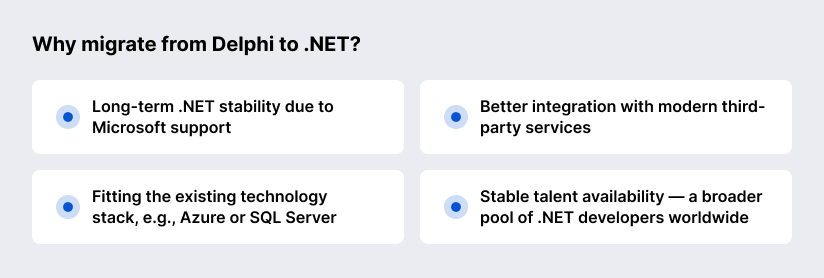
“Why migrate from Delphi to .NET? Delphi built the basis of business operations decades ago (throughout the 1990s and early 2000s), but .NET is where modern enterprise software stays alive. Long-term stability is a major reason I’d choose .NET: Microsoft develops the platform and publishes clear support timelines. For a company already using Azure or SQL Server, it also fits the existing technology stack. Its mature libraries make API and cloud integration easier to implement. Then there’s staffing — a broader pool of .NET developers means more options for hiring and future development.”
— Dzmitry Verasau, Team Lead, Chief .NET Technologist at SaM Solutions
What Does Migrating from Delphi to .NET Involve?
Successful migration usually deals with four components: data architecture, business logic, user interface (UI), system integrations.
- Data architecture: Refactoring and migrating legacy data sources (Paradox, dBase, InterBase, older Microsoft Access databases or direct file access) to solid relational systems like Microsoft SQL Server or Azure SQL.
- Business logic: Experts take full advantage of modern object-oriented principles and modular architecture to rewrite the core computational rules, validation routines and domain workflows embedded throughout Delphi units and forms in C#.
- User interface (UI): Modern, responsive interfaces, ranging from desktop frameworks like WPF or WinForms to web-based architectures (ASP.NET Core, Blazor, or decoupled React/Next.js frontends) replace aging VCL (Visual Component Library) or FireMonkey (FMX) desktop forms.
- System integrations: The re-architected modernized application natively integrates with modern enterprise ecosystems: identity providers (Azure AD/Entra ID), cloud storage, secure REST APIs, and AI-powered automation pipelines.
When Does a Delphi to .NET Migration Make Business Sense?
It is worth considering when the benefits (e.g, easier maintenance or better integration) obviously outweigh the cost and risk connected with the app rebuilding. Before deciding, you should compare the migration with a Delphi upgrade against the same business needs: planned features, security requirements, and how much longer the application is expected to stay in use.
| Criterion | Upgrade Delphi | Migrate to .NET |
|---|---|---|
| Application stability | The application works reliably and meets operational needs. | Existing limitations restrict business agility or planned functionality. |
| Architecture | The current architecture remains suitable, with incremental improvements. | The business needs substantial redesign for web applications, cloud deployment, or distributed services. |
| Developer availability | An experienced Delphi team can maintain and extend the application. | Delphi recruitment constrains delivery; suitable .NET expertise is more accessible. |
| Integrations | Current integrations either meet business requirements or need manageable updates. | You need extensive changes to connect your app to cloud services, web applications, or analytics platforms. |
| Expected application lifespan | The remaining lifespan is too short to justify rebuilding costs. | Long-term use provides time to recover the migration investment. |
| Maintenance and security | The team can address security demands and technical debt through targeted updates. | Growing maintenance costs, security gaps, or compliance requirements justify broader modernization. |
| Cost and risk | An upgrade delivers the improvements with acceptable cost and disruption. | Expected benefits outweigh rebuilding costs and transition risks. |
When staying with Delphi makes sense
- Stability and sufficiency: The application is stable, performs reliably, meets all current operational demands, and does not hinder business agility.
- Active in-house expertise: Your organization retains a reliable, experienced team of Delphi developers capable of maintaining, securing, and incrementally updating the codebase.
- Short-term horizon: The software supports a short-term project or a business unit slated to sunset within a few years, making a high-ROI migration economically unjustified.
When migrating to .NET becomes essential
- Architectural evolution: The business needs a transition from standalone desktop software to a multi-tier web application, cloud-native deployment, or distributed microservices.
- Talent acquisition constraints: Finding qualified Delphi and Object Pascal developers has become a persistent bottleneck, whereas .NET and C# talent is widely accessible.
- Ecosystem integration: The application must interact seamlessly with modern cloud services, web applications, or enterprise analytics platforms that reject direct desktop integration.
- Long-term maintainability and security: Compliance mandates, security audits, or ongoing technical debt make the legacy codebase increasingly expensive to secure and maintain.

How Do You Plan a Delphi to .NET Migration?
Stakeholders and tech experts should assess the existing application, define the architecture, validate the project scope, agree on the business outcomes, acceptable downtime, and criteria for a successful release.
Assess the application and its dependencies
Legacy Delphi codebases may hide undocumented logic and rigid component coupling. For this, careful mapping should be done. Engineers audit .dfm forms, .pas units, and data layers to isolate critical dependencies, before C# refactoring begins. This way, they ensure zero lost business rules.
Choose the target architecture and migration approach
Look at your actual working conditions and decide what you need: a desktop, web, or hybrid architecture. Browser access may suit distributed teams; offline operation or specialized hardware may favor retaining a desktop interface.
Next, decide whether to replace the application in one release or migrate individual functions gradually. For a phased approach, set clear boundaries between old and new functionality, define ownership of shared data, and plan for operating both systems during the transition.
Estimate scope, cost, and timeline
Estimate the effort by business workflow, accounting for complexity and dependencies. Include discovery, code conversion, refactoring, component replacement, testing, deployment, and user training. Budget for data migration where necessary and continued support for the Delphi application.
With a pilot project, you can check the assumptions, including how much manual work remains after automation. Present a budget and timeline range with explicit assumptions, delivery milestones, and contingency for unresolved dependencies.
How Do You Migrate a Delphi Application to .NET?
The process includes eight core steps: auditing, defining requirements, planning, reimplementing business logic and replacing unsupported components, migrating data and rebuilding integrations, rebuilding UI, testing, and deploying the final app with consequent post-launch support and training for users.
Step 1: Audit the application, code, data, and dependencies
Catalog every legacy .dfm form, Object Pascal unit, database connection, and third-party library to map hidden business rules and prevent unexpected downtime.
Step 2: Define requirements and choose the target architecture
Establish functional goals and map the transition from standalone desktop software to a scalable multi-tier web application or cloud-native environment.
Step 3: Plan the migration sequence and prepare a pilot
Break the transition into modular phases. Take a low-risk secondary module as a pilot project to validate toolchains and engineering workflows.
Step 4: Reimplement business logic and replace unsupported components
Perform clean C# refactoring of core routines. Substitute deprecated Delphi components and reporting packages with modern .NET equivalents.
Step 5: Migrate data and rebuild integrations
Transfer legacy storage (like InterBase or Paradox) to Microsoft SQL Server or Azure SQL. Establish secure REST APIs for seamless system integration.
Step 6: Rebuild the user interface
Replace aging VCL or FMX forms with modern desktop or web frontends (WPF, Blazor, or React) tailored to contemporary UX and accessibility standards.
Step 7: Test functionality, performance, and security
Run thorough testing cycles to confirm that business logic, data integrity, and application security meet enterprise benchmarks.
Step 8: Deploy, train users, and provide post-launch support
Execute a controlled production deployment, conduct comprehensive staff training sessions, and establish continuous monitoring for long-term system maintenance and optimal scalability.
What Challenges Can Delay a Delphi to .NET Migration?
Delphi-to-.NET migrations stall primarily due to undocumented legacy code, obsolete dependencies, complex data transformations, and the adoption of end users. These problems inflate project timelines when left unaddressed.
The “black box” problem
Undocumented business rules and updates accumulated over decades bury business logic deep within form event handlers and procedural Object Pascal scripts. This can cause unexpected discrepancies in the new system. Without formal specifications, developers risk missing vital edge cases during refactoring. Thorough discovery and close collaboration with domain experts eliminate this risk.
Unsupported third-party components
Many Delphi solutions use proprietary or abandoned third-party libraries that have no direct .NET equivalents. To avoid unexpected architectural bottlenecks, experts should rebuild such components from scratch, so they first should evaluate modern .NET components and UI libraries.
Data compatibility and user adoption
To move messy, unstructured legacy data formats (like Paradox or dBase files) into a clean Microsoft SQL Server database, you need rigorous schema normalization and validation. Simultaneously, forcing dramatic interface shifts on employees who got used to legacy desktop workflows can slow down internal adoption. If you involve end users during the design phase, you can guarantee that the modernized application will enhance daily productivity and won’t disrupt daily operations.
Which Delphi to .NET Migration Tools Can Help?
Ispirer Toolkit and VELO can assist with Delphi application conversion; SQL Server Migration Assistant handles supported database migrations.
Ispirer Toolkit
The Ispirer Toolkit is an automated migration platform for converting Object Pascal source code into C# and .NET environments. Ispirer Toolkit supports automated Delphi-to-C# conversion through its CodeWays application-conversion tool. Its capabilities cover business logic, supported interface elements, and database access code, with conversion rules that can be customized for individual projects.
VELO by GapVelocity
VELO is an agentic AI platform built by GAPVelocity AI (the AI modernization division of Growth Acceleration Partners) on Microsoft Foundry. You can use it to automate and modernize legacy enterprise applications into cloud-native C#/.NET and Blazor applications running on Microsoft Azure. VELO extracts business logic from Delphi VCL or FMX forms and transforms it into multi-tier .NET architectures.
SQL Server Migration Assistant
Microsoft’s SQL Server Migration Assistant (SSMA) is a specialized tool that addresses the database portion of modernization. It automates database migration from legacy engines like Access, Sybase, or MySQL (frequently paired with Delphi systems) to Microsoft SQL Server or Azure SQL.
What Else Should You Know Before Starting?
Before migration begins, you should also discuss offline requirements, source-code ownership, access controls, downtime expectations, and handover documentation.
Can a migrated application continue to work offline?
Modern .NET applications support offline capabilities when they are designed with local data synchronization layers or companion client architectures.
Pure web applications built on ASP.NET Core need network connectivity. But if you transition a legacy system into a hybrid WPF, WinForms, or .NET MAUI, the desktop client allows local SQLite or SQL Server Express caching. So, desktop applications can support offline operation, while a web-based redesign needs explicit planning for that capability.
You can specify which workflows must function without a connection and how offline changes will synchronize afterward.
Who owns the source code after migration?
The client retains 100% intellectual property rights and full ownership of all newly generated source code and project repositories. Professional software development partners deliver complete codebases through version control systems (GitHub or GitLab). With full code ownership, internal engineering teams can maintain the new app, deploy custom updates, and scale the application independently.
Can existing user permissions be carried over?
Existing roles and access rules must be mapped to the new authorization model and tested. Modern .NET identity models integrate with Microsoft Entra ID (formerly Azure AD), Active Directory, or custom credential tables. This guarantees that user security clearances, department restrictions, and compliance audit trails remain completely intact after cutover. There can be a separate migration process or reset for passwords and sign-in methods.
How can you minimize downtime during the switch?
Production downtime is reduced to near-zero when you execute a phased module-by-module rollout or a dual-running synchronization architecture. Engineering teams establish background data replication pipelines between the legacy database and the new SQL Server backend. This allows the old Delphi application and the modern .NET platform to operate concurrently. Final production cutover is then restricted to a brief, scheduled weekend maintenance window.
What documentation should the partner hand over with the new application?
A complete technical handover package usually includes:
- System architecture diagrams
- Database and API specifications
- Business-rule definitions
- Dependency and license inventories
- Build and deployment instructions
- Administrator manuals
- Test results
- Access-control documentation
- Procedures for monitoring, backups, and recovery
With these materials, your internal team can operate and update the application independently.
Why Choose SaM Solutions for Delphi to .NET Migration?
To modernize a legacy Delphi application, you need a delicate balance of deep technical mastery and rigorous project governance. SaM Solutions offers such a balance! Our engineering teams combine decades of enterprise software modernization experience with advanced .NET and AI-driven development capabilities.
“At SaM Solutions, we have a tried-and-tested legacy migration process from Delphi to .NET based on the usage of local AI models. This means our clients reduce manual migration work and keep AI processing within a controlled environment.”
— Dzmitry Verasau, Team Lead, Chief .NET Technologist at SaM Solutions
Here is a high-level description of our migration process.
Objective: Migrate a legacy software platform from Delphi to a modern .NET solution. Guarantee full functional parity and improve the overall quality of the codebase.
The tech stack: SaM Solutions’ team uses a local AI inference setup to secure and optimize operations. The core “intelligence” comes from the Qwen 3.8 Flash Next model, which is integrated into VS Code (the main environment/interface). Since we use local AI but not cloud-based services, we can guarantee data privacy and controlled infrastructure.
The structured process:
- Analysis and documentation: The local AI model reads and analyzes the original Delphi source code and generates a detailed functional description of how the application works.
- Conversion: AI uses the functional descriptions as a blueprint and rewrites the application in .NET.
- Human-in-the-loop verification: A human specialist monitors the entire process. The task is to verify the AI’s analysis and make sure that the newly written code adheres to the required functionality.
- Database migration: The database is converted from InterBase to MS SQL in tandem with the application logic.
- Quality assurance:
- Automated test development
- Analysis of test results
- Subsequent bug-fixing

Summing Up
Rising maintenance costs or integration problems can turn a dependable Delphi application into a constraint on growth. Moving to .NET may address those pressures, but the investment needs to be weighed against a Delphi upgrade and the application’s remaining useful life.
FAQ
Can Delphi and .NET modules share the same database during migration?
Yes, they can, if they have compatible database drivers and can work with the existing database structure.
Can Delphi and .NET components run side by side during migration?
How are COM integrations handled when migrating from Delphi to .NET?