AI-Driven Legacy Code Modernization: How to Transform Outdated Systems with Artificial Intelligence


Key Takeaways
- AI reduces legacy software modernization effort.
- Savings depend on verification efforts and complexity.
- Engineers remain responsible for the results.
A huge number of enterprise software systems were developed about 20 years ago or more, which means they are built on monolithic architectures, legacy frameworks, or retired programming languages. According to Gartner, they may consume up to 70% of corporate IT budgets for maintenance alone.
The era of artificial intelligence gives a perfect wayout for many companies suffering from legacy software limitations — legacy code modernization using AI. Generative artificial intelligence and large language models (LLMs) are some of the technologies that can do a lot, for example automate code analysis, or reverse-engineer undocumented business logic, or refactor monolithic applications into modern architectures.
McKinsey estimates that organizations deploying AI for legacy code modernization can cut migration timelines by up to 40-50% and at the same time reduce manual code translation errors. Read on to learn more on the topic.
Modernize your legacy software with SaM Solutiuons’ experts.
What Is Legacy System Modernization and Why Does It Matter?
Legacy system modernization means moving an existing application from outdated technologies to a modern tech stack while preserving its functions, business rules, and workflows. The purpose is to keep software that already serves the business easier to maintain. It does not mean changing what the application does, but rather upgrading how and where it runs behind the scenes to guarantee long-term stability and maintainability.
A system becomes “legacy” when its underlying technology creates problems: vendors may stop releasing security updates, compatible tools may become harder to find, and fewer developers may have the skills to maintain the code. Age alone is not the issue: a decades-old application can execute daily tasks reliably, but reliance on obsolete runtimes, unmaintained frameworks, or a shrinking pool of specialized developers (for COBOL, Delphi, or early Java and .NET Framework versions) makes keeping it on its original stack unsustainable.
If you delay software modernization, you miss lots of opportunities current technologies offer to your business. In other words, you lag behind the competition.
Imagine a logistics firm that uses a 20-year-old Delphi application to calculate complex routing algorithms. Business math works and stands the test of time. But the desktop stack simply can’t scale to meet peak server load or connect to reporting tools. The modernization of this system is taking that exact same calculation engine and putting it into a modern .NET WPF application.
How Can You Identify When a Legacy System Needs Modernization?
Among the obvious indicators that you should modernize your legacy software are: operational maintenance costs surge (or it’s becoming harder to find experts), system modifications stall business releases, software versions reach end-of-life (EOL), there are no security updates, manual workarounds take too much time, software performance prevents from business development.
| Warning sign | Evidence to examine | Business implication |
|---|---|---|
| Routine changes take longer | Lead time for comparable changes, approval delays, and regression testing effort. | Product launches and customer requests wait on software delivery. |
| Maintenance crowds out development | Engineering hours spent on incidents, patches, and recurring fixes. | Less capacity remains for revenue-generating improvements. |
| Technology support is ending | Vendor support dates and components without a viable upgrade path. | The organization needs a plan for maintaining security and reliability. |
| Security is questionable | Available security updates, especially if the technology is outdated. | The necessity to develop a migration plan to the modern tech stack in order to support the required level of security. |
| Integration requires manual work | Duplicate data entry, failed transfers, and reconciliation hours. | Employees spend time correcting gaps between systems. |
| Performance misses operational targets | Response times under peak load, failed transactions, and batch completion times. | Software capacity may restrict sales or service delivery. |
| Critical knowledge rests with a few people | Modules without documentation, tests, or an available backup maintainer. | Staff absence or turnover can delay essential changes. |
It’s better to prioritize modernization based on business impact and urgency. A slow internal report and an unreliable checkout process may both need attention, but their consequences are very different. Document the workflow affected, the cost or risk of leaving it as is, and the result the upgrade needs to achieve. These insights give you a clear starting point for your modernization roadmap.
Why Is AI Changing the Approach to Legacy Code Transformation?
Artificial intelligence makes legacy code modernization easier because it changes the traditional approach of rewriting old software manually line by line (a slow process) to automating many tasks and processes.
AI changes the game, as it combines high-speed automation with expert human control.
AI-assisted legacy code modernization is a human-guided workflow:
- Automating the routine: Generative AI reads through massive codebases, maps dependencies, uncovers undocumented business rules, and drafts initial translations from legacy stacks into modern frameworks.
- Keeping humans in control: AI handles the tedious work, but software architects stay firmly in the driver’s seat. Developers review every code draft and make final architectural decisions.
This human-in-the-loop approach eliminates manual busywork, but it doesn’t hand key technical decisions over to an algorithm. The upside is faster prep time, but AI-generated output still needs human review. Engineers decide which tasks to automate, assess the suggested changes, and compare the modernized application’s behavior with the original system.
What Challenges Can AI Solve During Legacy System Modernization?
Artificial intelligence tools can translate existing features into documentation and back into code, adapt code to unsupported interfaces and changed APIs, and rebuild components that cannot be upgraded.
| Modernization challenge | Traditional manual approach | AI-powered modernization approach |
|---|---|---|
| Matching features, documentation, and code | Read code and manuals, document behavior, and manually check that every feature survives migration. | Draft specifications from code and compare migrated features against documentation. |
| Updating unsupported interfaces and APIs | Research API changes, map parameters, and rewrite integration code manually. | Compare old and new specifications, draft parameter mappings, and generate integration code. |
| Rebuilding outdated components | Study component behavior and build replacements using modern frameworks. | Analyze available code and requirements, then generate replacement components. |
Bi-directional feature and documentation verification
The challenge: In legacy systems, written specifications can no longer match how the code works in practice. Engineers spend a lot of time trying to reconcile feature behavior with outdated manuals, or manually documenting every obscure feature before a rewrite can even begin.
The AI solution: LLMs automate this documentation work in both directions. AI can read legacy source code and generate accurate, up-to-date functional specs. It can also review old documentation, user manuals, and requirements to check that the modernized codebase covers every legacy feature and hidden workflow.
Modernizing unsupported interfaces and changed APIs
The Challenge: When you upgrade a legacy system, its connections to external services may break. Original APIs, protocols, and interface structures may have changed or reached end of life. Finding outdated API documentation, mapping parameter changes, and rewriting integration wrappers manually takes significant time and effort.
The AI solution: LLMs are well suited to bridging these integration gaps. They analyze both old interface schemas and modern API specifications, draft replacement integration layers, map parameters, and generate wrapper code. This can save teams dozens of hours of manual research and repetitive coding.
Rebuilding outdated components from scratch
The challenge: Legacy applications may depend on outdated UI controls, or on unsupported third-party libraries, or on proprietary components that have no direct equivalent on modern platforms.
The AI solution: AI doesn’t try to force old dependencies into a new framework. It examines how the original component works behind the scenes, identifies the underlying state logic, user interactions, and styling requirements, then creates modern replacements from scratch using contemporary frameworks.
How Can AI Assist Developers in Modernizing Legacy Applications?
We’ve already mentioned that AI is an intelligent assistant throughout the modernization lifecycle, not a replacement of software engineers. Intelligent tools analyze code and create documentation, help with refactoring, code transformation, reverse engineering, and knowledge extraction, as well as conduct automated verification via MCP.
AI-powered code analysis and documentation
AI repository tools scan codebases to generate:
- Architecture summaries: High-level system maps, component dependency trees, and data flow diagrams.
- Inline documentation and API specs: Automatically generated code comments and specifications for undocumented internal APIs.
- Vulnerability audits: Identification of security risks, such as hardcoded credentials, unsafe database queries, or deprecated libraries, prioritizing what needs fixing before migration.
AI-assisted refactoring and code transformation
Converting legacy code line-by-line is notoriously tedious. Generative AI accelerates this process by performing context-aware code translation:
- Syntax and framework migration: Translates legacy syntax (e.g., C++) into modern target stacks like Rust or Go.
- Applying modern patterns: Beyond simple syntax replacement, AI restructures procedural routines into clean, maintainable patterns.
AI-driven reverse engineering and knowledge extraction
If the developers who built your legacy system no longer work for your company, you may have the logic locked inside undocumented code. With AI assistance, experts can spend less time untangling such legacy code.
- Business logic discovery: AI analyzes complex control flow, formulas, and validation routines, then explains them in plain language for business analysts and product owners.
- Data model mapping: AI traces how data structures move through legacy systems to help architects design modern database schemas and domain models.
Automated dual-execution and verification via MCP
- Simultaneous build execution: Through Model Context Protocol (MCP) servers, AI agents can launch and interact with both the legacy build and the newly modernized application environment.
- Automated differential testing: The AI automatically feeds identical test inputs, user flows, or database payloads into both systems, compares the outputs, and flags any behavioral discrepancies or edge-case regressions. This eliminates hours of manual, repetitive regression testing.
“Totally agree with the described approach. Modern LLMs are very useful in the modernization process. A modernisation task has clear verification steps, which makes reviewing the final solution simpler and many of those steps automatable.”
— Dzmitry Verasau, Team Lead, Chief .NET Technologist at SaM Solutions
How Should Companies Choose AI Models and Tools for Modernization Projects?
If you want to modernize your legacy software with the help of artificial intelligence, you should choose the right AI models and tooling. To do this in the best possible way, evaluate AI capabilities for different tasks, look at general-purpose and specialized models, take into account data privacy and security requirements, and examine integration flexibility.
Evaluate AI capabilities for different modernization tasks
Match the model to the job. Use powerful AI models for complex work, such as analyzing old system architecture or understanding unclear business rules. Use faster, simpler models for routine tasks like syntax fixes.
Choose AI models based on relevant benchmarks
When selecting a base AI model, focus on benchmarks that reflect your specific tasks. Evaluate how different models perform in your target domain and test the most promising options on representative code before making a decision. Contact SaM Solutions’ experts for a consultation.
Consider data privacy and security requirements
Organizations should choose AI tools that protect confidential business information. Review where code and prompts are processed and stored, how long they are retained, and whether they can be used to train models. Confirm that vendor terms meet company and client requirements.
Integrate AI tools with existing development environments
AI works best when developers can use it inside familiar tools. Look for compatibility with the team’s editors, repositories, build tools, and CI/CD pipelines. Developers should be able to inspect, test, and revise AI-generated changes within their usual workflow.
Balance automation with human expertise
AI can suggest code changes and automate repetitive work, but developers should review its output before using it. Assign AI clearly defined tasks. Senior engineers should remain responsible for important decisions about system architecture, security, and database changes.
Measure AI tool performance and project impact
Specialists should measure whether AI actually improves modernization work. Useful metrics include the number of completed pull requests, code acceptance rates, bug levels, release frequency, and the time required to deliver changes.
What Is the Role of Developers and Architects in AI-Driven Modernization?
The process of AI-driven legacy code modernization switches developers and architects’ tasks from writing every line of code to guiding and checking the modernization. They turn from manual code writers to strategic system designers, code reviewers, and AI workflow supervisors.
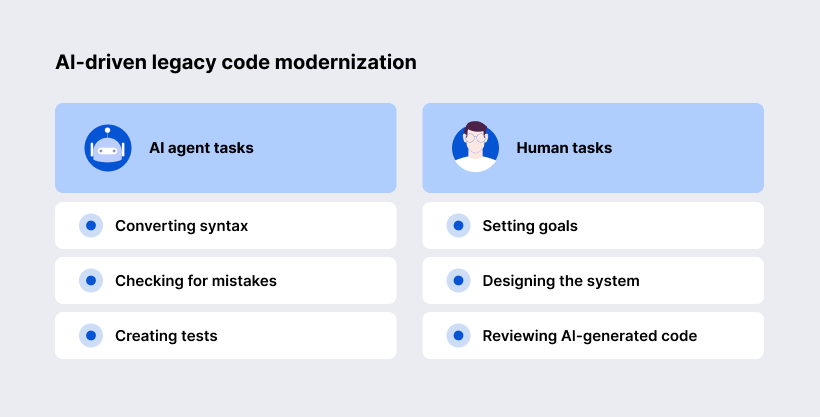
- AI handles repetitive tasks: converting syntax, checking for mistakes, creating tests, etc.
- Engineers make bigger decisions: setting goals, designing the system, reviewing AI-generated code.
How Can Organizations Ensure Quality and Security During AI-Assisted Modernization?
They should enforce automated testing, continuous security analysis, strict compliance auditing, and multi-tier human governance.
Automated testing and validation
Automated regression testing guarantees that modern refactored applications reproduce exact business outcomes legacy platforms generate.
Developers implement “characterization testing” strategies, where AI tools observe legacy system inputs and outputs to create comprehensive regression test suites. Running these automated suites in parallel against both legacy and modern applications confirms functional parity.
Security analysis and compliance checks
AI-generated code must undergo automated Static Application Security Testing (SAST), Dynamic Application Security Testing (DAST), and open-source license audits.
Integrating tools such as SonarQube, Snyk, or Checkmarx into automated migration pipelines ensures newly refactored code adheres to OWASP Top 10 security standards.
Human review and governance processes
Formal governance frameworks mandate multi-stage peer reviews and architectural approvals for all AI-transformed code modules.
Software teams implement strict pull request guidelines requiring at least two human software engineer approvals for AI-generated code. Peer reviews verify logic accuracy, readability, maintainability, and alignment with modern corporate coding standards.
What Are the Business Benefits of AI-Powered Legacy Transformation?
You can get compelling business advantages, including reduced costs, accelerated feature delivery, and mitigated operational risk.


How Does the AI-Driven Modernization Process Work?
The AI-augmented legacy code modernization process follows five stages: assessing existing systems, planning the architecture, applying AI to selected tasks, migrating applications, and monitoring results. Importantly, engineers guide this process and decide when the app is ready for production.
Assessing existing systems and dependencies
The team examines the code, infrastructure, integrations, and business rules to understand what needs improvement. AI helps explain unfamiliar code and interpret dependency maps. Human experts verify these findings and record current performance, costs, and reliability as a baseline for measuring progress. Developers can use LLMs to draft missing tests that capture current behavior, including unusual scenarios.
Defining the target architecture and roadmap
Architects decide which components to retain, update, or replace based on business priorities and technical constraints. The roadmap sets the order of work, responsibilities, and acceptance criteria. For example, replacing an unsupported framework may take priority over redesigning a reporting module.
Applying AI to selected modernization tasks
Developers assign AI specific tasks: to translate a module, to replace outdated API calls, to draft an equivalent component, to create documentation, or to update repetitive code patterns.
Migrating applications to modern technologies
The team deploys the updated application to the target environment and checks its integrations and business workflows along the way. Where possible, engineers run the old and migrated versions through the same test scenarios. AI can automate these comparisons and summarize the differences.
Monitoring performance and continuous improvement
After deployment, the team compares response times, error rates, operating costs, and other agreed measures with the original baseline. Monitoring and user feedback reveal remaining problems. These findings guide further improvements and help determine whether AI-powered legacy code modernization is delivering the expected business value.
What Are the Limitations of Using AI for Legacy Modernization?
Companies must account for some major hardships of using artificial intelligence for software modernization: hallucinations, architectural blind spots, data privacy risks, and human oversight.


What Does the Future of AI-Assisted System Transformation Look Like?
In the near future AI-assisted system transformation will be a partnership between people and AI. AI agents will increasingly analyze old code, suggest modernization plans, generate and test code.
Developers and architects will still make the key decisions. They will set the goals, review important changes, protect security and data, and handle complex business rules. The most successful approach is likely to use AI for repetitive work and people to provide judgment, oversight, and accountability.
Why Choose SaM Solutions for AI Legacy Code Modernization?
SaM Solutions is a long-standing player in the IT market. We combine more than 30 years of software engineering experience with expertise in AI development and legacy modernization.
So you get one partner who can offer:
- Practical experience with modern and outdated technologies
- Human engineering and automated AI capabilities
- Cloud, QA, API, and DevOps services
Summing Up
Legacy modernization no longer has to be a multi-year gamble. If you combine intelligent AI tools with experienced software architects, you can reduce technical debt and preserve decades of essential business logic. Waiting only increases maintenance costs and security risks. Modernizing now gives your team the freedom to build something new and innovative.
FAQ
Can AI estimate the total cost of modernizing an enterprise application?
With the help of AI, you can get a quick technical baseline, but it doesn’t give you a complete budget. In minutes, it can scan code complexity or volume to estimate engineering hours. But human architects still need to account for organizational change management or, for example, custom compliance requirements to finalize the price.
Which programming languages benefit most from AI-assisted transformation?
How can companies measure the ROI of AI-driven modernization projects?