How to Migrate from BigCommerce to Shopify: Complete 2026 Guide


(If you prefer video content, please watch the concise video summary of this article below)
Key Facts
- A BigCommerce → Shopify migration is best treated as a replatforming project, not just a data copy: store data, theme rebuild, integrations, payments/tax/shipping configuration, and SEO preservation all need coordinated planning.
- Shopify uses fixed subdirectory names for core resources (for example, /products, /collections, /pages), and you can’t rename them, which is a major driver of redirect planning when coming from BigCommerce.
- Shopify can import core entities through CSV workflows (products, customers) and supports redirect management (including CSV import/export for redirects), but customer passwords cannot be migrated via CSV — customers need to set new passwords after import.
- For SEO, Google’s guidance expects temporary ranking fluctuations during significant URL changes, recommends preparing a 1:1 URL mapping, implementing permanent redirects, and monitoring via Search Console.
If you’re considering moving from BigCommerce to Shopify in 2026, you’re not alone — many teams switch when they want faster iteration, a broader extension ecosystem, or a cleaner operational model (especially for merchandising and marketing teams that need to ship changes without constant developer involvement).
The good news: a well‑planned migration can preserve SEO equity, keep customers shopping with minimal disruption, and set you up with a modern storefront and leaner tech debt. The bad news: rushed migrations often create avoidable problems — broken URLs, missing metadata, duplicate customer records, checkout edge cases, or analytics gaps — so the “how” matters just as much as the “why.”
BigCommerce vs Shopify: Key Differences
Below is a practical comparison focused on what actually changes during migration (data structures, URLs, extensibility, and operational constraints).
| Area that impacts migration | BigCommerce | Shopify |
| Platform transaction fees | No additional transaction fees are stated in BigCommerce’s positioning (payment processing fees still apply via gateways). | Third‑party transaction fees apply when using third‑party payment providers; conditions vary by plan and store configuration. |
| Apps and integrations ecosystem | Official marketplace message emphasizes “hundreds of apps and integrations.” | Shopify positions the App Store as “over 16,000 apps,” with a review process for listing. |
| Theme ecosystem and storefront customization | The theme system is built around Stencil; support docs and developer docs reference Handlebars in Stencil themes. | The theme system is built around Liquid and a structured theme architecture (templates, sections, blocks). Liquid is Shopify-created and open source. |
| URL structure flexibility | BigCommerce allows control over URL structure settings (for certain page types) via platform settings. | Shopify uses fixed resource subdirectories (e.g., /products, /collections, /pages) that can’t be renamed. |
| Redirect tooling | BigCommerce supports 301 redirects and positions them as SEO-friendly permanent redirects. | Shopify supports built-in URL redirects (including CSV import/export) but also has redirect constraints (fixed paths and restricted prefixes). |
| Checkout customization approach | BigCommerce provides a Checkout SDK positioned as enabling deep checkout customization; open-source artifacts exist for custom checkout builds. | Shopify’s modern checkout customization uses extensibility (UI extensions, functions, branding tools). Some checkout UI extension capabilities are Shopify Plus-only; legacy approaches have deprecations and deadlines. |
| International and multi‑store strategy | BigCommerce Multi‑Storefront supports managing multiple storefronts from one control panel; BigCommerce also supports multi‑currency. | Shopify supports international domains and localized experiences; however, the “products” path element can’t be translated (only the handle/slug can). |
Signs It’s Time to Switch Platforms
If right now you’re having doubts about whether it’s time for migrating from BigCommerce to Shopify, the following table will help you make up your mind quickly:
| Signal you’re feeling | What it often means | Why it matters during migration |
| Your team can’t ship storefront changes quickly | You may be constrained by theme architecture, development workflow, or ecosystem fit. | You should budget for a theme rebuild (not just data transfer) and define what “must exist on day one.” |
| Integration requests keep piling up | You’re hitting limitations in your current integration ecosystem or operations model. | You need an integration inventory and a cutover plan (ERP/OMS/3PL/POS/email/SMS/etc.). |
| SEO or URL structure constraints are blocking growth | You may prefer or require a different URL/hierarchy strategy, or you need better redirect governance. | Shopify’s fixed subdirectories typically increase redirect workload when moving from hierarchical patterns. |
| Checkout experimentation feels limited or risky | You might need a clearer checkout customization model, or you’re dealing with deprecations/legacy scripts. | Checkout custom work must align with each platform’s supported approach (especially Shopify extensibility rules). |
| You’re planning a multi-region expansion | You need a scalable approach to localized currency, domains, languages, and governance. | Decide early: one store with markets vs multiple storefronts; this affects SEO, domains, and catalog strategy. |
Migration Methods Overview
Let’s have a look at what migration methods are out there to learn how to migrate from BigCommerce to Shopify smoothly and effectively:
Automated migration tools
Automated tools generally connect source and target stores, map entities (products/customers/orders/content/redirects depending on the tool), and run repeatable migrations — often with support for “recent data” re-sync before launch. Tool positioning commonly emphasizes that you can keep the original store running during the transfer, which is helpful for minimizing business disruption.
Manual migration approach
Manual migration typically relies on exports from BigCommerce and imports into Shopify via CSV, followed by manual recreation of anything that doesn’t map cleanly (certain content types, custom fields, reviews, some order history handling, and app-configured business logic). Shopify’s official CSV processes are powerful but strict: customer imports have constraints (file size, duplicates, password limitations), and product CSVs have dependencies that can accidentally overwrite variants if columns are missing.
Agency-led migration
Agency-led migrations are essentially “managed replatforming”: discovery, solution design, theme build, data mapping, integration work, SEO migration planning, QA, launch, and post‑launch stabilization. Shopify explicitly acknowledges that partners can be hired for bulk import/export tasks, and enterprise Shopify Plus pricing guidance frames migration as merchant responsibility, with paid services available for custom needs.
SaM Solutions offers a wide range of platform-based and from-scratch ecommerce development services that help you reach your digital sales objectives.
Step-by-Step Migration Process
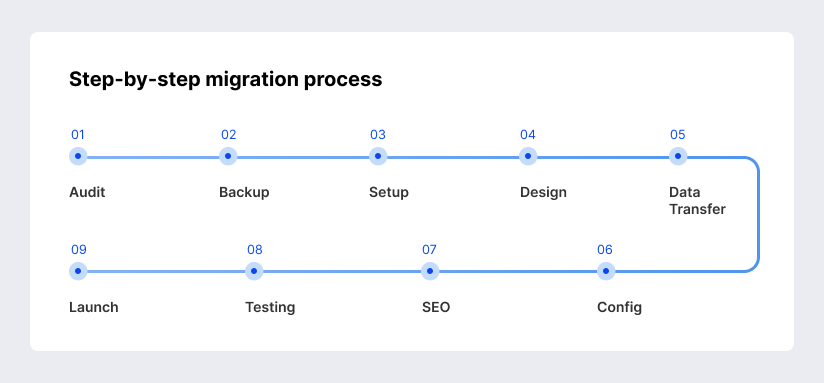
Below is a reliable, SEO-conscious sequence that matches how Google recommends executing URL-changing moves: prepare, map, redirect, then monitor.
Capture what exists today: indexed URLs, top landing pages, highest-revenue products/collections, key templates, and integration dependencies. Google recommends determining old URLs from sitemaps, analytics/server logs, and Search Console link data when you’re doing URL changes.
Export products (and other entities you can export) from BigCommerce for backup and data preparation. BigCommerce supports product exports to CSV and provides import/export tooling as part of its modern experience.
Choose your Shopify plan and create the new store environment. Shopify’s pricing guidance also points to the Store Importer app as an option for importing products, customers, and orders.
Select a theme and rebuild the storefront experience (navigation, collection templates, PDP layout rules, content blocks). Shopify’s theme structure is modular (templates → sections → blocks), so your BigCommerce theme rarely “ports” directly.
For products: use Shopify’s product CSV format carefully — variant columns have dependencies, and missing option columns can cause unintended variant deletion/recreation.
For customers: Shopify customer CSV imports can’t migrate passwords; duplicates by email/phone can be skipped; overwrites replace existing customer data; metafield support exists but requires definitions.
For orders: confirm whether you need the full order history or a defined time window (returns/warranty). Shopify Plus launch guidance recommends migrating at least orders within the return window and suggests 2-5 years where practical.
Rebuild payment, tax, and shipping behavior based on Shopify’s configuration and your operational needs. Also, confirm transaction fee implications if you plan to use third‑party payment providers (fees vary by plan and scenario).
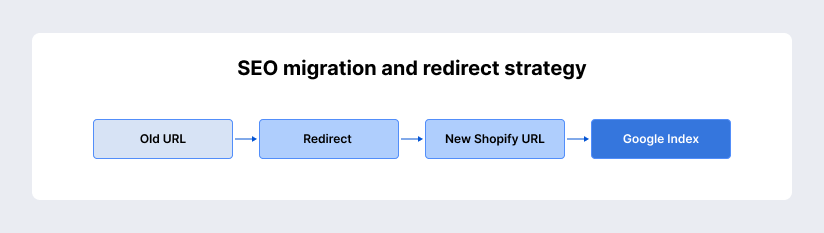
Create a full URL mapping (“old → new”), then implement permanent redirects. Google’s migration documentation calls out preparing URL mapping and configuring server-side permanent redirects as core steps.
Within Shopify, URL redirects can be created and managed (including CSV import/export), but you can’t create redirects that target fixed Shopify paths in certain ways, and some prefixes are restricted—so test your redirect file logic early.
Validate critical paths: search, filtering, cart/checkout, taxes/shipping edge cases, emails, and analytics. Google also advises preparing the new site and testing thoroughly before initiating the move.
Launch, then actively monitor crawl, indexing, and traffic shifts. Google explicitly recommends expecting temporary ranking fluctuations and monitoring traffic during the move.
Shopify automatically generates a sitemap (helpful for discovery and monitoring) that you can submit to Search Console.
Data, SEO, and Risk Management
Any migration process isn’t a walk in the park. It requires careful observation of the main risks and challenges:
What data can be transferred
In most BigCommerce → Shopify migrations, you can plan to transfer:
- Products and variants, typically via CSV (or via a migration tool).
- Customers, via Shopify customer CSV (with known limitations around passwords and duplicates).
- Orders, using importer tooling or specialized migration apps where needed; Shopify also references importing orders via Store Importer in pricing FAQs, and Shopify Plus guidance emphasizes migrating relevant historical orders.
- Basic content (pages/blog posts) depending on your toolchain; many migration tools advertise coverage for pages/blogs and more advanced entities.
- URL redirects, via Shopify’s redirect CSV import/export.
“What you can transfer” is not the same as “what will behave the same.” For example, Shopify cannot import customer passwords via CSV, so account access must be re-established post-migration.
SEO risks and how to prevent ranking loss
- URL structure differences
Shopify’s fixed subdirectories mean you usually can’t preserve BigCommerce’s exact URL folder strategy. Shopify can generate SEO-friendly URLs like /products/[handle] and /collections/[handle], but you can’t rename the /products or /collections directory names themselves.
This is why the redirect map becomes the “bridge” between old URLs and the new canonical Shopify URLs. Google explicitly instructs creating URL mapping and using permanent redirects as the backbone of URL-change moves. - Redirect strategy best practices
Google’s site move guidance emphasizes: prepare mapping, start the move by configuring redirects, and monitor traffic; it also notes that permanent redirects (including 301s) should not cause PageRank loss.
Shopify supports URL redirects and allows import/export by CSV for bulk handling, but it restricts redirects for certain fixed Shopify paths and prefixes — so validate your approach against Shopify’s redirect rules before launch day. - Metadata and content preservation
Shopify provides SEO fundamentals guidance, such as structuring collections and products in a logical hierarchy and using internal linking. During a migration, preserving page content intent (titles, descriptions, collection copy, internal links) reduces the “change surface area” Google needs to re-evaluate.
Also, Shopify generates a sitemap.xml that includes products, collections, pages, and blog posts, which can support discovery after launch once submitted to Search Console.
Common Migration Challenges
What problems can you face on the road to the new platform? Let’s have a deeper look:
CSV-driven migrations can fail in subtle ways: customer duplicates can be skipped, overwrites can replace existing profiles, and product CSV column dependencies can unintentionally delete variants if required option columns are missing.
Google explicitly tells site owners to expect temporary ranking fluctuations during major URL moves while it recrawls and reindexes, and notes that medium‑sized sites can take weeks for most pages to move in the index.
Shopify has a very large app ecosystem (positioned as 16,000+ apps), but migrations still require integration parity checks: the tool exists, but that doesn’t mean your exact workflow is identical after cutover.
BigCommerce likewise positions its marketplace as “100s of apps and integrations,” so you may be replacing one integration set with another rather than eliminating integration work.
Many migration approaches aim for minimal downtime by preparing Shopify in parallel, then switching DNS when ready; however, the technical reality is that search engines and users will experience a transition period, and Google warns that its crawlers may temporarily crawl the new site more heavily post-move.
Migration Cost and Timeline Expectations
Migration Cost Breakdown (what businesses typically pay for)
Small stores
Costs often cluster around:
- Platform plan cost during build/transition (Shopify Basic/Grow/Advanced in the UK, depending on needs).
- Automated tool fees, which are commonly priced based on the volume of entities migrated (examples include tools that start around ~$59 and scale by counts, or “pay for what you migrate” models).
- The theme cost if you choose a paid theme; Shopify’s theme marketplace shows a large catalog of paid themes and a smaller set of free themes.
Some published 2025-2026 breakdowns for small-shop scenarios estimate totals in the low hundreds to low thousands USD when using tooling plus limited professional help, but your actual outcome depends heavily on cleanup and QA time.
Medium stores
The cost center usually shifts from “data move” to “rebuild and systems alignment”:
- Theme rebuild to match brand and merchandising requirements.
- Integration work (ERP/OMS/3PL/email/reviews/subscriptions), testing, and launch support.
- Potential use of higher-capability import/export tooling (for example, tools that handle large files and multiple entity types).
Enterprise stores
Enterprise budgets often include:
- Shopify Plus subscription costs (starting pricing and a variable fee structure are explicitly described on Shopify Plus pricing), plus possible costs for additional stores beyond the included expansion stores.
- Checkout extensibility work aligned to Shopify’s supported model (some extension capabilities are Plus-only; legacy scripts and checkout.liquid have deprecations and deadlines).
- Multi-region domain and localization strategy (international domains setup; constraints around translating “products” in the URL path).
Migration Timeline Expectations
The most asked question is how long the migration will take. But the thing is, no one can give you a definite answer. Because everything will depend on the size of the project and the complexity of it.
Many implementation guides cite timelines in the weeks range for smaller stores when the scope is limited, and tooling is used, but you should still plan time for validation, redirects, and post-launch monitoring.
Other experienced teams describe multi‑month timelines when integrations, custom builds, multiple locales, or enterprise governance are included — because the work is less “migration” and more “platform re-architecture and launch QA.”
A helpful mental model: Shopify data imports can be fast, but SEO stabilization and indexing transitions can take weeks, and large move completeness depends on crawl and site scale.
Best Migration Tools and Services
A good tool choice depends on catalog size, entity types (orders, redirects, pages), and repeatable “delta” migration needs before launch.
- Matrixify: Positioned for bulk import/export/migration across many Shopify entities (products, customers, orders, pages, blogs, redirects, metafields, and more), and is commonly referenced for handling complex datasets beyond native CSV limits.
- Cart2Cart: A migration app/service that emphasizes guided migration and automated transfer across common entities, with pricing that depends on volume and options.
- LitExtension: Offers migration services and pricing that start at published entry points and scale by entity counts; also offers a Shopify migration app that describes broader entity support (including redirects and advanced data types, depending on configuration).
- Shopify’s built-in guidance references using Store Importer to import products, customers, and orders (availability and exact behavior can vary by source platform and store configuration).
Post-Migration Checklist
What to keep in mind after the migration is over:
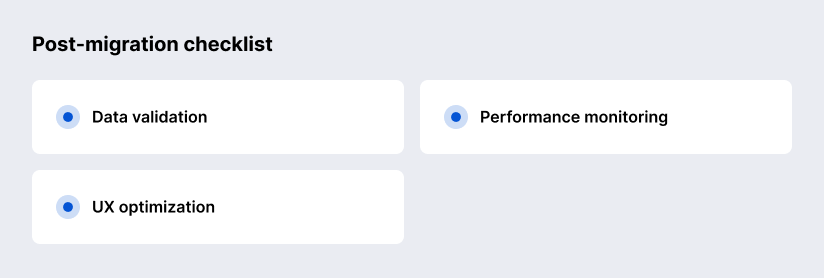
Confirm the basics with evidence, not hope: spot-check products with variants, inventory, pricing, collections, customer records (especially duplicates), and verify redirect imports worked as intended. Shopify’s documentation highlights how customer duplicates can be skipped and how product CSV structure can affect variants — so validation is not optional.
Once stable, optimize navigation and internal linking structure (homepage → collections → products) consistent with Shopify SEO guidance, and ensure collections are doing real merchandising work (not just acting as buckets).
Monitor indexing, crawl errors, and traffic shifts — Google explicitly recommends monitoring traffic on old and new URLs during a move and using Search Console tooling appropriately (including Change of Address when domains change).
Best Practices for a Smooth Transition
Keep the migration scope crisp: Google advises “change only one thing at a time” where possible and expects fluctuations during major moves — so avoid stacking a redesign, domain change, taxonomy rewrite, and product copy overhaul all at once unless you truly have to.
If you do need internationalization, decide early whether you’ll use Shopify international domains and how you’ll handle language/currency per market; also, remember that Shopify restricts translating the /products path word itself.
Future-Proofing Your Ecommerce Stack
Future-proofing typically comes from reducing “fragile customizations” and using supported extensibility mechanisms:
- On Shopify checkout: prioritize Checkout Extensibility patterns (UI extensions, branding controls, functions) and stay aligned to deprecation timelines for legacy checkout mechanisms.
- For SEO resilience: maintain redirect governance and a clean mapping system; Google describes URL mapping and permanent redirects as the operational backbone of URL-change site moves.
- For global growth: compare “one store with markets/domains” vs “multiple storefront governance.” BigCommerce explicitly frames Multi‑Storefront as a way to run multiple storefronts from one account, and Shopify provides international domain strategies for localized experiences.
Why Choose SaM Solutions For Migration From BigCommerce to Shopify?
SaM Solutions brings more than three decades of experience in software development and IT consulting, working with businesses across Europe and the US. This depth of experience translates into a structured, low-risk migration process where technical decisions are aligned with real business goals — not just platform capabilities. Instead of treating migration as a simple data transfer, the team approaches it as a full replatforming project, ensuring your new Shopify store is scalable, secure, and ready for long-term growth.
For Shopify specifically, SaM Solutions offers end-to-end services covering migration, custom development, system integration, testing, and ongoing support. This means you’re not just moving your store — you’re rebuilding it with a clear architecture, stable integrations, and optimized performance. Their broader expertise in ecommerce solutions allows them to handle complex scenarios, from multi-market setups to custom workflows, reducing risks and ensuring a smoother transition.
Conclusion
A successful BigCommerce to Shopify migration in 2026 is primarily about preserving what already works (SEO equity, merchandising logic, operational workflows) while rebuilding what needs to improve (theme experience, extensibility, and integration architecture). The safest path is disciplined: audit, backup, data mapping, redirect strategy aligned to Google’s guidance, careful CSV/tooling usage, then monitoring until rankings and conversions stabilize.
FAQ
Can I run both platforms simultaneously during transition?
Yes, running both platforms in parallel is a widely used and practical approach. Your BigCommerce store can remain live and continue generating revenue while your Shopify store is being built, configured, and tested behind the scenes. This allows your team to validate functionality, design, integrations, checkout flows, as well as critical aspects like hosting setup, scalability, and security without disrupting customers or risking sales.
This setup also enables a controlled launch. You can test internally, run soft launches, and ensure everything works as expected before switching traffic. The final cutover is typically quick, but the real challenge lies in keeping data like orders and inventory in sync during the transition, which is why many businesses rely on automation, migration tools, and structured processes to ensure accuracy and stability.
How long does a full migration take?
Should I hire an agency or do it manually?
How do I handle international stores during migration?