Shopify vs WooCommerce: Which Is Better?


(If you prefer video content, please watch the concise video summary of this article below)
Key Facts
- Shopify is a hosted Software-as-a-Service (SaaS) platform with built-in hosting, security, and a streamlined checkout. WooCommerce is an open-source plugin for WordPress, so you are responsible for setting up hosting and managing the technical side.
- Shopify has a set monthly subscription fee (from $39 to $399, depending on your plan) and charges extra transaction fees if you use payment gateways other than Shopify Payments. WooCommerce itself is free, but you need to pay for hosting, domain names, and any extra features. Premium plugins for things like advanced shipping or abandoned cart recovery usually cost $50 to $300 per year for each plugin.
- With WooCommerce, you own your content and can export all your store data without any limits. Shopify lets you export products and other data as CSV files, but the company still controls the platform itself.
- According to W3Techs data from March 2026, WooCommerce is used by 8.5% of all websites (12% of sites with a known CMS), while Shopify powers 5.1% of websites (7.2% market share). WooCommerce’s bigger presence comes from its connection to WordPress, while Shopify’s numbers show its growth among hosted ecommerce platforms.
- Shopify’s official accessibility conformance report indicates that the checkout meets WCAG 2.0/2.1 Level AA standards. WooCommerce adopts the Web Content Accessibility Guidelines as its benchmark; the WooCommerce.com purchase flow is conformant with WCAG 2.1 Level AA.
If you’ve ever tried to launch an online store, you’ve probably bumped into the same question over and over: “Should I go with Shopify or WooCommerce?” On paper, both look great. In practice, they feel very different.
Instead of starting with a long, polished definition, let’s frame it in simpler terms:
- Shopify is more like renting a fully furnished apartment. You sign up, move in, and most things “just work”.
- WooCommerce is closer to buying an empty house. You own it, but you’re also the one calling the electrician and choosing the flooring.
That’s the core trade‑off: convenience vs control.
What Is Shopify?
Let’s start with Shopify and keep it simple.
Shopify is a hosted ecommerce platform. You pay a subscription, log into a web dashboard, and run your store from there. Behind the scenes, Shopify bundles:
- Website hosting and server management
- Domain and SSL setup
- A global CDN and performance optimizations
- A checkout that’s been tested and refined across thousands of stores
A typical launch looks like this:
- Create an account and pick a plan.
- Choose a theme (free or paid).
- Add products, set up shipping, and taxes.
- Connect a payment method.
- Hit publish.
The platform nudges you along with a checklist and a section‑based visual editor, so you rarely feel lost.
If you stick to Shopify Payments, you avoid extra platform transaction fees. If you integrate something like PayPal or Stripe instead, Shopify adds an additional fee (usually somewhere between 0.2% and 2%, depending on your plan).
Some of the things people like about Shopify:
- Products and inventory are easy to manage, including variants and digital items.
- Shipping tools with discounted carrier rates and label printing live right inside the admin.
- Abandoned cart emails are available on all plans — no extra plugin just to remind customers they left something behind.
- POS (Point‑of‑Sale) ties online and in‑person sales together, which is handy if you run a physical shop too.
- Built‑in AI helpers like Shopify Magic, the AI Theme Generator, and the Sidekick assistant help with copy, layouts, and support.
- Basic SEO features (sitemaps, canonical tags, standard product schema) are handled automatically.
In short, Shopify tries to be the “don’t worry, we’ve got this” option.
Ready to scale? Get a custom Shopify store built for growth by SaM Solutions’ experts.
What Is WooCommerce?
WooCommerce takes a different route. It’s not a standalone platform; it’s a WordPress plugin that turns an ordinary WordPress site into an online store.
The official description calls it a flexible platform for physical products, digital downloads, variable products, subscriptions, bookings, memberships, and more. That’s accurate, but the biggest thing to remember is this:
With WooCommerce, you own the whole thing — the code, the database, and the hosting setup.
You install it on your WordPress site, and from there you can:
- Build layouts with page builders like Elementor or Divi
- Customize templates using themes, hooks, and custom code
- Extend functionality with a huge library of free and paid plugins
Some of the core characteristics:
You can change almost anything if you’re comfortable with WordPress and PHP (or you have a developer who is).
The core plugin supports large catalogs and complex variations, and official extensions add things like subscriptions and bookings.
There are 100+ gateways available (Stripe, PayPal, Square, WooPayments, and more), and WooCommerce doesn’t add its own extra transaction fee on top of what the gateway charges.
Simple flat‑rate shipping and local pickup are built in. Real‑time rates and label printing usually require add‑ons. Tools like WooCommerce Tax and other plugins help automate tax rules.
Because it runs on WordPress, you get full control over permalinks, meta titles, and descriptions, and advanced schema via plugins like Rank Math.
For many businesses, WooCommerce feels like a better fit when they already use WordPress heavily or when they want long‑term control more than short‑term convenience.
Why Shopify and WooCommerce Matter for Online Businesses
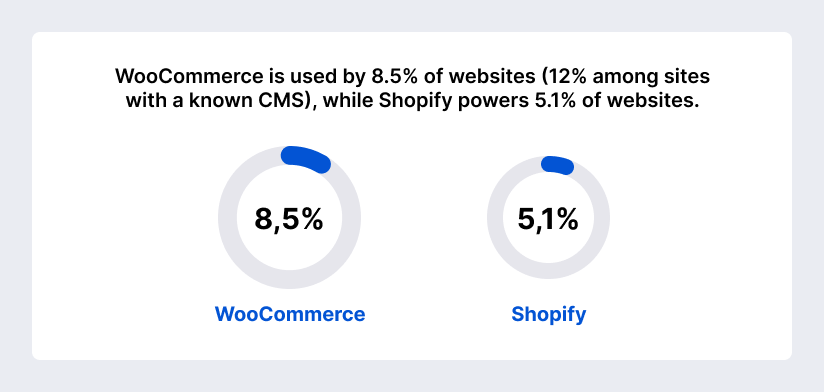
Both platforms are leaders in ecommerce. WooCommerce works closely with WordPress, which helps it reach more websites — 8.5% use WooCommerce, compared to 5.1% for Shopify. Shopify’s managed service attracts merchants who want speed, simplicity, and reliability.
Shopify processed $444 billion in transactions in 2025 (according to WP All Import) and remains a go‑to choice for startups looking to quickly build a polished store. WooCommerce, in contrast, powers millions of WordPress websites and is favored for its deep customization and lower ongoing costs when using carefully chosen extensions.
Difference Between Shopify and WooCommerce
Let’s compare Shopify vs WooCommerce:
| Feature | Shopify (Hosted SaaS) | WooCommerce (Open‑Source) |
| Platform type | Hosted SaaS; built‑in hosting, security, checkout, and updates | Free WordPress plugin; self‑hosted |
| Cost model | Plans from $39-$399/month + potential transaction fees | Free core; pay for hosting and premium plugins |
| Transaction fees | 0.2%-2% fee for non‑Shopify gateways | No platform fees; gateway fees only |
| Ownership & data | Data stored on Shopify servers; export via CSV | Full ownership of data and content; export freely |
| Customization | Section editor: Liquid for deeper changes (checkout locked behind Plus) | Full code access; page builders and hooks |
| Payment gateways | Shopify Payments plus external gateways | 100+ gateways; no extra fees |
| Shipping | Built‑in shipping with discounted rates and labels | Basic flat‑rate/local pickup; real‑time rates require plugins |
| Scalability & performance | Hosted infrastructure; limited server tuning | Depends on hosting & optimization; unlimited scaling with the right servers |
| Security | PCI‑compliant; SSL & updates handled by Shopify | Self‑managed security; use plugins & updates |
Core similarities and key differences
Main similarities:
- Both platforms support the sale of physical and digital products, product variants, and subscriptions via extensions.
- Each offers a marketplace or app store with hundreds of plugins or apps to add advanced functionality.
- Both provide built‑in or extendable solutions for shipping, taxes, marketing, and analytics.
- Both integrate with popular payment gateways and offer POS capabilities.
Major differences:
- Shopify is a managed SaaS service; WooCommerce is a self‑hosted open‑source. With Shopify, hosting, maintenance, performance, security, and updates are handled by the provider. WooCommerce gives you full control but leaves those responsibilities to you.
- Cost structure: Shopify charges fixed monthly fees and transaction charges. WooCommerce’s core is free, but it requires expenses for hosting, domains, and premium plugins.
- Customization: Shopify’s theme editor restricts changes beyond pre‑designed sections, and deep checkout changes are locked behind Shopify Plus. WooCommerce offers unlimited customization using page builders and code-level hooks.
- SEO control: Shopify automates fundamentals but restricts URL structures and sitemap editing. WooCommerce grants full access to SEO configuration, advanced schema, and custom permalinks.
Hosted SaaS vs. open‑source model:
- Hosted SaaS eliminates infrastructure management and provides predictable performance and support. It also limits low‑level access and imposes platform transaction fees.
- Open‑source allows complete ownership, customization, and the ability to select hosting providers. It requires technical expertise, time, and money to manage updates, security, and performance.
Ecosystem control and ownership:
- With Shopify, your store lives on Shopify’s servers. You can export product data via CSV, but the platform environment is closed. Customizations outside of the provided tools require you to work within Shopify’s ecosystem.
- WooCommerce ensures that you own your store data and can move it anywhere. You control the hosting environment and can integrate any third‑party services via their REST APIs.
Setup, usability, and learning curve
Shopify gives you a guided setup with a checklist to add products, set up payments, and launch your store. With WooCommerce, you need to choose and set up hosting and WordPress before adding the plugin. The setup isn’t as unified and has two steps: a basic setup wizard, then separate tasks for payments and shipping.
Shopify’s drag-and-drop interface and single dashboard make it easy for beginners to set up a store in less than an hour. WooCommerce requires you to know your way around WordPress. Its interface mixes ecommerce and blog tools, which can feel overwhelming.
Shopify uses its own Liquid templating language and has API rate limits. Customization is straightforward but has some limits. WooCommerce gives developers full code access, hooks, and a strong REST API, so they can build custom features and connect to any service.
Design flexibility and customization depth
- Themes and templates: Shopify has a theme store with responsive designs and a section-based editor to keep your design consistent. You can buy premium themes or build your own using Liquid and theme frameworks. WooCommerce uses thousands of WordPress themes and works with page builders like Elementor and Divi for real drag-and-drop design.
- Code access and development freedom: Shopify limits deep customization to its theme and app APIs. To change the checkout, you need a Shopify Plus subscription. WooCommerce gives you full access to PHP templates, CSS, and JavaScript through child themes and custom hooks.
- Headless and composable architecture options: Shopify offers Hydrogen (React‑based headless framework) for building custom storefronts. WooCommerce can be used headless via its REST API combined with modern front‑end frameworks. Developers can compose microservices for payments, search, and personalization.
Ecommerce features and business functionality
Shopify’s product interface is simple, with fields for variants and digital goods. WooCommerce allows unlimited products and supports complex product types, such as bookings and memberships, via extensions.
Shopify offers a highly optimized checkout with built‑in payment processing. Third‑party payments incur additional fees. WooCommerce uses the WooPayments gateway or other processors without platform fees and requires separate extensions for one‑page checkout or advanced payment options.
Shopify has abandoned-cart recovery and built-in email marketing on all plans. WooCommerce doesn’t include marketing automation by default, so you’ll need to add plugins for email marketing, cart recovery, or loyalty programs.
Extensions, integrations, and ecosystem
- Marketplace and plugin availability: The Shopify App Store hosts thousands of apps for SEO, marketing, subscriptions, and shipping. However, many essential features — subscriptions, reviews, advanced search — require paid apps and can significantly increase the total cost of ownership.
WooCommerce’s marketplace has many free and paid extensions, all reviewed for quality. Since the platform is open, you can also use plugins from other sources. It’s important to make sure everything works together and to keep your plugins updated.
- ERP, CRM, and third‑party integrations: Both platforms integrate with major ERPs (NetSuite, SAP, etc.), CRMs (Salesforce, HubSpot), and marketing tools (Mailchimp, Klaviyo). Shopify requires apps or connectors with per‑app fees. WooCommerce uses WordPress integration plugins or custom API connections, often free or with a one‑time cost.
- API capabilities: Shopify provides REST and GraphQL APIs with rate limits that vary by plan. WooCommerce includes a robust REST API that developers can extend and has no usage fees.
Pricing structure and total cost of ownership
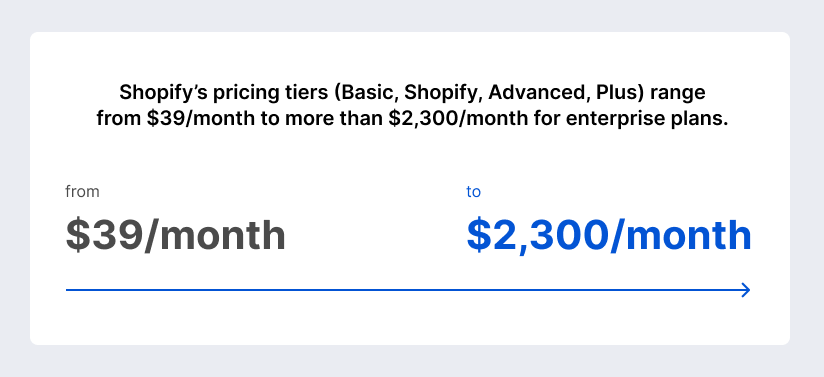
- Subscription and licensing models: Shopify’s pricing tiers (Basic, Shopify, Advanced, Plus) range from $39/month to more than $2,300/month for enterprise plans. Plans include hosting, SSL certificates, and 24/7 support.
WooCommerce’s core plugin is free. Costs accrue from hosting ($10-$50+ per month) and premium plugins ($50-$300 per year), but merchants only pay for the features they need.
- Transaction and processing fees: Shopify charges 0.2%-2% transaction fees when using external gateways. WooCommerce charges no platform fees. You pay only the payment processor’s fee.
- Development, maintenance, and scaling costs: Shopify means you don’t need as many developers or DevOps staff, but you might spend more on apps and higher-tier plans as your store grows. WooCommerce may require hiring web developers for setup, hosting, and maintenance, which can be expensive if you’re not technical.
SEO, AEO, and visibility capabilities
Shopify automatically generates sitemaps and canonical tags, but you cannot edit the sitemap or create custom URL hierarchies. WooCommerce lets merchants define their own permalink structures, customize meta tags, and implement advanced schema, enabling rich results.
Shopify includes basic product and organization schema, but restricts manual editing. WooCommerce (via plugins such as Rank Math) allows you to add extensive schema types for products, FAQs, recipes, and more.
Shopify’s integration with Shopify Magic and Sidekick provides AI‑generated content suggestions, product descriptions, and marketing copy. WooCommerce relies on third‑party AI plugins such as Rank Math’s content assistant and Link Whisper to suggest internal links.
Performance, scalability, and reliability
- Infrastructure and hosting environment: Shopify hosts your store on a global network with built-in CDN, caching, and image optimization. You can’t pick your server location, but you get steady performance everywhere. WooCommerce’s speed depends on your hosting. Using a VPS or dedicated server with caching plugins can make your store very fast.
- Traffic peaks and enterprise scaling: Shopify automatically handles traffic spikes. For advanced features like multiple stores, custom checkout, or higher API limits, you’ll need the Plus plan. WooCommerce can handle big catalogs (over 50,000 products) and lots of traffic if you have strong hosting, but you or your developer must set up caching, a CDN, and database optimization.
Security, compliance, and risk management
Shopify provides Level 1 PCI DSS compliance and manages SSL certificates and security layers. WooCommerce merchants must ensure their hosting and plugins are PCI-compliant and purchase SSL certificates if they are not included.
Shopify updates the platform and fixes security issues automatically. With WooCommerce, you need to update WordPress, themes, and plugins yourself, and keep an eye on security alerts.
Both platforms allow GDPR compliance through data export tools. WooCommerce offers full control over data retention, while Shopify provides built‑in policies and tools. Merchants should assess local regulations and install privacy compliance apps or plugins.
Internationalization and multichannel selling
- Multilingual and multi‑currency support: Shopify Markets enables region‑specific domains, currency conversions, and automatic duty/tax calculation. Multi‑currency checkout requires Shopify Payments and international sales tools. WooCommerce relies on WPML or Polylang for translations and separate multi‑currency plugins.
- Marketplaces, social commerce, and omnichannel: Both platforms let you sell on Facebook, Instagram, Amazon, and eBay using apps or extensions. Shopify’s POS hardware and unified inventory make selling across channels easy. WooCommerce connects to marketplace APIs too, but you might need to do more manual setup.
AI capabilities and automation
- Native AI features: Shopify has built-in AI tools like Shopify Magic for product descriptions, an AI Theme Generator, and the Sidekick assistant. It also offers Shopify Flow for automating tasks like tagging customers or sending notifications.
- Third-party AI integrations: WooCommerce doesn’t have built-in AI or automation tools. Merchants use third-party plugins like Rank Math’s AI assistant, ZipWP website builder, and AutomateWoo for these features.
Support, community, and ecosystem strength
Shopify gives you 24/7 live chat and a large help center. WooCommerce support is spread out — users rely on documentation, forums, and help from third-party developers.
WooCommerce benefits from WordPress’s vast community, numerous tutorials, and open development. Shopify has a strong developer community around its APIs and app ecosystem.
Market adoption and industry position
- Market share overview: W3Techs data show that WooCommerce is used by 8.5% of websites (12% among sites with a known CMS), while Shopify powers 5.1% of websites. WooCommerce’s dominance is linked to WordPress integration. Shopify’s growth stems from its ease of use and marketing momentum.
- Typical business profiles: Shopify is a good fit for entrepreneurs, small and medium businesses, and larger companies that want an all-in-one platform without much technical work. WooCommerce is better for businesses that need deep customization, already use WordPress, or want to build content-rich online stores.
Strategic recommendations for different business models
If you want to launch quickly and keep things simple, Shopify is a great choice. It lets you set up a professional store fast, with all the basics and support included. WooCommerce can be cheaper at first if you already use WordPress and don’t mind handling hosting and plugins yourself.
Businesses expecting rapid growth may prefer WooCommerce if they need custom workflows, advanced SEO, and the flexibility to swap service providers. Shopify’s upgrade path to Plus offers enterprise‑grade features but comes with higher costs and revenue‑share fees.
Large companies should look at both options. Shopify Plus offers dedicated infrastructure, scalable APIs, and tools for global growth. WooCommerce can run on powerful servers, connect with ERP systems, and handle complex catalogs, but you’ll need to invest in development, DevOps, and compliance.
Request SaM Solutions’ ecommerce development services to grow your client base and boost profitability of your online sales.
Why Choose SaM Solutions for Ecommerce Development?
If you decide you don’t want to deal with all the technical moving parts alone, this is where SaM Solutions comes in.
SaM Solutions is a global software engineering company with a strong focus on ecommerce. On the Shopify side, we usually help clients who want to get a store live fast, but still need it to be stable and ready to grow. We set up a clear, easy‑to‑manage storefront, so your team can handle products, orders, and content without deep technical skills. When a project calls for serious scale — high traffic, multiple storefronts, or unusual workflows — our developers work with Shopify Plus and build custom apps tailored to those needs.
Customization is a big part of our work. We design and develop custom themes, create apps to connect third‑party services, and wire everything together through APIs. Beyond the build itself, we pay close attention to SEO and marketing tools so you’re not just launching a store — you’re setting it up to be found. Things like SSL, PCI compliance, and high uptime are part of the standard checklist, not an afterthought.

Conclusion
So, which is better: Shopify or WooCommerce? The “right” choice depends on a few very down‑to‑earth questions:
- How much technical work are you willing to handle (or pay for)?
- Do you prefer predictable subscription costs, or a more flexible infrastructure you can tune over time?
- Is speed to market more important, or is long‑term flexibility and SEO control your priority?
For many founders and small teams, Shopify feels like the safer starting point: quick to launch, opinionated in a good way, and backed by strong support. For businesses that already live in the WordPress world, or that need very specific workflows and deep SEO tweaks, WooCommerce often makes more sense.
Both platforms continue to evolve, gain features, and refine their ecosystems. Understanding their strengths and trade‑offs now gives you a better chance of building an online store that still feels like the right fit two or three years from today.
FAQ
How does migrating between Shopify and WooCommerce affect SEO performance and rankings?
Switching platforms always carries some SEO risk, whether you move from Shopify to WooCommerce or the other way around. Shopify takes care of basics like sitemaps and canonical tags automatically, but it doesn’t give you full control over URL structures. WooCommerce, together with SEO plugins, lets you define custom permalinks and add advanced schema.
If you plan the move carefully — mapping URLs, setting up 301 redirects, updating sitemaps, and monitoring search console data — your rankings can stay stable and, in some cases, improve when you take advantage of WooCommerce’s SEO flexibility. Moving from WooCommerce to Shopify usually involves more redirects because Shopify’s URL patterns are less flexible, but the platform still maintains core SEO fundamentals for you.
How do data ownership and export options differ between Shopify and WooCommerce?
How do Shopify and WooCommerce compare in terms of accessibility (WCAG) compliance support?