Umbraco vs WordPress: Which CMS Platform Is Best for Your Business?


(If you prefer video content, please watch the concise video summary of this article below)
Core Insights:
- WordPress is usually the faster route to value, while Umbraco is often the cleaner route to a tailored solution.
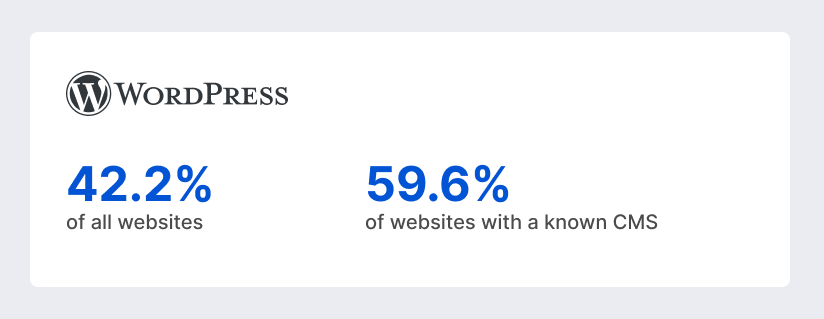
- WordPress powers 42.2% of all websites and 59.6% of websites with a known CMS, which makes it the clear market leader in public web usage.
- Official Umbraco materials say the platform powers more than 700,000 websites worldwide, while third-party usage trackers place its public web share at less than 0.1% of sites with a known CMS.
- Umbraco’s architecture, headless delivery path, user-group controls, and structured content model make it especially well-suited to projects where the CMS sits inside a larger business system rather than operating as a standalone marketing tool.
- Both platforms can support headless architecture, but Umbraco usually has the cleaner native claim because the Content Delivery API is presented as a built-in headless capability.
Choosing a CMS looks simple right up until the moment it stops being simple.
At first, it feels like a website decision. Then marketing wants faster campaign launches, content teams want fewer publishing bottlenecks, IT asks about hosting and identity, leadership asks about scalability, and suddenly the CMS is shaping far more than pages. It is shaping speed, governance, cost, and how confidently your business can evolve online.
That is exactly why the Umbraco vs WordPress debate is so interesting. One platform wins on gravity, reach, and ecosystem size. The other wins on structure, flexibility for custom solutions, and a cleaner fit for many .NET-driven organizations. As of 2026, the right answer is still not “the more popular one.” It is the one that matches your business model, team, and technical direction.
The Key Differences Between Umbraco and WordPress
The clearest way to understand these platforms is to stop asking which one is “better”, Umbraco or WordPress, in the abstract and ask how they behave under business pressure. Here’s a detailed Umbraco and WordPress comparison:
| Decision area | WordPress | Umbraco | What it means for business |
| Market footprint | Dominant public-web CMS with 42.2% of all websites and 59.6% of sites with a known CMS. | Much smaller public-web share, but 700,000+ websites by official count. | WordPress usually wins on partner availability, hiring, and fast implementation patterns. Umbraco wins through specialization, not ubiquity. |
| Core stack | PHP with MySQL or MariaDB; Apache or Nginx recommended. | .NET with SQL Server or SQLite; Linux and macOS are supported in modern versions. | WordPress often lowers hosting friction. Umbraco often fits better where .NET is already a strategic standard. |
| Extension model | Massive plugin and theme ecosystem. | Smaller package ecosystem plus custom dashboards, property editors, and add-on products. | WordPress gives breadth and speed. Umbraco gives a more deliberate, solution-shaped extension path. |
| Editorial model | Block editor and Site Editor emphasize flexibility and visual composition. | Backoffice is shaped by Document Types, Block Grid, Block List, and structured content modeling. | WordPress gives editors freedom fast. Umbraco gives editors stronger guardrails. |
| Headless readiness | Built-in REST API enables remote content access and powers the block editor. | Built-in Content Delivery API is explicitly designed for headless delivery. | Both can go headless. Umbraco makes that direction more intentional out of the box. |
| Multilingual approach | Core supports localization, but multilingual content usually relies on plugins, multisite, or manual content patterns. | Language variants are built into the content model. | Umbraco has the cleaner native story for structured multilingual delivery. |
If you want the shortest useful summary, it is this: WordPress is usually the faster route to value, while Umbraco is often the cleaner route to a tailored solution.
Umbraco vs WordPress – The Basics
Let’s have a look at the simple definitions of WordPress and Umbraco:


Core Similarities Between the Platforms
Before focusing only on differences, it is worth noticing how much shared ground these platforms actually have.
| Shared capability | WordPress | Umbraco | What it means in practice |
| Open-source core | GPLv2 or later. | MIT license. | Neither requires you to pay for the core CMS software itself. |
| Extensibility | Plugins, themes, hooks, custom post types, taxonomies. | Packages, custom dashboards, property editors, APIs, and custom backoffice extensions. | Both are platforms, not just page editors. |
| API support | Built-in REST API. | Built-in APIs plus Content Delivery API and webhooks. | Both can integrate with external systems and front-end frameworks. |
| Role and permission model | Built-in roles such as Administrator, Editor, Author, Contributor, Subscriber. | User Groups, granular permissions, document and property-level restrictions. | Both support collaborative teams, but with different depth and philosophy. |
| Media handling | Media library, search, filtering, quick edits, media REST endpoints. | Media section, Media Picker, Image Cropper, focal points, Media Delivery API. | Both can manage digital assets, though Umbraco tends to offer more structured image handling out of the box. |
The business takeaway is simple: both platforms can run serious digital experiences. The real distinction is not capability versus incapability. It is how those capabilities are assembled, governed, and extended over time.
Architecture and Codebase
Let’s compare Umbraco and WordPress in terms of their architecture and codebase:
Open-source ecosystems
| WordPress lives inside one of the largest open-source website ecosystems ever assembled. The official plugin directory alone lists over 62,000 plugins, and the official theme directory advertises over 14,000 free themes. Its plugin and theme processes are not completely anarchic either. Official WordPress teams review themes for license, security, and code quality, and the plugin directory also operates under detailed guidelines. That blend of scale and governance is one reason WordPress can move so quickly in real-world projects. |
| Umbraco’s ecosystem is meaningfully smaller, but it is also less chaotic. The official package model is oriented around extending CMS functionality for editors, developers, and site visitors, and the surrounding product family adds focused capabilities like managed hosting, deployment, workflows, commerce, and UI tooling. In other words, Umbraco’s ecosystem is less about endless choice and more about building a custom solution on a stable .NET foundation. For many enterprise teams, that trade is attractive. |
Developer experience and flexibility
| WordPress offers flexibility through a combination of hooks, themes, custom post types, custom taxonomies, and the REST API. It also has two major theming paradigms in active use, classic themes and block themes. That is powerful, but it also means WordPress carries some historical layers. Developers can do almost anything, but they must decide whether to lean on plugins, custom plugins, block development, classic PHP templates, or block-theme architecture. Freedom is abundant. Consistency is something teams have to create for themselves. |
| Umbraco is flexible in a different way. Its content architecture starts with Document Types and Data Types, then extends into Element Types, Block Editors, typed models via Models Builder, and custom backoffice extensions. Developers are encouraged to shape the CMS around the business domain. That often makes the initial implementation more deliberate, but it can make the long-term codebase feel cleaner and more predictable, especially for teams already comfortable in .NET. |
Ease of Use for Content Editors
What features make WordPress and Umraco easy to use?
WordPress user interface overview
WordPress has earned its reputation for accessibility honestly. Its official feature set emphasizes easy publishing, drafts, scheduled posts, revisions, media uploads, and role-based collaboration. In the modern editor, content is built from blocks, and tools like List View make it easier to manage complex nested layouts. On sites using block themes, the Site Editor extends that same block logic to templates, navigation, patterns, and global styles.
Umbraco back-office experience
Umbraco’s back office is less about universal visual freedom and more about giving editors a purposeful workspace. Its documentation centers the back office around sections like Content, Media, Users, and Settings. Editors work through a content tree, open a node, and edit only the fields the solution defines for that content type. With Block Grid and Block List, editors can still compose rich layouts, but they do so inside boundaries designed by the implementation team.
Features and Capabilities
What are the most important features of WordPress and Umbraco?
Content management
| WordPress’s core content management model is broad and proven. It supports posts, pages, drafts, scheduled publishing, revisions, passwords, built-in user roles, custom post types, and custom taxonomies. That gives teams a lot of content flexibility without leaving core patterns. For content-first organizations, especially publishing and marketing teams, that matters more than almost any abstract technical benchmark. |
| Umbraco approaches content management more structurally. Document Types define what content exists, what fields it has, where it can be created, and how it should behave. Element Types, Block Editors, and language variants extend that structured modeling further. Add the official Workflow package for staged approvals, and Umbraco becomes particularly strong where publishing needs to pass through business rules instead of just editorial convenience. |
Customization options
| Customization is where WordPress’s enormous reach becomes obvious. Developers can build or modify themes, register custom post types, create custom taxonomies, extend behavior through actions and filters, and expose or consume data through the REST API. At the non-code end, the theme and plugin ecosystems make it possible to add large amounts of functionality quickly. At the code-heavy end, WordPress can still behave like an application platform. |
| Umbraco’s customization power is deeper in the “build the right system” sense. Document Types, Data Types, Models Builder, packages, dashboards, content apps, property editors, custom APIs, and back office customization all exist to let developers shape both the front end and the editorial experience around the solution. That usually means more intentional engineering up front, but it also means fewer compromises later when the business wants something specific. |
Multilingual support
| WordPress core supports localization of the interface and translation-ready themes, but official WordPress support documentation states that WordPress does not support a bilingual or multilingual blog out of the box. In practice, that means multilingual content usually comes from plugins, multisite architectures, or manual content patterns. For many businesses, that is perfectly workable, but it is a meaningful architectural decision, not a native default. |
| Umbraco, by contrast, has native language variants built into the content system. Editors can switch language variants on the same content item, and permissions can also be scoped by language. That gives Umbraco a more coherent multilingual story for organizations that care about structured translation workflows, regional governance, or multi-language publishing at scale. |
Media and asset handling
| WordPress gives editors a familiar media workflow: drag-and-drop uploads, alt text, captions, galleries, grid and list views, search, filtering, and quick edits from the media library. Its media endpoints are also available through the REST API, which helps when building custom front ends or integrations. That makes WordPress strong for everyday content operations, especially when speed matters more than rigid media governance. |
| Umbraco has a more structured asset story. The Media section is distinct in the back office, the Image Cropper supports focal points and predefined crops, Media Picker allows controlled selection behavior, and the Media Delivery API extends asset use in headless projects. If design consistency and responsive image control matter, Umbraco often gives developers and editors a stronger base without needing third-party media tooling immediately. |
Performance and Scalability
- WordPress can scale very well. Its official optimization guidance recommends caching plugins, persistent object caching, CDN use, server-level caching, database tuning, and even adding multiple servers for heavier traffic. WordPress Multisite also allows many sites to share one core codebase while separating databases and media paths appropriately. So the idea that WordPress is “only for small sites” is simply wrong. It can scale, but it needs disciplined implementation to do so elegantly.
- Umbraco also supports serious scale. Official documentation covers load-balanced environments, distributed cache synchronization, and runtime modes for development versus production. In addition, Umbraco Cloud introduces an opinionated delivery workflow for code, schema, content, and media movement between environments. This often gives enterprise teams a more engineered scaling story from the beginning, especially when the organization already thinks in .NET, CI/CD, and multi-environment governance.
SEO Capabilities
- WordPress’s baseline SEO story is one of its quiet strengths. It supports human-readable permalinks, and since WordPress 5.5, it has included core XML sitemap functionality. Official feature pages also point to the plugin ecosystem for extending SEO controls further, which is important because it means most businesses can move from “good basics” to “highly tuned SEO stack” without changing platforms.
- Umbraco approaches SEO with more explicit structural control. Request handler settings let teams manage URL behavior such as trailing slashes and special-character replacement. Redirect URL Management automatically records changed URLs and exposes 301 redirect handling in the back office. Official tutorials also cover building XML sitemaps, and Umbraco documentation explicitly uses reusable SEO property groups as a content-modeling example. That is a very Umbraco way of thinking about SEO: not just fields, but repeatable governance.
Security Comparison
- WordPress core security is mature and more serious than its critics often admit. Official WordPress security materials state that the security team includes more than 50 trusted experts, that the project hardens against common web threats, and that critical fixes are backported to older versions as a courtesy. WordPress also supports automatic background updates for core, and optional auto-updates for plugins and themes. But there is an important nuance. WordPress’s own hardening guidance emphasizes keeping core, plugins, and themes updated.
- Umbraco’s security profile leans more toward governance and structured access. Official docs cover centralized security settings, user groups, granular permissions, document-property restrictions, file and folder permissions, and external login providers for OAuth and OpenID Connect scenarios. That gives Umbraco strong building blocks for enterprise content governance, especially where identity integration and fine-grained access control matter.
Hosting and Infrastructure
- WordPress has one of the lightest entry barriers in the CMS world. Its official requirements are modest, and almost every major hosting model supports it, from inexpensive shared hosting to containerized cloud estates. Apache or Nginx are recommended, but the official documentation is clear that WordPress can run on essentially any server that supports PHP and MySQL-compatible databases. That flexibility is one of the reasons WordPress is so often chosen for fast-moving commercial sites.
- Umbraco’s infrastructure profile is more specialized, though much more flexible today than older perceptions suggest. It supports SQL Server or SQLite, works natively on Linux and macOS in the modern .NET era, and can be provisioned through .NET CLI workflows. For organizations that already operate .NET systems, this can feel very natural. For organizations without .NET experience, it can raise the baseline operational bar.
Integrations and Ecosystem
- WordPress integrates in two primary ways: breadth through plugins and customization through APIs and hooks. The official plugin directory gives it extraordinary reach, while the REST API and hook system make it possible to connect WordPress to CRMs, commerce tools, analytics platforms, identity systems, and custom applications. That combination is why WordPress remains so commercially adaptable despite its publishing roots.
- Umbraco integrates in a more explicitly enterprise-friendly manner. Official documentation covers custom APIs, generated API documentation, webhooks, packages, and external login providers. Its headless delivery model also makes external consumption a first-class scenario rather than an afterthought. The package ecosystem is smaller than WordPress’s, but for many businesses, the real value lies in how cleanly Umbraco can be adapted to internal systems and custom workflows.
Cost and Licensing
Both platforms have free open-source cores. WordPress is licensed under GPLv2 or later. Umbraco CMS is licensed under MIT. That means the core software itself is not where most budgets live. The real cost comes from architecture, implementation, hosting, maintenance, integrations, support, training, and add-ons.
| WordPress usually has a lower entry cost. Hosting is widely available, the talent pool is broad because of WordPress’s dominant market share, and many common features can be implemented by combining existing plugins and themes. The catch is that this convenience can shift cost into premium add-ons, compatibility testing, update management, and long-term maintenance if the build becomes too plugin-dependent. |
| Umbraco often starts with a higher engineering baseline. You are more likely to need .NET-fluent developers, and the official product family includes commercial options such as Cloud, Forms, Deploy, Workflow, and Commerce. On the other hand, the spend often goes into a more tailored architecture rather than a patchwork of unrelated extensions. For organizations that value control, governance, and custom fit, that can be a very reasonable trade. |
Develop your custom software with SaM Solutions’ engineers, skilled in the latest tech and well-versed in a wide range of industries.
Pros and Cons
Let’s have a look at the main pros and cons of both WordPress and Umraco:
Advantages of WordPress
- Exceptional speed to market for content-driven websites because the core publishing model, visual editor, themes, and plugin ecosystem are all mature and easy to activate quickly.
- Huge ecosystem depth makes it easier to find plugins, themes, agencies, freelancers, and operational knowledge.
- Strong flexibility range, from blogs and campaigns to multisite networks and headless builds using the REST API.
- Very good SEO starting point, thanks to human-readable permalinks, core XML sitemaps, and a broad ecosystem of SEO-focused extensions.
Advantages of Umbraco
- Structured content architecture through Document Types, Element Types, variants, and block editors makes it excellent for shaped editorial workflows.
- Natural fit for .NET organizations that want typed models, application-level customization, and closer alignment with existing engineering practices.
- Native multilingual and headless strengths reduce the need to bolt on core architectural capabilities later.
- Governance-friendly editor experience with strong user-group permissions, structured backoffice configuration, and optional workflow approvals.
Limitations of WordPress
- Multilingual content is not natively built into the core, so businesses often rely on plugins, multisite, or manual patterns.
- Plugin-heavy implementations can become harder to govern, especially across security, compatibility, and performance tuning.
- The admin experience can vary widely by project, because themes and plugins can reshape workflows in inconsistent ways.
- Complex enterprise-grade integrations are possible, but not magically “no-code”, and often still require custom development via plugins, hooks, and APIs.
Limitations of Umbraco
- Smaller ecosystem and smaller public-web footprint mean less plug-and-play breadth and a narrower market for Umbraco-specific specialists.
- Higher baseline complexity for non-.NET teams can increase delivery effort if the organization is not already comfortable with the stack.
- Some of the most enterprise-friendly capabilities live in add-on products, which can introduce commercial costs on top of the free core.
- It is often a worse fit for teams that mostly want instant visual freedom and low-friction plugin assembly, because Umbraco assumes more design in the implementation phase.
Use Cases: When to Choose Each CMS
Let us help you decide when it’s better to use this or that platform:
Best scenarios for WordPress
Choose WordPress when your business values speed, editorial autonomy, and ecosystem leverage above all else. It is especially strong for marketing websites, editorial platforms, blogs, content hubs, microsite programs, and businesses that want to launch quickly without designing every workflow from scratch. It is also a smart choice when hiring flexibility matters, because the platform’s market footprint makes it easier to find implementation and maintenance partners.
WordPress also makes sense when your content team wants a lot of freedom. If marketers expect to build, duplicate, adjust, and publish pages at high speed, WordPress is often the more immediately productive environment. Even with headless or custom integrations, it remains an efficient choice when content publishing is the heartbeat of the project.
Best scenarios for Umbraco
Choose Umbraco when your business values structured content, custom architecture, .NET alignment, and editorial governance. It is especially well-suited to enterprise websites, portals, multilingual properties, distributed content operations, headless implementations, and solutions where the CMS must reflect business rules rather than just page-building preferences.
Umbraco is also a compelling choice when the CMS is only one component in a larger digital transformation program. If you need identity integration, structured APIs, tighter control over schemas, or a content model that behaves more like a business domain model, Umbraco often gives you a better long-term shape. It may require more deliberate setup, but the reward is usually clarity and control.
Why Choose SaM Solutions for Umbraco and WordPress Development?
The strongest reason to consider SaM Solutions is not simply that it can build CMS websites. It is a broader software engineering partner with capabilities in solution architecture, IT consulting, maintenance, cloud migration, digital transformation, custom PHP development, and dedicated Umbraco development services. That matters because successful CMS projects rarely remain “just CMS” for long. They usually grow into integration, workflow, analytics, localization, and modernization work. Plus, the company works with two platforms, which is why it can help you make the choice Umbraco CMS vs WordPress easier.
Conclusion
There is no serious universal winner in the WordPress vs Umbraco comparison, and that is exactly what makes the decision worth taking seriously.
Choose WordPress if your business wants the shortest path to launch, a huge ecosystem, a familiar editorial model, and wide partner availability. Choose Umbraco if your business wants stronger content structure, better native multilingual and headless posture, tighter governance, and a CMS that behaves more like a tailored digital platform than a mass-market publishing engine. Both can scale. Both can be secure. Both can support ambitious organizations. The best one is the one whose strengths line up with the kind of complexity your business actually has, not the kind of complexity it imagines.
FAQ
Often, yes, especially when the project demands structured content models, custom APIs, multilingual governance, role granularity, workflow approvals, and .NET alignment. Umbraco’s architecture, headless delivery path, user-group controls, and structured content model make it especially well-suited to projects where the CMS sits inside a larger business system rather than operating as a standalone marketing tool. That said, “better” still depends on the organization. A content-heavy brand team with limited engineering capacity may still get more value from WordPress.