What Is Shopify and How Does It Work? A Complete Guide


(If you prefer video content, please watch the concise video summary of this article below)
Key Facts
- Shopify is a cloud-based ecommerce platform used by millions of businesses across 175+ countries worldwide.
- The platform handles hosting, security, and updates, allowing merchants to focus on selling rather than infrastructure.
- Shopify supports multiple business models, including physical products, digital goods, subscriptions, and services.
- Its ecosystem includes thousands of apps and integrations, enabling businesses to scale and customize their commerce operations.
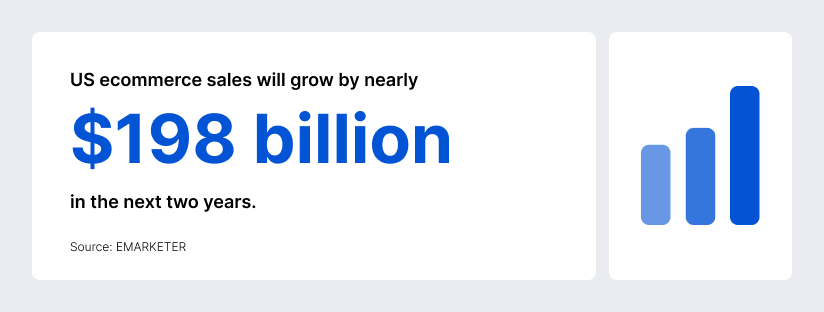
Ecommerce isn’t just “the future” anymore — it’s already a massive share of everyday retail. According to industry forecasts, US ecommerce sales will grow by nearly $198 billion in the next two years.
While Shopify is now a global platform used by “millions of businesses in 175+ countries,” it started with a surprisingly relatable origin story: its founders originally built their own ecommerce solution for a snowboard shop called Snow Devil back in 2004, because they were not satisfied with the existing ecommerce products on the market. So what is Shopify and how does it work?
What Is Shopify?
Shopify is best understood as a hosted, cloud-based commerce platform. So, what is Shopify in practical terms? You pay a subscription, and the platform provides the core software, hosting, and tools needed to build and operate an online store (and support multichannel selling).
Overview of the ecommerce platform
Shopify describes itself as cloud-based and hosted, so you can access your store admin and data from compatible devices with an internet connection. In practice, most merchants use it as a single “command center” to run a storefront (website + checkout), accept payments, manage products and inventory, fulfill orders, handle taxes/shipping settings, and connect marketing or sales-channel tools through apps.
What is Shopify Plus?
Shopify Plus is Shopify’s enterprise tier, designed for higher-volume or more complex businesses that want deeper admin controls, more scalability options, and advanced capabilities. This tier includes advanced features for scaling businesses, such as unlimited staff accounts, support for expansion stores, enhanced API access, and built-in B2B functionality.
Ready to scale? Get a custom Shopify store built for growth by SaM Solutions’ experts.
Shopify Ecommerce Explained
To really understand Shopify, it helps to separate what you build (your storefront and brand experience) from what the platform runs (the hosted commerce engine underneath).
Hosted SaaS model
Shopify is a SaaS (software-as-a-service) company: the software is delivered online (not installed on your own servers), and you typically pay a subscription to use it. This model is popular in ecommerce because it reduces the need to manage hosting, updates, and much of the underlying infrastructure yourself.
Cloud-based infrastructure
Shopify states directly that it is “fully cloud-based,” meaning the core ecommerce software and hosting are managed by the provider, and merchants don’t need to run or maintain their own servers.
Core components of the ecosystem
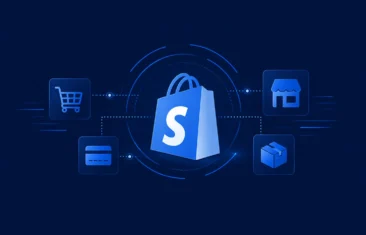
It is more than a storefront builder — it’s an ecosystem with multiple layers that can be mixed and matched depending on how simple or advanced you want your commerce stack to be:
- The admin and catalog core: Shopify’s Products area is designed to manage a complete product catalog, including product creation and organization.
- Themes and storefront rendering: the themes are built using Liquid — an open-source template language created specifically for this platform — plus standard web technologies like CSS and JavaScript.
- Checkout and payments: Shopify Checkout provides the hosted checkout experience and Shopify Payments allow merchants to accept payments without setting up a separate provider.
- Apps and integrations: the company emphasizes that it “covers the basics,” and for everything else there are apps — Shopify’s App Store highlights “over 16,000 apps.”
- APIs and automation: For custom builds and integrations, it provides APIs like the GraphQL Admin API (for products, orders, customers, inventory, etc.) and webhooks (event notifications like “orders/create”).
How Does Shopify Work?
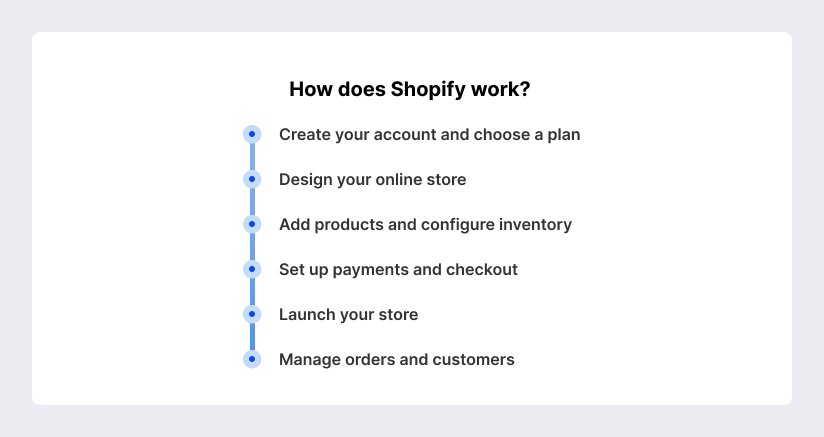
Shopify’s hosted model means your site and checkout are already running on its infrastructure — you’re mainly configuring and customizing rather than engineering a commerce system from scratch.
According to the Help Center, there are multiple plan types for different selling needs: Basic and Grow for launching and then scaling a store with more features (like advanced reporting or more staff accounts), Advanced for scaling businesses that want more advanced capabilities and reporting, and Plus for high-volume merchants that run complex businesses.
Once you have a plan, your store’s design usually starts with a theme. The themes are built using Liquid and standard web technologies, and Shopify’s documentation emphasizes that theme features live in Liquid templates, sections, blocks, and snippets.
In Shopify, products are created and managed in the Products area. Shopify’s product setup flow is straightforward: go to Products, click “Add product,” add the title and details, and save. Inventory is managed in Shopify’s Inventory page, where you can set up tracking, view stock levels, and make adjustments.
Shopify Payments is Shopify’s built-in payment solution. The company describes it as the simplest way to accept payments online because it removes the need to set up a third-party provider. If you do use external payment providers, third-party transaction fees can apply.
Many new stores begin password-protected while being built. You can remove password protection only after you pick a pricing plan. Shopify also provides a launch checklist-style page describing how to remove the password via the Themes or Preferences areas in the admin.
Once you’re live, Shopify’s core workflow becomes operational. Orders are managed from the Orders page; Shopify defines order management as viewing/tracking orders, processing payments, making changes, and handling returns and refunds. Fulfillment can be done individually or in bulk, and Shopify notes you can buy and print shipping labels directly in the admin and access discounted shipping rates (where available). Customer profiles are created automatically when a customer places an order (and can also be created when someone abandons checkout, joins a mailing list, etc.). Shopify’s customer segmentation is rule-based and dynamic, with segments built using ShopifyQL-style queries in the admin.
Key Features of Shopify
It’s easy to think of Shopify as “a website builder,” but the practical value usually comes from how Shopify bundles the most conversion-sensitive parts of ecommerce:
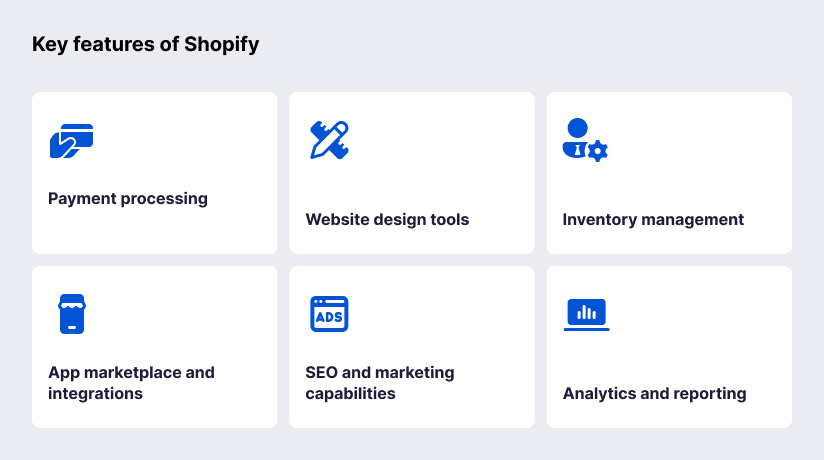
Shopify Payments is built to be activated directly in the platform so merchants can accept major payment methods without separately configuring a third-party provider. Shopify notes the cost varies based on your plan and you can lower credit card rates by upgrading your subscription.
Shopify’s storefront layer is theme-driven. Themes are built with Liquid (created by Shopify, open source) and are composed of architectural elements like templates, sections, blocks, and snippets.
Shopify supports inventory tracking in the admin: you can view stock levels, adjust counts, and review the history of inventory adjustments (and inventory reports). For multi-location operations, you can use inventory transfers and shipments to reserve stock at an origin location and track items as they move to another location.
The App Store frames apps as the way to customize beyond the core platform — and highlights over 16,000 apps, with a review process before apps are listed. On the developer/partner side, Shopify documents how app developers earn revenue and how revenue share tiers work.
Shopify includes built-in SEO fundamentals. The help documentation lists several automatic SEO features, including auto-generated canonical tags, automatically generated sitemap.xml and robots.txt, themes generating title tags, SSL certificates activated by default
Shopify’s analytics tools include dashboards and reports for store activity, visitors, web performance, and transactions — designed as a unified reporting experience. Shopify also describes its “new reports” as having components like a ShopifyQL query editor, configuration panel, data visualization, and data table.
What Can You Sell on Shopify?
Shopify supports multiple business models — not only traditional “ship a box” ecommerce, but also digital delivery, subscriptions, services, and hybrid setups that mix online with in-person selling.
Physical products are the classic use case: you list items, manage inventory, take payment, then fulfill orders (yourself or with partners). If you also sell in person, POS is a point-of-sale system available on iOS and Android, designed to let you sell products in person while syncing with your admin.
The Help Center explains that you can sell digital goods (downloadable files and online services) and states there are no additional fees for selling digital products on your online store. For file delivery, it provides a free Digital Downloads app: you upload files (videos, songs, graphic art, etc.), and customers receive a download link after purchase.
Subscriptions are supported via purchase options and (typically) an app. The Help Center describes the Subscriptions app as connected to your store so you can build and manage subscriptions in the admin, enabling recurring sales and even in-store subscription selling with POS.
The platform supports selling services, but the booking logic generally comes via apps. To provide a booking link for services (events, appointments, bookings), you should install an app from the App Store, and configure it subsequently.
Dropshipping is a model where you sell products without handling inventory or shipping — suppliers fulfill orders directly to customers. Shopify’s Help Center describes dropshipping in these exact terms and positions it as a way to reduce upfront costs and logistical complexity.
Benefits of Choosing Shopify
Shopify’s appeal is rarely just one feature — it’s the compounding effect of several benefits:
User-friendly interface
Because the platform is hosted and cloud-based, merchants can manage their store from the admin without managing servers and core platform operations themselves. This “reduced technical overhead” effect is a major usability win for small teams, especially early on when speed matters more than deep customization.
Scalability and flexibility
The cloud-based model is fundamentally designed to scale without merchants provisioning infrastructure. Flexibility also shows up in how it supports multiple architectural approaches: standard theme-based storefronts, headless builds (via APIs), and hybrid stacks that use apps, automation, and integrations to extend core features.
Multi-channel selling
Shopify promotes multi-channel selling as a core capability: Shopify’s own “What is Shopify?” guide lists sales surfaces including an online store, in-person retail, marketplaces (like Amazon and Etsy), and social channels (like TikTok and Instagram).
Security and compliance
Shopify states it is certified Level 1 PCI DSS compliant, and that this compliance extends by default to all stores powered by it. It also enables SSL/TLS secure connections for stores to encrypt customer data transmitted to the site (HTTPS).
Automation and AI tools
Shopify’s automation story includes both workflow automation and AI assistance:
- Shopify Flow is described as an ecommerce automation platform that lets you automate tasks and processes within your store and across apps using triggers, conditions, and actions.
- Shopify Magic and Sidekick: Sidekick as an AI-powered commerce assistant trained on the platform’s features. You can also use Shopify Magic as a suite of AI tools for merchants (with availability and access varying by feature).
Global selling capabilities
Selling internationally usually means handling languages, currencies, and market-specific settings. The plarform supports this through “international sales tools,” which help you set up and manage markets (countries/regions or groups of countries) with different settings.
How Much Does Shopify Cost?
Also you can find several pricing plans available at the moment, exact totals vary widely depending on your business model, volume, and tech stack.
Pricing plans overview
The published plan pricing commonly lists:
- Basic: $27/month
- Grow: $72/month
- Advanced: $399/month
- Plus: $2300/month
Transaction fees
Two cost concepts are often confused:
- Card processing fees: Shopify Payments charges fees per payment, with rates varying by card type and location, and you can lower rates by upgrading your plan.
- Third-party transaction fees: If you use a third-party payment provider, there may be an extra transaction fee added.
Additional costs and apps
Beyond the platform and payment fees, the costs can include:
- Apps: Shopify’s App Store highlights “over 16,000 apps,” and Shopify itself frames apps as the way to extend functionality beyond the basics.
- Email/SMS messaging volume: Shopify Messaging includes free email sending up to 10,000 per month, then usage-based pricing.
Who Uses Shopify?
The platform’s user base spans nearly every stage of commerce maturity — from solo founders shipping their first orders to globally recognizable brands operating multi-channel stacks.
Millions of businesses in 175+ countries use the platform. For small businesses, the hosted model means you can launch without maintaining servers and can manage core store operations (products, payments, orders) through the admin.
As brands scale, platform reliability and conversion optimization become more important. Shopify highlights tools like Shop Pay to reduce checkout friction, and publishes studies claiming meaningful conversion lifts versus guest checkout in some contexts.
Shopify’s earnings release gives examples of brands using Shopify “from entrepreneurs to brands like” Aldo, SKIMS, and Supreme. Enterprise use cases often align with Shopify Plus, where the company documents B2B availability, expansion stores, higher API capacity, and other admin controls intended for operational complexity.
Pros and Cons of Using Shopify
No ecommerce platform is “perfect” — the best choice depends on your operating model, appetite for customization, and how much you want to manage yourself.
| Category | Pros | Cons / Trade-offs |
|---|---|---|
| Speed to launch | Hosted platform; admin-led setup; themes + apps accelerate build | Custom requirements may still require developers/partners |
| Infrastructure | Cloud-based hosting is provider-managed | Less infrastructure control than self-hosted stacks |
| Checkout & payments | Built-in checkout and payment options, plus accelerated checkout via Shop Pay | Payment fees vary by region/plan; third-party processors can add platform transaction fees |
| Ecosystem | Large app marketplace for extensions | App stack can become costly/complex over time |
| SEO fundamentals | Many SEO basics handled automatically | Advanced SEO/control can require technical work or apps |
| Scaling | Clear upgrade path (including enterprise tier) | Higher tiers and enterprise options can increase total cost |
Shopify Alternatives
If you’re choosing an ecommerce platform, comparing Shopify to alternatives isn’t just about features — it’s about the operating model: hosted SaaS vs self-hosted, and “own the customer relationship” vs “sell inside a marketplace.”
WooCommerce
WooCommerce is positioned as an open-source ecommerce platform for WordPress. This usually appeals to teams that want more control over hosting and code (because the store is built on a WordPress site you host/manage), and are comfortable assembling their own stack of hosting, security, caching, plugins, and maintenance.
Wix
Wix positions its ecommerce offering as an all-in-one ecommerce platform with customizable storefront design and built-in tools, layered with AI-powered capabilities. It can be appealing if your priority is design flexibility with minimal technical work, though advanced commerce operations may depend on plan and ecosystem constraints.
BigCommerce
BigCommerce positions itself as an “Open SaaS” ecommerce platform — a model that aims to blend managed SaaS security/hosting with more open integration and customization options. This can be attractive for businesses that want SaaS convenience but expect more composable architecture patterns.
Amazon Marketplace
Selling on Amazon is fundamentally different: you’re selling inside a marketplace rather than operating your own branded storefront-first channel. Amazon’s seller materials emphasize reaching a large shopper base and outline the basics of creating a selling account, listing products, and fulfilling orders.
Create your ecommerce system with SaM Solutions – and enjoy easy maintenance, longer customer dwell time, and an increased conversion rate.
Why Choose SaM Solutions for Shopify Development?
SaM Solutions is an international IT services and software solutions provider with over 30 years of experience and a global presence on the market. Our team provides Shopify development services that include consulting/audits, online store design and development, theme customization, app development, and third-party tool integration. We offer:
- End-to-end delivery (not just design): SaM Solutions can cover store build + theme work + app strategy + custom development + integration, reducing handoffs and “integration gaps.”
- Integration readiness: the platform supports seamless integration with existing ERP and CRM systems through APIs, SDKs, and partner solutions — especially at the Plus level — and we help implement and optimize these integrations.
- Platform breadth: We work across multiple ecommerce platforms (e.g., SAP Commerce Cloud, Sitecore OrderCloud, Adobe Commerce), which can matter if you’re migrating, running multiple brands, or comparing architectures.
Conclusion
Shopify is a cloud-based, hosted commerce platform built to help businesses start, run, and scale ecommerce without managing their own infrastructure. If you’re deciding whether it is right for you, the most useful next step is usually not “Does it have feature X?” but rather: “What business model am I running (products, subscriptions, services, omnichannel), what level of control do I need, and which costs will scale with me (apps, payment mix, integration complexity)?” Based on your preferences, the right development partner can help you build a store that’s not only beautiful, but operationally scalable.
FAQ
Is coding knowledge required to customize advanced Shopify themes?
Not always — but it depends on what you mean by “advanced customization.” If you’re adjusting layout, colors, typography, homepage sections, and many design elements, you can often do that through theme settings and the theme editor without writing code.
Can Shopify integrate with ERP systems like SAP or Microsoft Dynamics?
Does Shopify support headless commerce architecture?