How to Migrate from Magento to Shopify: A Complete Guide for Seamless Ecommerce Transition


(If you prefer video content, please watch the concise video summary of this article below)
Key Facts
- Magento to Shopify migration is a critical business process, and its implications are far-reaching, touching every aspect of a business.
- If a migration from Magento to Shopify is successful, it would reduce the overall infrastructure costs and improve the time to market for new features.
- However, if a migration from Magento to Shopify fails, it might result in data loss, broken URLs, and a poor overall customer experience.
- Ecommerce platforms are growing, and along with them, performance expectations are also increasing, leading many to migrate from one platform to another, like from Magento to Shopify, as even a slight improvement in performance can result in a huge boost in conversions and overall revenues.
- Shopify, being a cloud-based platform, takes care of hosting, security, and performance, unlike Magento, which requires a lot of infrastructural costs and maintenance.
- For a successful migration from Magento to Shopify, a proper plan has to be in place, and migration risks like data, traffic, and overall operational gaps have to be avoided.
Replatforming isn’t just a “website move.” It’s a business-critical transition that affects checkout reliability, marketing performance, customer accounts, analytics, operations, and SEO — often all at once.
Done right, a Magento to Shopify migration can reduce the maintenance burden of hosting and patching while giving teams a faster path to launching features through themes, native tools, and apps. Done poorly, it can create data mismatches, broken URLs, and customer frustration. A successful migration from Magento to Shopify requires careful planning around data, SEO, integrations, and customer experience.
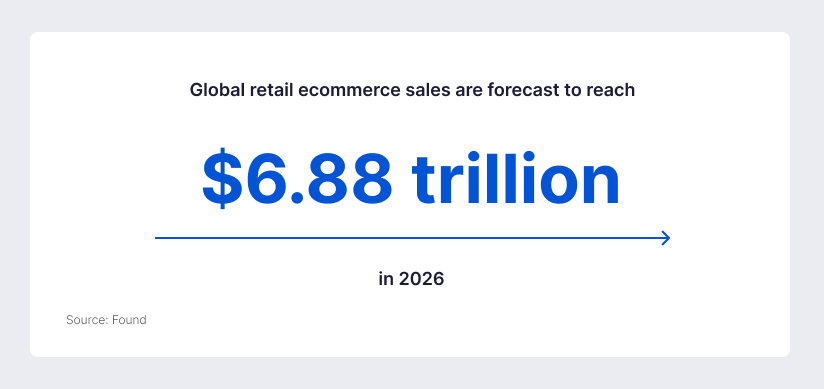
The timing matters, too. Global retail ecommerce sales are forecast to reach $6.88 trillion in 2026, representing 21.1% of total retail sales — so the cost of downtime, slow pages, or an SEO drop is higher than ever.
Why Businesses Are Switching Platforms
For many growing brands, Magento migration to Shopify is no longer just a technical project, but a strategic move to simplify operations and support faster ecommerce growth. Platform migrations usually happen when growth exposes operational drag: slow release cycles, rising dev/ops costs, or fragile integrations. While every store has its own reasons, several recent signals explain why “Magento → Shopify” is a common decision path.
Growth expectations are rising, not slowing down
Many brands choose to migrate Magento to Shopify when growth starts exposing operational bottlenecks, rising maintenance costs, and slower release cycles. Teams that can iterate faster (merchandising, CRO tests, localization, promotions) typically outlearn the competition.
Performance has a measurable revenue impact
Speed isn’t a vanity metric. A widely cited study by Deloitte found that a 0.1 second improvement in mobile site speed correlated with +8.4% retail conversions (and +9.2% average order value) in the analyzed sample.
Separately, Google reports that 53% of mobile visits are likely to be abandoned if pages take longer than 3 seconds to load.
SaaS economics and risk management are increasingly attractive
Magento/Adobe Commerce can be powerful — but it also usually means you own a bigger share of the reliability and security workload (patch cadence, infrastructure tuning, extensions compatibility, incident response). Adobe publishes patch schedules and security patch release notes for Adobe Commerce/Magento Open Source, underscoring the operational reality: keeping the platform secure and stable requires ongoing patch discipline.
By contrast, Shopify’s model includes built-in performance optimizations like a CDN and ongoing platform-level updates; its documentation also positions the platform as providing a Cloudflare-backed CDN at no extra charge.
Create your ecommerce system with SaM Solutions – and enjoy easy maintenance, longer customer dwell time, and an increased conversion rate.
Magento vs Shopify: Core Differences
Choosing between Magento (Adobe Commerce) and Shopify comes down to how much control, complexity, and scalability your business truly needs — so let’s break down the core differences side by side.
| Area | Magento / Adobe Commerce approach | Shopify approach |
|---|---|---|
| Operating model | Often requires more hands-on technical ownership: infrastructure decisions, release planning, and patch management. | Fully hosted SaaS platform with managed infrastructure, built-in CDN, and minimal operational overhead. |
| Security & compliance | Ongoing patching and security updates are a documented requirement; Adobe publishes patch schedules and security update bulletins. | PCI DSS Level 1 compliant by default, with security handled at the platform level. |
| Ecosystem | Highly extensible via modules/extensions and custom development, with strong control over architecture. (Product-type flexibility is notable.) | Large app ecosystem: over 21,000 apps in the App Store as of Dec 31, 2025. |
| Scale proof points | (Varies by implementation/hosting.) | 21,000+ apps (2025), enabling rapid feature extension through integrations rather than core changes. |
| International & multi-store | Can support complex multi-site/multi-store setups depending on implementation. | Shopify Markets + Shopify Plus expansion stores simplify global commerce operations. |
| Flexibility vs simplicity | High flexibility: full control over backend logic, hosting, and architecture — but increased complexity and maintenance. | Simplicity-first: faster launch and iteration within a managed ecosystem, with less technical overhead. |
| Customization approach | Code-level customization via modules and core modifications; suited for highly tailored solutions. | Customization via themes, APIs, and apps; requires mapping features to native, app-based, or custom solutions. |
| Hosting & performance | Performance depends on infrastructure, caching, and optimization strategy — fully owned by your team. | Built-in performance optimization with Cloudflare CDN, global delivery, and optimized asset handling. |
Planning Your Migration Strategy
A smooth transition is rarely about the migration tool. It’s about planning: mapping business outcomes to platform decisions and sequencing the work to reduce risk. If you’re evaluating how to migrate from Magento to Shopify, the process should start with business goals, data mapping, and risk assessment.
Business goals and KPIs
Set measurable goals before you touch data:
- Revenue KPIs: conversion rate, AOV, revenue per visitor (RPV).
- Experience KPIs: Core Web Vitals and mobile performance (because speed impacts conversion and abandonment).
- Marketing KPIs: organic sessions, rankings for top landing pages, index coverage. (Google provides specific guidance for site moves with URL changes.)
- Operations KPIs: time to launch promotions, time to add products/attributes, support tickets per order, and “dev hours per month to maintain the platform.”
Choosing between Shopify and Shopify Plus
The ‘Plus or not’ question should be answered by requirements — not brand size alone — especially when scalability, B2B needs, and international expansion are part of the roadmap.
Shopify Plus pricing is documented in USD as $2,300/month (3-year term) or $2,500/month (1-year term) for standard setups, and notes that more complex/higher-volume businesses may move to a variable platform fee.
Shopify B2B is available only on the Plus plan (and B2B features are included as part of the Plus subscription).
If you need Plus features such as expansion stores (9), advanced permissions, certain API resources, or B2B, plan for Plus early so you don’t design a solution that has to be reworked later.
Migration risks and mitigation
Most migration failures fall into three buckets:
- Data risk: mismatched product options, incorrect inventory counts, customer duplicates, broken variants.
- SEO risk: URL changes without proper redirect mapping, missing metadata, accidental robots/indexing blocks. (Google’s migration guidance is explicit that you should plan URL changes carefully.)
- Revenue risk: checkout and payment misconfiguration, shipping/tax errors, and analytics gaps that hide issues.
Mitigation strategy: stage your migration in test runs, validate with real-user performance telemetry, and launch with a rollback mindset (domain/DNS plan, redirect plan, monitoring). The pre-launch guidance explicitly recommends placing test orders and then removing password protection when ready to go live.
Migration Data Scope and Limitations
This is where migrations get “real.” Not everything migrates equally well because the two platforms have different data models, permissions, and security approaches.
What data can be migrated
Most stores can move essential commerce records — but often not in a single click.
Products and catalog structure
The platform supports importing products via CSV. The official “product CSV” documentation includes extensive rules around required columns, variant dependencies, international columns (Markets), and metafield support.
Magento/Adobe Commerce provides an admin export flow for several entity types (Products, customer files, stock sources, etc.).
Customers and accounts
The platform supports customer imports via CSV and specifies constraints (including file size) and what can/can’t be imported.
Orders and transaction history
Manual migration via “migrate” guidance notes that some data (including orders) can’t be moved via a simple manual approach; The platform also positions third-party migration apps as a path to transfer orders and other records.
For historical order continuity, many enterprise migrations use APIs or specialized tooling. Admin API documentation supports creating/updating orders programmatically (which is one technical route to importing history).
What Data Cannot Be Fully Migrated
Some limitations are security-driven; others are “platform model mismatch” issues.
Password limitations and reactivation
You can’t migrate customer passwords via CSV because passwords are encrypted outside of the platform; instead, you must invite customers to create new passwords (or use account invitation workflows).
If you’re considering the newer customer accounts experience, the platform documents passwordless sign-in options (one-time codes) and the account behavior for existing customer profiles.
Custom functionalities and extensions
Magento extensions don’t “transfer.” Every custom module, checkout rule, and integration must be mapped to one of three possible paths:
- native Shopify feature,
- Shopify app,
- custom development (theme + app + API).
Shopify’s Plus documentation highlights platform extensibility via APIs and Shopify Functions (for customizations) on Plus.
Data Migration Process
Execution success depends on discipline: export cleanly, import in the right sequence, and validate ruthlessly.


Product Structure Transformation
This is the heart of Magento → Shopify complexity. The goal isn’t to “copy the catalog.” The goal is to re-model it to fit Shopify’s product system while preserving customer-facing behavior.
Attributes vs tags and metafields
Magento catalogs often rely on attribute sets and layered navigation. On Shopify, you typically distribute this information across:
- Tags (good for grouping and internal filtering workflows; Shopify documents tags as a way to group, search, and filter items).
- Metafields (structured custom data; Shopify documents category metafields as product attributes in Shopify’s Standard Product Taxonomy).
Important nuance for migration planning: Shopify’s product CSV import/export supports product metafields, but the documentation notes that variant metafields aren’t supported for product CSV import/export (you’d handle those through other bulk tools).
Configurable products vs variants
Magento’s configurable products represent a parent product linked to distinct simple SKUs. Adobe’s documentation describes configurable products and how they represent individual SKUs for inventory tracking.
Shopify’s equivalent is variants. Shopify’s help documentation states you can have up to 2,048 variants per product and up to three options per product.
Migration implication: a configurable product usually becomes one Shopify product with variants — but you must confirm that option structure and merchandising rules still work (e.g., filtering, swatches, and international pricing).
Bundles, grouped products and custom logic
Magento supports bundle and grouped products as first-class product types. Adobe’s documentation describes grouped products and bundle products and their behaviors.
Shopify can support bundling through:
- Shopify Bundles, a free first-party app for fixed bundles and multipacks.
- Combined listings, which connect separate products into a single storefront listing with variant-like behavior and can support details not usually available at the variant level (e.g., unique URLs, descriptions).
Migration implication: you should decide whether “bundle logic” is a merchandising UI pattern, an inventory pattern, or both — because each maps differently in Shopify.
Storefront, UX, and Content Rebuild
A Magento → Shopify migration is also a redesign project, even if you try to keep the look and feel. Shopify’s theme system and CMS patterns differ materially from Magento.
Shopify’s theme architecture is modular: templates are made of sections and blocks, and Shopify documents that structure explicitly. If you’re moving to Online Store 2.0, Shopify’s developer documentation describes OS 2.0 as a set of features that makes themes more flexible and maintainable (including JSON templates).
Shopify’s own migration guidance notes that some data like blog posts can’t be moved via manual migration, and that you may need to copy/paste content into Shopify where needed (or use specialized tools/services). For scaling content migration safely, treat pages like product data: inventory, map, import, validate.
Mobile performance is a revenue issue, not just a UX issue. The Deloitte study on speed and conversion provides one quantitative reason to prioritize performance during theme rebuild. Shopify also provides web performance reporting based on real user data from the past 30 days, evaluating the Core Web Vitals and ranking them Good/Moderate/Poor — use this as your “post-launch barometer.”
SEO Preservation Strategy
Before touching URLs, anchor your approach on search-engine guidance. Google’s Search Central documentation describes how to move a site with URL changes while minimizing negative impact in search results.
URL structure and redirects
Shopify provides native URL redirect management and documents how to create redirects with relative or full URLs (and notes they start working immediately).
Your best practice is still: map old → new URLs, avoid redirect chains, and validate top pages first (homepage, top collections, top PDPs, top blog posts). Google’s site move guidance is explicit that careful planning reduces negative impact.
Metadata and content migration
Carry over title tags, meta descriptions, canonical intent, headings, and body content — especially for high-performing landing pages. Shopify provides tools and documentation around sitemaps and SEO workflows to support indexing, including how to find and submit your sitemap.
Preventing traffic loss
Avoid accidental blocks. Shopify documents that editing robots.txt.liquid is an unsupported customization and warns that incorrect edits can result in loss of all traffic — so only change it when you have a specific reason.
Integrations and Extensions
Your integration plan should be treated as a first-class architecture stream.
On Shopify, integrations typically happen through apps and APIs; Shopify Plus documentation highlights advanced API access and resources (Plus-only API resources and the ability to request increased rate limits). For many merchants, the Shopify App Store breadth is part of the strategy — Shopify reported 21,000+ apps at the end of 2025.
Shopify Payments is positioned as the simplest way to accept payments online and reduces the need to configure a third-party merchant account in many cases. For Shopify Plus, Shopify notes that if you use a third-party payment provider you may pay that provider’s fees plus an additional Shopify fee, and that activating Shopify Payments may waive certain transaction fees depending on location.
Plan app selection like a systems design exercise: list current Magento modules, identify Shopify equivalents, then test app interactions in a staging environment. This is one reason to do phased UAT and performance validation before launch.
International and Multi-Store Setup
International expansion is one of the most common reasons teams migrate, because localization touches currency, content, taxes, duties, shipping rules, and domain structure.
Markets and localization
Shopify provides built-in currency localization features and documents how local currencies work in Markets.
Shopify’s product CSV documentation also reflects Markets structures via “International” and market-specific columns, which becomes relevant when migrating international price books.
If you’re on Shopify Plus, expansion stores (9) are supported for internationalization and related purposes.
Currency and tax configuration
Shopify documents tax setup via Settings → Taxes and duties and provides guidance for collecting tax and creating overrides/exemptions.
For cross-border selling, Shopify also documents duties and import tax configuration and how to manage these as part of international settings.
B2B and Wholesale Capabilities
If your Magento store includes wholesale logic, you need to treat B2B as a migration stream — not an “after launch” task.
Shopify documents that Shopify B2B is available only on Shopify Plus and that it’s a suite of features to sell B2B through Shopify admin and online store.
Shopify documents B2B catalogs for controlling product access and pricing, and also documents payment terms setup (net terms, deposits) for companies. Migration implication: Magento customer groups/pricing rules usually map into Shopify B2B companies, catalogs, and price logic — or, if you’re not on Plus, into apps + segmentation patterns.
Testing Before Launch
Launch testing isn’t optional. It’s where you eliminate “unknown unknowns.”
Functional testing
Shopify provides a “Preparing your Shopify store for launch” guide and recommends placing test orders before launch.
Order and payment testing
Shopify documents how to place test orders using the Bogus Gateway or Shopify Payments test mode, and notes you need to be on a paid plan to test gateways.
Performance validation
Use web performance reports and Core Web Vitals evaluation, plus external tools like PageSpeed Insights. Shopify documents both the reports and how they’re based on real user metrics.
Launch Checklist
A clean launch is usually about sequencing and verification.
Shopify documents how to connect a third-party domain, how long DNS changes can take (up to two days), and how to change your primary domain. For existing domains, Shopify also explains the difference between connecting and transferring and warns that a domain transfer can cause downtime if not handled carefully.
Shopify documents GA4 setup and explicitly notes that Google Analytics can’t track events until you remove password protection from your store. If you’re using pixels or tag management, Shopify provides guidance for custom pixels and testing.
Shopify documents how to submit sitemap.xml to Google Search Console, and Shopify also documents that many CMSs (including Shopify) use automation to generate sitemaps at the standard location. Google also provides its own guidance for building and submitting sitemaps.
Post-Migration Optimization
A migration is a baseline reset. After launch, you should move quickly to optimization.
Tie CRO back to performance and friction reduction. Web performance materials connect Core Web Vitals performance to conversion and discoverability, while external studies quantify performance impact on conversion behavior.
Shopify documents performance reports and how to interpret them, and Shopify’s own performance blog positions RUM-based monitoring as the foundation for improvements.
Use Search Console coverage reports, monitor 404s and redirect errors, and review indexation after major URL changes (aligned with Google’s site move guidance).
Common Challenges and Pitfalls
Even well-planned Magento-to-Shopify migrations can run into hidden obstacles, so it is important to identify the most common risks early and address them before they affect performance, SEO, or daily operations.
With SaM Solutions’ ecommerce developers, you build a digital retail ecosystem that becomes your business’ key sales channel.
Why Choose SaM Solutions For Migration From Magento to Shopify?
SaM Solutions has been a trusted partner for businesses looking to migrate their online stores from Magento to Shopify. With a strong, practical understanding of both platforms, we go beyond simple data transfer to ensure that your business logic is fully preserved throughout the transition.
Our team brings hands-on experience in migrating from Magento 2 to Shopify, including the secure and accurate transfer of business data. We focus on making the entire process — planning, testing, and refinement — smooth and efficient, so your business can continue to operate seamlessly every step of the way.
Conclusion
Migrating from Magento to Shopify is less about “moving data” and more about rebuilding your commerce foundation: product model, customer accounts, SEO equity, integrations, and operational workflows. The highest-impact migrations treat performance, SEO, and testing as core project streams — not afterthoughts — because speed and stability translate directly into conversion outcomes.
With the right plan — data mapping, catalog remodeling, redirect governance, and pre-launch testing — you can transition platforms without sacrificing customer trust or organic visibility, and put your team in a better position to iterate in a high-stakes ecommerce environment.
FAQ
Can you migrate customer passwords securely between platforms?
Shopify explicitly states that you can’t migrate customer passwords via CSV because passwords are encrypted outside of Shopify. The recommended approach is to import customers and then invite them to create new passwords (or use account invitation flows depending on your account configuration).
Is Shopify suitable for highly customized enterprise ecommerce solutions?
How much does it cost to migrate Magento to Shopify?