Shopify API Integration: Complete Guide for Scalable Ecommerce Systems


(If you prefer video content, please watch the concise video summary of this article below)
Main Insights:
- Shopify releases new API versions every quarter, and each stable version is supported for at least 12 months, with overlap between versions so teams can migrate safely.
- Since January 1, 2026, new legacy custom apps can no longer be created. New custom apps are managed in the Dev Dashboard.
- For apps built for your own organization and installed in stores you own, Shopify supports the OAuth 2.0 client credentials grant. Those tokens expire after 24 hours and must be refreshed programmatically.
- Starting April 1, 2026, new public apps that call the Admin API must request and use expiring offline access tokens, a security change that makes token rotation part of normal operations.
Modern Shopify stores don’t run alone — they rely on many systems working together, from ERP and CRM to payments and logistics. The challenge is making all these parts communicate smoothly and reliably.
That’s where Shopify API integration comes in. It connects your tools, automates workflows, and keeps data in sync in real time. In this guide, you’ll learn how Shopify APIs work and how to build integrations that are simple, stable, and ready to scale.
What Is Shopify API Integration and How Does It Work
Let’s have a proper look at how Shopify API integration works:
Core concept of API-based commerce connectivity
API integration in Shopify is the process of connecting Shopify to another system so that both sides can exchange data and trigger actions automatically. Think of it like hiring a very reliable interpreter between your store and everything around it: your ERP asks for orders, your CRM requests customer events, your warehouse wants inventory changes, and your storefront needs product and cart data. APIs define how those conversations happen in a structured, predictable way.
How data flows between systems
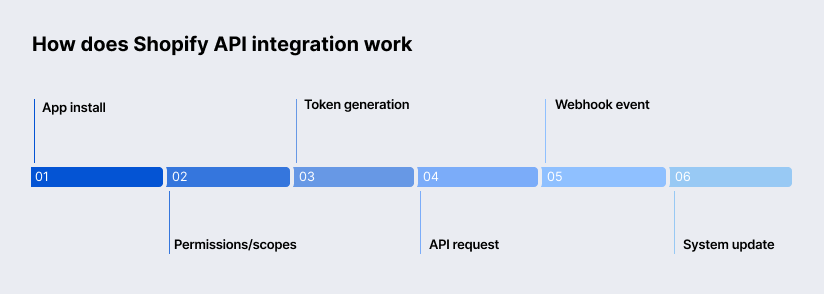
A typical Shopify integration follows a simple path. Your app is installed on a store, scopes are approved, and the app gets an access token using the right OAuth flow for that app type. After that, your back end makes authenticated requests to Shopify’s GraphQL Admin API or another relevant API endpoint. When an event occurs, such as a new order or an inventory update, Shopify sends a webhook to your endpoint so your system can update its own records. Shopify notes that webhook events are near real-time, but not guaranteed to arrive in order, and duplicates can occur, so good integrations are always designed to be idempotent and timestamp-aware.
Types of Shopify APIs You Can Use
The easiest way to choose the right API is to ask one question: who is this integration serving right now, the merchant, the shopper, the partner team, or the theme layer? The table below gives you the quick answer.
| API | Best for | What it does | Important notes |
| Admin API | Back-office operations, apps, automation | Reads and writes store data such as products, orders, inventory, customers, and webhooks | GraphQL is the recommended path; REST Admin is legacy |
| Storefront API | Headless storefronts, web, mobile, games | Powers customer-facing shopping experiences with products, collections, cart, and checkout flows | GraphQL only; supports tokenless and token-based access |
| Partner API | Partner operations | Accesses data from the Partners Dashboard, including transactions, app events, and marketplace opportunities | Separate auth model, versioned, 4 requests per second per client |
| Payments Apps API | Payment app providers | Manages payment sessions, captures, refunds, and voids | Available only to approved Payments Partners |
| Ajax API | Theme-side cart and storefront interactions | Adds lightweight dynamic theme behavior such as cart updates, predictive search, and recommendations | Theme-only, unauthenticated, cannot be used on custom storefronts |
| Customer Privacy API | Consent and privacy controls | Checks processing permissions, sets consent, and supports cookie banner logic | Browser-side JavaScript API, unversioned |
Key Benefits of Shopify API Integration
Are you about to integrate an API into Shopify? Let’s have a look at the pros of such an integration first:
Automation of business processes
Shopify’s own webhook documentation uses classic business examples such as integrating order data with accounting software, informing shipping companies about order changes, and sending inventory updates to management tools.
Real-time data synchronization
Shopify recommends webhooks for event-driven sync because they are near-real-time and more efficient than repeatedly calling APIs to ask, “Did anything change yet?” That matters when you need inventory, order status, or customer events to stay consistent across multiple tools.
Scalability for enterprise ecommerce
GraphQL Admin API limits are based on calculated query cost and vary by plan tier, while Storefront API is designed for businesses of all sizes and has no rate limits on request count, though it still includes protection against malicious traffic. Shopify also separates Admin API rate limits by app-store combination, which is a very important detail for enterprise teams operating across multiple stores or apps.
This approach puts Shopify in the same architectural conversation as platforms like SAP Commerce Cloud, Adobe Commerce, Sitecore OrderCloud, and Emporix, all of which are designed for large-scale, API-driven commerce environments. The difference is that Shopify abstracts much of this complexity, allowing teams to scale without managing the same level of infrastructure overhead.
Improved customer experience
Storefront API supports custom shopping experiences across web and mobile. Hydrogen and the headless channels add tooling for performance, analytics, SEO, caching, and internationalization.
Step-by-Step Shopify API Setup Tutorial
How to integrate the API in Shopify in steps:
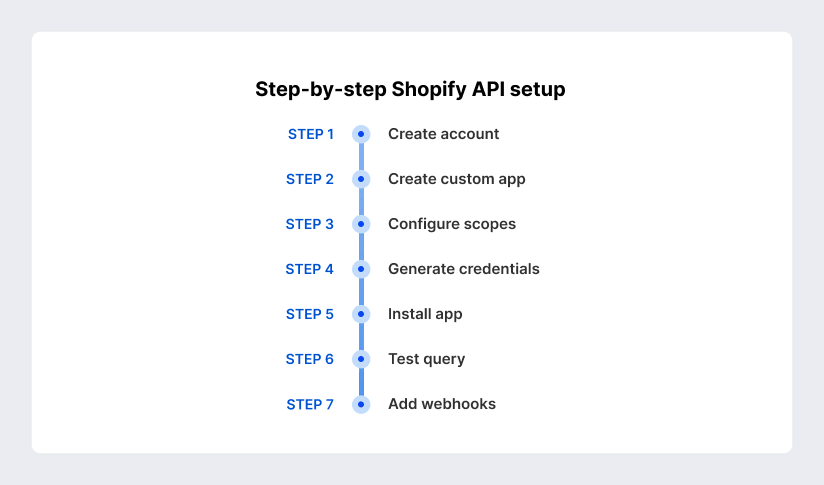
Create a Shopify partner account
| If you are building apps for clients, planning to work across multiple stores, or operating as an agency or software vendor, starting with the Shopify Partner Program still makes sense. Shopify’s partner pages position it as the entry point for building apps, storefronts, and services, and the Dev Dashboard plus partner tools are built around that model. |
| At the same time, Shopify’s newer Dev Dashboard docs make clear that a Partner account is not the only path anymore. You can also work from a merchant organization if you have developer permissions. In other words, use a Partner account when your operating model is partner-driven, and use organization permissions when your work is internal. |
Create and configure a custom app
| For modern custom integrations, Shopify now points teams to the Dev Dashboard. You create the app, define a version, set the app URL, select a Webhooks API version, choose scopes, and release that version before installation. |
| Shopify also notes that if you later add scopes in a new version, merchants still need to approve them manually. This detail matters more than it looks. A surprising number of broken integrations are really just unapproved scope changes wearing a fake moustache. |
Generate API credentials
How you get credentials depends on the app type.
| For apps developed by your own organization and installed in stores you own, Shopify supports the OAuth 2.0 client credentials grant. You copy the Client ID and Client secret from the Dev Dashboard, send a request to the store’s OAuth token endpoint, and receive an access token valid for 24 hours. You then refresh it with the same grant flow. |
| For public apps, Shopify documents the authorization code grant and token exchange flows. Shopify also recommends using its app templates and libraries where possible because they reduce implementation time and security risk. As of April 1, 2026, new public apps calling the Admin API must use expiring offline access tokens, which means token refresh should be part of your system design from day one, not a later hardening step. |
Install and test the integration
| Installation in the Dev Dashboard is straightforward: choose the store, install the app, then authenticate before making API calls. For a first smoke test, the simplest useful call is a tiny GraphQL Admin API query, such as asking for the shop name or a few products. |
| If you are building a storefront integration, install the Headless channel and generate Storefront API tokens through the channel. Shopify also provides GraphiQL explorers and official clients to speed up basic validation. |
Common Shopify API Integration Use Cases
Let’s observe the most common and useful use cases of API integration with Shopify:
ERP and accounting synchronization
| ERP and accounting connections are one of the most valuable uses of Shopify integration because they directly affect finance, fulfillment, and reporting. Shopify’s webhook examples explicitly call out integrating order data with accounting software. |
| In real projects, this usually expands into syncing orders, refunds, tax lines, fulfillment updates, SKU mappings, and settlement states. The important principle is event-driven sync backed by periodic reconciliation, not just bulk import jobs. |
CRM and marketing automation integration
| CRM and marketing integrations are powerful, but they need more care than product or inventory sync because customer and order data can be protected. Shopify states that protected customer data requires explicit approval and that unapproved fields are redacted on non-development stores. |
| Consent also matters on the storefront side, where the Customer Privacy API and Storefront API visitor consent context help keep analytics and marketing flows aligned with regional privacy rules. |
Inventory and order management systems
| This is where webhooks earn their keep. Inventory and order systems need quick, reliable signals when stock changes, orders are created, refunds happen, or fulfillment states move. |
| Shopify explicitly lists inventory notices and shipping-company notifications as webhook use cases. In practice, an OMS integration usually combines GraphQL Admin reads and writes with event subscriptions and duplicate-event protection. |
Headless commerce and custom front ends
| If you want full control over the front-end experience, Shopify gives you several headless paths. The Storefront API powers the data layer, while Hydrogen offers Shopify’s opinionated React-based path, and the Headless channel gives you a central place to manage Storefront API access tokens and storefront permissions. |
| Shopify also exposes sitemap data through the Storefront API for search engine optimization, which is one of those small details that becomes a large headache if you ignore it early. |
Mobile app integration
| Shopify explicitly says the Storefront API can power buyer experiences on apps as well as the web. Public Storefront tokens can be used in browser or mobile contexts, while customer-authenticated experiences can be built through the Customer Account API using OAuth 2.0 with PKCE. |
| The result is that mobile commerce on Shopify no longer means “some copies of web pages inside an app.” It can be a first-class, API-driven experience. |
Authentication and Security Best Practices
How to integrate the API with Shopify effectively and securely:
For public apps, OAuth is not an optional decoration. It is the basis of secure installation and authorization. Shopify documents the authorization code grant for installing apps and acquiring access tokens, and it documents token exchange as the recommended way for apps in App Home to acquire an access token from a session token. The current security trend is clear: shorter-lived tokens, explicit refresh, and less reliance on long-lived credentials sitting quietly in databases for years.
Every GraphQL Admin API request requires a valid Shopify access token, normally passed in the X-Shopify-Access-Token header unless you are using an official client library that handles that for you. Shopify also notes that public and custom apps created in the Dev Dashboard generate tokens using OAuth, while custom apps created in the Shopify admin are authenticated in the admin. If you are building an internal app with the client credentials grant, remember the main rule: this flow is only available for apps developed by your own organization and installed in stores you own.
Shopify cautions that the client secret is sensitive information and must not be exposed in front-end code or repositories. If it is compromised, rotate it immediately. For client credentials grants, tokens expire after 24 hours. For expiring offline tokens, Shopify says the refresh token expires after 90 days if unused, and the merchant will need to relaunch the app if that refresh token expires.
Data protection on Shopify is not just a legal side note. It is built into the platform model. Protected customer data requires approval; unapproved fields are redacted, and public apps request access through the Partner Dashboard. For App Store apps, Shopify also requires mandatory compliance webhooks such as customers/data_request, customers/redact, and shop/redact. On the storefront side, consent can be checked and set through the Customer Privacy API, and visitor consent can now be encoded directly into Storefront API checkout flows through @inContext(visitorConsent: …).
Performance Optimization for Shopify API Integration
Here you can get a few tips on how to optimize performance effectively:
Handling rate limits efficiently
- Rate limits are not punishment. They are traffic rules. Shopify uses a leaky bucket model, and the exact rules vary by API. GraphQL Admin API uses calculated query cost with plan-based restore rates, while REST Admin API relies on request counts and response headers to reflect current usage.
- From a software engineering perspective, this is less about limits and more about control. Shopify’s own guidance is refreshingly practical: queue work, smooth request bursts, catch throttling errors, and use usage metadata from responses to adapt dynamically.
- In enterprise software environments — especially those running in the cloud with distributed workloads — this becomes critical. Whether you are integrating back-end systems, embedded services, or external platforms, efficient rate limit handling is what keeps systems stable under load.
Caching and data minimization
- Shopify’s limits documentation explicitly recommends caching frequently used data and requesting only the data your app actually needs. It also recommends webhooks over continuous polling for events.
- So the winning formula is simple: use APIs for the current truth, use webhooks for change detection, and cache everything that is expensive but not instantly perishable.
Using GraphQL for performance
- GraphQL is often faster, not because the network is magically quicker, but because you stop asking for nonsense you do not need. Shopify’s GraphQL docs explain that queries go to a single endpoint and that you specify the fields you want. Connections let you walk relationships in one query instead of daisy-chaining multiple REST requests.
- The Storefront API also supports @defer in developer preview, which shows the platform continuing to push toward more flexible, performance-aware response patterns.
REST vs GraphQL APIs in Shopify
| Aspect | REST in Shopify | GraphQL in Shopify | What this means in practice |
| Current status | REST Admin API is legacy | GraphQL Admin API is the recommended path | New integrations should start with GraphQL |
| Data model | Fixed resource endpoints | Single endpoint with field-level selection | GraphQL usually reduces round-trips and over-fetching |
| Limits | 40 requests per app per store per minute, replenished at 2 req/s, 10x for Plus | Calculated query cost with plan-based restore rates | REST is easy to count; GraphQL is better for batching rich data |
| Error handling | Uses HTTP status codes and headers like Retry-After | Can return 200 OK with errors or userErrors | Your error parser must match the API style |
| Best fit today | Legacy maintenance and transitional cases | New builds, complex reads, modern apps | If you are choosing from scratch, choose GraphQL |
Key differences
REST gives you predefined resources and endpoints. GraphQL lets you ask for exactly the shape of data you want. In Shopify’s ecosystem, that difference matters because ecommerce data is highly connected.
When to use REST
Use REST when you are maintaining an older integration, working through a phased migration, or dealing with a specific legacy dependency that has not yet been fully replaced in your own system.
When to use GraphQL
Use GraphQL for new projects, especially when you need fewer round trips, richer resource traversal, better batching, or future-aligned platform support. That includes most ERP, CRM, OMS, analytics, custom admin, and headless use cases.
Best Practices for Shopify API Integration
Building a reliable Shopify integration requires more than just connecting endpoints — it demands thoughtful handling of errors, versioning, and system visibility.
Error handling and monitoring
A mature Shopify integration assumes things will occasionally go wrong and plans accordingly. GraphQL mutations can return userErrors, Storefront responses can contain structured error details, REST returns status codes and retry headers, and webhooks can arrive twice or out of order. Shopify’s own Dev Dashboard now gives teams logs and health metrics for each app, and in early 2026, Shopify expanded webhook history and filtering in monitoring. That is useful, but it is not a substitute for your own application logging and alerts.
Versioning and maintenance
Shopify versioning is predictable, which is great news if you actually use it. New versions ship every quarter. Stable versions are supported for at least 12 months. Unsupported versions fall back to the oldest supported stable version. That sounds comforting until you realize it can hide breaking assumptions if you never test against current versions. The right habit is simple: pin versions, track changelog items, and schedule upgrades as normal maintenance work instead of emergency archaeology.
Logging and observability
Logging should answer three questions fast: what happened, where did it happen, and can we replay or recover it? Shopify’s webhook headers already give you useful identifiers such as topic, store domain, webhook ID, event ID, trigger time, and API version. Combine those with your own request IDs, queue IDs, and retry counts, and debugging gets much easier. Shopify’s recent Dev Dashboard improvements help, but the strongest setups still add end-to-end traces across webhook intake, queue processing, API calls, and downstream syncs.
Challenges and Limitations
Even the most carefully designed Shopify integrations run into constraints, making it essential to understand where and why limitations appear.
Rate limits and throttling
Even well-built integrations can be throttled if they burst too hard or fetch too much data too often. On REST, the math is obvious. On GraphQL, the pain is subtler because the cost depends on the query shape. The fix is rarely “buy more hardware.” Usually, it is “refactor the data flow.” Smaller queries, queuing, caching, backoff, and webhook-driven updates solve far more throttling problems than brute force.
Data consistency issues
Shopify itself warns that webhook ordering is not guaranteed and that duplicate events can occur. So if your integration assumes clean chronological delivery, it will eventually surprise you at 3 a.m. The right pattern is to use timestamps, event IDs, and reconciliation jobs. Near-real-time sync is wonderful, but eventual correctness still needs design.
Security risks
The main security risks are predictable: leaked secrets, over-broad scopes, sloppy token storage, unapproved protected customer data access, and client-side exposure of credentials that belong on the server. Shopify’s docs repeatedly caution against exposing secrets, stress approvals for protected customer data, and increasingly favor expiring tokens. The pattern is clear. Security is moving from “set it once” to “continuously manage it.”
Future Trends in Shopify API Ecosystem
Shopify’s API ecosystem is evolving rapidly, with clear signals pointing toward more flexible architectures, deeper automation, and greater developer control.
Headless commerce growth
Everything in Shopify’s documentation points toward continued headless growth. Shopify now documents multiple headless build options, a dedicated Headless channel, Hydrogen for React-based storefronts, and Storefront API capabilities for SEO, localization, and large-scale customer experiences.
AI-driven automation
In April 2026, Shopify released the AI Toolkit for connecting AI tools to Shopify’s documentation, API schemas, code validation, and store-management capabilities. Shopify also added Saved Catalogs in the Dev Dashboard for AI agents and is documenting broader agentic commerce primitives.
Composable commerce architecture
Shopify does not always label it “composable commerce” in the loud marketing sense, but the platform direction matches that idea. This is an inference based on Shopify’s modular surface area: Storefront API for custom front ends, Functions for back-end business logic, webhooks for eventing, Customer Account API for authenticated customer experiences, and specialized APIs for partners, privacy, and payments. The forced migration from Shopify Scripts to Functions by June 30, 2026, reinforces that modular direction.
Ready to scale? Get a custom Shopify store built for growth by SaM Solutions’ experts.
Why Choose SaM Solutions for Shopify Development Services?
SaM Solutions positions itself as a full-service Shopify development provider rather than a narrow implementation shop, which is proven by our numerous Shopify case studies, including a storefront modernization engagement that describes performance and conversion improvements for a growing international brand, VeeCollective. We provide consulting, custom development, migration, third-party integrations, UI/UX design, QA, and post-launch maintenance, which maps well to the real needs of complex Shopify integration programs.
Conclusion
If you remember only one thing, remember this: the best Shopify integrations are not the ones that make the biggest number of API calls. They are the ones that make the smallest number of smart calls, at the right time, with the right permissions, and with a design that can survive growth. That is what turns a working integration into a scalable ecommerce system.
FAQ
API integration does not automatically help or hurt SEO. The effect depends on how you build the storefront. In plain terms, a well-built integration can preserve or improve SEO, while a careless headless implementation can absolutely damage it.