Flutter vs Node.js: Key Differences


(Prefer videos? Watch a brief summary of this article below.)
Key Facts
- Flutter is a frontend framework for cross-platform application interfaces.
- Node.js is a backend runtime for APIs, services, middleware, and real-time workflows.
- Flutter uses Dart. Node.js uses JavaScript or TypeScript.
- Flutter is usually chosen for mobile-first products and consistent UI.
- Node.js is usually chosen for server-side logic, asynchronous operations, integrations, and cloud deployment.
- Flutter and Node.js are often better together than apart.
Here’s the thing nobody says clearly enough: Flutter and Node.js don’t compete. One paints the screen; the other runs the server. If your team is arguing about which to pick, you’re probably asking the wrong question — because most production applications need both.
What actually matters is sequencing and fit. Which layer is the bottleneck right now? Where does your team’s skill concentrate? Is the product mostly UI-driven, or is the backend the hard part? Answer those, and the technology choice more or less answers itself.
What Is Flutter?
Flutter is Google’s open-source UI framework. Write once in Dart, ship to Android, iOS, web, Windows, macOS, and Linux — with a single codebase and consistent rendering across all of them.
How Flutter works
Flutter applications are built from widgets. A button is a widget. A screen is a widget. Menus, forms, layouts, animations, and themes are all composed in the same general model.
The framework renders much of the interface itself, giving developers strong control over how the app looks and behaves across platforms.
That control is the appeal. The product does not have to look native in five slightly different ways. It can look like the brand.
Key features of Flutter
- Single codebase, six targets. One Dart project ships binaries for Android, iOS, web, Windows, macOS, and Linux. In well-structured projects, 90%+ of code is shared across all of them.
- Composable widget system. Material and Cupertino components come built in, but nothing forces you to use them. Every widget is overridable, and design systems that look nothing like platform defaults are straightforward to build.
- Hot reload. Changes to UI code appear in the running emulator in under a second. This sounds trivial until you spend a day iterating on layouts and realize how much dead time it eliminates.
Common Flutter use cases
Consumer mobile apps are where Flutter earns its reputation. It also handles branded enterprise tools well, particularly when the design system needs to diverge from iOS or Android conventions.
Kiosk and embedded UI deployments are another strong fit — Flutter gives you full control over every pixel, and that control matters in a custom hardware context.
SaM Solutions uses Flutter to help you rapidly and efficiently bring your apps to multiple platforms at a reasonable cost.
What Is Node.js?
Node.js is a server-side runtime that lets developers use JavaScript outside the browser. In business language, it powers the work that happens after a user clicks, taps, submits, pays, uploads, or refreshes.
That includes APIs, permissions, notifications, payment logic, database access, reporting, middleware, and integrations.
It is less visible than the interface. It is also where many product failures begin.
How Node.js works
Node.js uses a non-blocking, event-driven model. Instead of waiting around while one request talks to a database or external service, it can keep handling other work.
That is why it appears often in API-heavy systems, real-time dashboards, chat tools, live tracking, streaming updates, and notification services.
It is not a universal hammer. CPU-heavy processing, advanced analytics, or machine learning training may need workers, queues, or separate services. Good teams do not force one runtime to do everything.
Key features of Node.js
- Non-blocking I/O. The architectural default, not a bolted-on feature. It’s why Node.js became the obvious choice for chat services, real-time dashboards, and high-concurrency API layers in the mid-2010s.
- npm. Over two million packages. Whatever you’re trying to do, someone has already written a library for it. This is both a massive productivity advantage and a supply-chain security concern worth taking seriously.
- JavaScript on both ends. Sharing validation logic, type definitions, and utility functions between frontend and backend eliminates an entire category of bugs that occur when two teams independently model the same data.
Common Node.js use cases
Node.js is common in SaaS products, ecommerce backends, payment services, real-time systems, admin portals, APIs, data pipelines, and middleware layers.
It shines when the backend has to coordinate many small conversations: mobile app to API, API to database, backend to payment provider, order service to notification engine.
Get expert help with Node.js project development. Let’s discuss the roadmap, architecture, and security.
Flutter vs Node.js: Core Differences
Flutter and Node.js are not two versions of the same idea. Flutter mainly owns the frontend. Node.js mainly owns the backend.
| Area | Flutter | Node.js |
|---|---|---|
| Main role | Builds user interfaces | Runs server-side logic |
| Output | Mobile, web, desktop, embedded apps | APIs, services, middleware |
| Language | Dart | JavaScript or TypeScript |
| Performance focus | Smooth rendering and interaction | Fast I/O, concurrency, low latency |
| Structure | Widgets, state, routing, themes | Routes, services, queues, database access |
| Scalability | One frontend across platforms | Backends scaled with containers, caching, queues, and serverless |
| Deployment | App stores, web builds, desktop packages | Cloud, servers, functions, containers |
| Best fit | Cross-platform user experience | Backend systems and integrations |
The table gives the map. The road is messier, especially when a product grows past MVP and starts collecting edge cases.
Purpose and primary use
Flutter builds what users see. Node.js builds what answers back.
Use Flutter when the interface is the commercial risk: onboarding, usability, trust, conversion, and daily engagement. Use Node.js when the risk is in the server logic: API design, integrations, permissions, data movement, and reliability.
A strong app usually needs both.
Architecture and structure
Flutter architecture is about screens, components, state management, navigation, themes, and platform channels.
Node.js architecture relates to services, routes, API contracts, authentication, queues, caching, logs, deployment, and database access.
One keeps the product understandable to people. The other keeps it dependable for systems.
Programming language
Flutter uses Dart, which is readable and built with UI development in mind. It is not hard to learn, but many teams need ramp-up time.
Node.js uses JavaScript or TypeScript. That can be a hiring advantage, especially for companies already invested in web development.
Still, a shared language does not erase the difference between frontend and backend engineering. Security, asynchronous flows, database design, and production monitoring are separate skills.
Performance and speed
Flutter performance is judged by touch: scrolling, screen transitions, gestures, animation, and perceived smoothness.
Node.js performance is judged by flow: requests handled, events processed, latency controlled, APIs kept responsive under load.
If the task is CPU-heavy, Node.js may need help. If the interface is poorly structured, Flutter can also disappoint. Tools do not rescue weak architecture.
Scalability
Flutter scalability means the same frontend can grow across platforms, roles, screens, and product versions without splitting into several codebases.
Node.js scalability means the backend can absorb more traffic, users, integrations, and data. Teams may use clustering, caches, queues, microservices, containers, and serverless deployment.
The word is the same. The pressure is not.
Development experience
Flutter gives quick visual feedback. That is useful when stakeholders need to react to what they can see, not a ticket description.
Node.js gives quick backend feedback. APIs can be built, tested, changed, and deployed in short loops.
One speeds up product feel. The other speeds up system behavior.
Ecosystem and libraries
Flutter has packages for UI components, device features, maps, payments, charts, state management, and local storage.
Node.js has a huge ecosystem for backend development. That helps teams move quickly, but it also creates dependency risk.
Enterprise teams should review libraries for maintenance, security, licensing, and upgrade paths. Free code is not free if it becomes a liability.
Cross-platform capabilities
Flutter’s cross-platform value is direct: build a single app experience for multiple screens.
Node.js is cross-platform at the infrastructure level. It runs across operating systems and fits naturally into cloud environments, containers, and automated deployment pipelines.
Both are portable. They are just portable in different directions.
Community and market adoption
Flutter has an active community around cross-platform app development and a growing body of production experience.
Node.js benefits from the wider JavaScript world. That helps with hiring, documentation, tooling, and long-term support.
Adoption should not decide for you. But it changes the cost of talent and maintenance.
Learning curve
Flutter has a moderate learning curve: Dart, widgets, layouts, state, and platform specifics.
Node.js looks easier at first because many developers know JavaScript. Then production arrives. Error handling, async code, API security, observability, and deployment turn “easy” into “needs discipline.”
The first week is not the real test. The second year is.
Flutter vs Node.js: Pros and Cons
Flutter removes much of the duplicated frontend effort. Node.js speeds up server-side delivery. Neither should be asked to do the other’s job.
| Technology | Pros | Cons |
|---|---|---|
| Flutter | Shared UI codebase, strong visual consistency, quick prototyping, good mobile experience | Dart skills may need training, some native work remains, and the app size can be larger |
| Node.js | Fast API development, large ecosystem, real-time support, cloud-friendly deployment | CPU-heavy work needs careful design, dependencies require governance, and async code can get messy |
| Flutter and Node.js | Clean frontend-backend split, fast full-stack delivery, good fit for connected products | Requires API discipline, cross-layer testing, and shared security planning |
No stack is automatically modern. A well-chosen stack makes trade-offs visible early, before they become expensive.
Flutter vs Node.js: Use Cases Compared
Flutter wins when the interface carries the value. Node.js wins when data flow, integrations, or concurrency carry the value. Serious platforms often need both.
| Use case | Better choice | Why |
|---|---|---|
| Mobile applications | Flutter | One codebase can cover iOS and Android |
| Web applications | Depends | Flutter fits app-like UIs; Node.js fits backend logic |
| Enterprise platforms | Both | Complex systems need interfaces, APIs, permissions, and integrations |
| Real-time applications | Node.js, often with Flutter | Event-driven backends handle live updates well |
| Ecommerce solutions | Both | The storefront and transaction engine must work together |
| MVP development | Both | Flutter validates UX; Node.js validates backend logic and APIs |
Use cases are better than abstract debates. They show where the risk sits.


Flutter and Node.js Together: Can You Use Both?
Yes, and the combination is common enough that it’s become a standard stack for product companies that want mobile-first delivery without giving up backend flexibility. Flutter handles the experience; Node.js handles the infrastructure.
Typical full-stack architecture
A practical Flutter + Node.js production stack looks roughly like this:
- Flutter app (iOS, Android, web) — UI rendering, local state, encrypted local storage
- Node.js API layer (Express / Fastify / NestJS) — authentication, business logic, data aggregation, third-party integrations
- Database — PostgreSQL or MongoDB for primary storage, Redis for caching and session management
- Middleware — JWT verification, rate limiting, request validation, structured logging — all sitting in the Node.js layer
- Deployment — Flutter builds go through App Store and Play Store CI; Node.js services run in Docker containers on Kubernetes or as serverless functions for event-driven workloads
The Flutter client and Node.js server communicate over HTTPS — REST or GraphQL — with WebSockets for real-time channels. Shared TypeScript type definitions (or a shared OpenAPI schema) serve as the contract between them.
Benefits of combining Flutter and Node.js
The practical advantage is team structure. JavaScript engineers own the Node.js backend; Flutter engineers own the client. The API layer is a clean boundary — backends can ship updates without triggering an app store release, and client teams can iterate on UI without touching server deployments.
Type definitions, JSON schemas, validation rules — these mirror cleanly between Dart and TypeScript, keeping the data model coherent across the stack as the product scales.
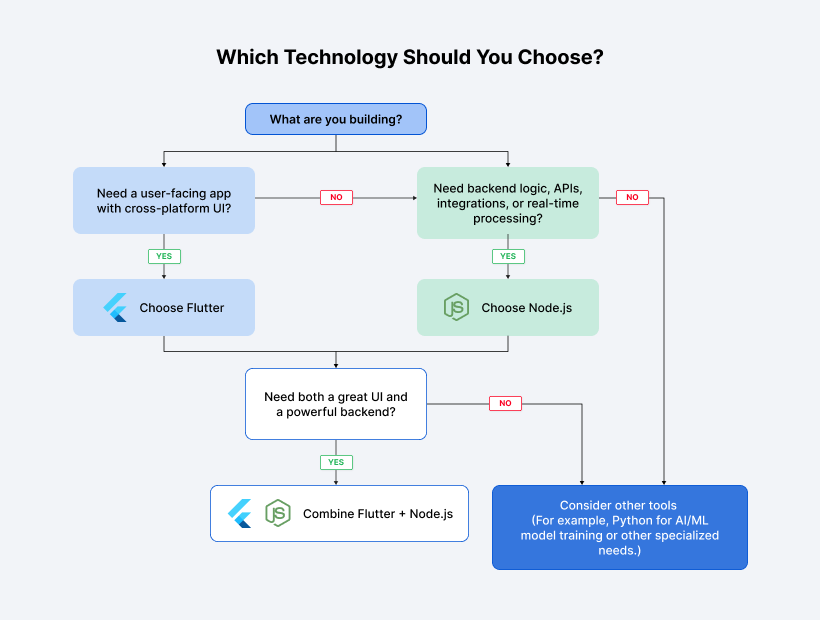
Flutter vs Node.js: Which Technology Should You Choose?
The layer you’re building determines which tool to use. That’s the short version. Here’s the longer one.
When Flutter is the better option
Flutter is the better option for mobile-first products, branded interfaces, shared frontend code, and fast cross-platform delivery.
It fits banking, retail, booking, healthcare, education, fitness, customer engagement, and field-service products.
It also helps when the business cannot justify separate native teams but still needs a polished app.
When Node.js is the better option
Node.js is the better option when the hard work happens behind the scenes.
That includes APIs, user accounts, payments, integrations, messaging, dashboards, serverless functions, data flows, and event processing.
It is especially practical for products with many concurrent users, frequent API calls, or teams already skilled in JavaScript and TypeScript.
When to combine both technologies
Combine them when the product needs both a strong client experience and a flexible backend.
That is common for marketplaces, ecommerce platforms, logistics tools, fintech apps, SaaS products, IoT platforms, and enterprise systems.
The question is not really Node.js vs Flutter. It is which layer each technology should own.
Why Choose SaM Solutions for Flutter and Node.js Development?
SaM Solutions has been building software for over 30 years, working with clients across Europe, North America, and the Middle East in logistics, healthcare, finance, retail, and manufacturing. Technology choices don’t happen in isolation — the right stack for a logistics SaaS is not the right stack for a retail consumer app, and getting that wrong at the start is expensive to unwind.
Our Flutter and Node.js teams have production deployments under their belt, not portfolio projects. When clients come to us unsure whether they need Flutter, Node.js, a combined stack, or something else entirely, we run a discovery workshop before writing code — because architecture decisions made on assumptions are the most common reason products need rewrites.
Our software engineering services include dedicated teams, staff augmentation, and fixed-scope engagements across the full delivery lifecycle.
Conclusion
Flutter and Node.js aren’t rivals. One is a frontend toolkit; the other is a backend runtime. The confusion happens because both get described as “cross-platform,” which is accurate but means completely different things. Flutter crosses device platforms. Node.js crosses server environments.
If your product needs a fast, consistent mobile UI without maintaining two native codebases, Flutter is the answer. If you need a scalable API or real-time server infrastructure, Node.js is the answer. If you need both — most products do — the question isn’t which one to pick. It’s how to structure them so they work together cleanly from day one.
FAQ
Is Flutter suitable for desktop application development?
Yes, for internal tools, dashboards, productivity apps, and kiosks. It works well when extending an existing Flutter mobile app to a desktop. For desktop-first products with deep OS integration, native plugin work may be needed.
Can Node.js be used for AI and machine learning projects?
How much does it cost to develop an app with Flutter or Node.js?
What security considerations should businesses evaluate when choosing Flutter or Node.js?