Headless Umbraco Multi-Site: Pros and Cons of Running Multiple Websites in a Single Instance


Key Takeaways
- With Headless Umbraco, multiple websites can share one content backend but keep their own designs, frontend technologies, and release schedules.
- When you reuse content and integrations, you can reduce maintenance costs and speed up launches for related brands or regional websites.
- A shared backend spreads risk: outages, performance problems, and incompatible CMS changes can affect several websites.
- One instance works best when teams share requirements and ownership. You may think about separate instances when strict isolation or independent CMS upgrades are more important.
A headless Umbraco multi-site setup can reduce duplicated content and maintenance across related websites, but it also concentrates operational risk in a shared CMS. The architecture works best when brands or regions use similar content structures and can agree on how their platform evolves.
For business leaders, the decision extends beyond hosting costs. A shared installation may help a manufacturer launch regional websites faster, yet make an independently operated subsidiary wait for a common upgrade. Understanding that exchange is essential before consolidating a digital portfolio.
Streamline your content management and power up your digital marketing with SaM Solutions’ Umbraco services.
What Is a Headless Umbraco Multi-Site Setup?
A headless Umbraco multi-site setup uses one Umbraco content management installation to supply several websites through APIs. Editors manage content centrally, while separate frontend applications control how visitors experience each website.
This article focuses on Umbraco CMS with its Content Delivery API, available in self-hosted and Umbraco Cloud deployments. Umbraco Heartcore is a separate managed headless offering; its commercial terms and operational responsibilities require their own assessment.
Here, “single instance” means one logical CMS installation and content database. That installation can run across multiple application servers, so consolidation does not necessarily mean relying on one machine.
How Does a Single-Instance Multi-Website Architecture Work?
A shared Umbraco backend stores and publishes content, while each frontend retrieves the material intended for its audience. Clear ownership of content, routing, and delivery keeps those websites distinct.
Shared content management backend
Umbraco typically represents each website with a separate root node in its content tree. These roots share the installation’s database and schema definitions, although individual websites can use different document types. A central team should therefore own changes to shared structures.
Separate frontends and delivery channels
Websites sharing an Umbraco backend can have their own frontend technology, hosting, and release process. For example, a corporate website could use Next.js while a partner portal uses another framework. Both consume Umbraco content, but their navigation, accessibility, and user journeys remain application responsibilities.
Content APIs and website routing
The Content Delivery API returns structured content rather than finished web pages. Its Start-Item header identifies a root for content operations, helping resolve identical paths across websites. Developers must map each frontend domain to the correct site context and handle redirects, canonical URLs, and sitemaps.
When Does Running Multiple Websites in One Instance Make Sense?
A shared Umbraco installation makes sense when websites have substantial common content, compatible operating requirements, and a team accountable for the whole platform. Useful candidates include:
- Regional websites sharing product information and corporate messaging.
- Related brands using common content models and integrations.
- Franchise websites with centrally managed material and local details.
Umbraco’s OG Clean Fuels case study illustrates centralized headless delivery: one environment supports a website, customer portal, and mobile app, with content available in five languages. The example shows the value of sharing information across channels that serve the same business.
What Are the Benefits of Headless Umbraco Multi-Site?
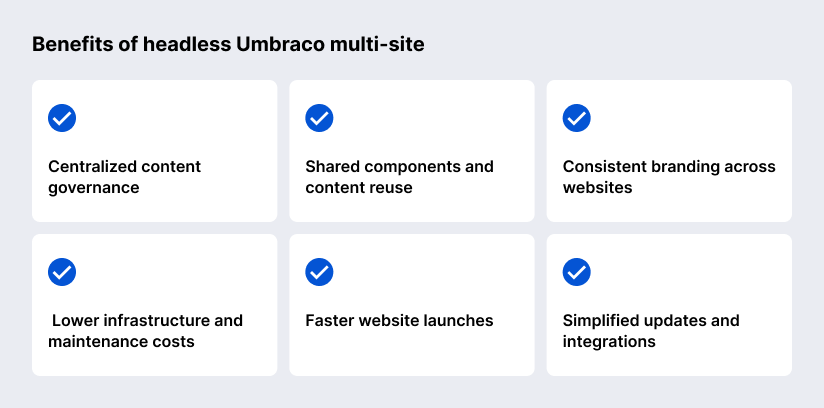
The pros of headless Umbraco include: centralized content governance, shared components and content reuse, consistent branding, lower infrastructure and maintenance costs, faster website launches, easier updates and integrations. The benefits grow when websites share meaningful requirements and teams deliberately maintain reusable assets.
Centralized content governance
A shared Umbraco backoffice gives content governance a common administrative foundation. User groups, start nodes, and granular permissions can limit which material editors access. Headquarters can control corporate information while regional teams manage local pages, provided ownership and approval rules are defined.
Shared components and content reuse
Reusable Umbraco content models let several websites reference the same approved information. A manufacturer could maintain one equipment description and reuse it across regional catalogs. Frontend components can also be shared through a component library, although that requires separate engineering and does not happen automatically through Umbraco.
Consistent branding across websites
A shared Umbraco content model helps keep brand images and messaging consistent/standardized across websites. A shared frontend design system keeps fonts and page elements looking and working as intended. At the same time, it allows changes for local markets. Before letting local teams make changes, decide which choices must stay with the brand team.
Lower infrastructure and maintenance costs
When you consolidate websites via headless Umbraco multi-site, you naturally reduce the number of CMS installs that you need to host, monitor, patch and backup. Savings depend on capacity requirements and support workload. Include separate costs for frontend hosting, commercial add-ons, regression testing and resilience measures when considering total ownership costs.
Faster website launches
A new Umbraco website can reuse established content models, integrations, and editorial conventions. For a regional rollout, much of the remaining work may concern localization, domain setup, content preparation, and frontend configuration. The advantage diminishes when the new website requires fundamentally different workflows or functionality.
Simplified updates and integrations
A shared Umbraco backend can reduce duplicated integration development. For example, one maintained connection to a product information management system can supply several brand websites. Keep source ownership explicit: Umbraco can manage editorial descriptions while commerce and ERP systems retain responsibility for transactions and operational data.
What Are the Drawbacks of Using a Single Instance?
A single installation means shared points of failure, performance and scalability limitations, more complex permissions and editorial workflows, deployment dependencies, limited technology autonomy, and the increasing architectural complexity. As you see, headless delivery separates presentation, but it does not remove those backend dependencies.


How Does a Single Instance Compare With Separate Umbraco Instances?
A single instance favors coordinated reuse. Separate instances give greater operational independence. The comparison assumes separate installations have appropriately separated infrastructure and access controls.
| Consideration | Single shared instance | Separate instances |
|---|---|---|
| Content management | One backoffice and shared repository | Separate repositories; sharing needs integration |
| CMS upgrades | Coordinated across websites | Scheduled independently |
| Frontend releases | Can remain independent | Can remain independent |
| Scaling | Shared backend capacity | Capacity allocated per installation |
| Fault isolation | Shared backend incidents affect several sites | Better containment with isolated dependencies |
| Customization | Must coexist with shared dependencies | Greater backend freedom |
| Maintenance | Fewer CMS installations to operate | More installations; automation can reduce effort |
Separate instances can still reuse code. Umbraco Cloud Baselines allow projects to inherit common components and receive shared updates; Umbraco’s multisite guidance recommends considering Baselines on Cloud. This provides a practical alternative when reuse matters but a shared database is undesirable.
“Before recommending one Umbraco instance, I’d look at what the websites actually share. Similar content models and integrations give you a useful foundation. If every brand needs exceptions, however, the time spent coordinating changes can eat into the savings you expected.”
— Vadim Birkos, Senior Full-Stack .NET and Sitecore Developer at SaM Solutions
What Security and Data Isolation Risks Should Be Considered?
Multiple content roots provide organizational separation, not a complete security boundary. A shared Umbraco database and administrative environment require explicit controls wherever brands or business units need restricted access.
Backoffice permissions and API authorization solve different problems. Umbraco’s enabled Delivery API is publicly accessible by default unless configured otherwise. Consequently, a frontend’s site filter should not be treated as enforced tenancy isolation, meaning separation of each site’s data and access. Test cross-site content requests directly, and protect preview credentials on the server.
Isolation reviews should cover media URLs, search indexes, logs, backups, and integration credentials as well as pages. Where contractual requirements demand stronger separation, assess separate databases and infrastructure. In ecommerce deployments, keep sensitive customer and payment information in systems designed and governed for those records.
How Can Performance and Scalability Be Managed?
Performance depends on efficient API queries, appropriate caching, and capacity matched to measured workloads. Independent frontend hosting and load balancing can expand delivery capacity, while the shared CMS database and storage still require monitoring and capacity planning.
Caching can materially change backend demand. As an illustrative calculation, if an edge cache serves 95% of 1,000 eligible content requests per second without contacting the origin, 50 requests reach the CMS. That calculation excludes revalidation and other workloads; it is not an Umbraco benchmark.
Load tests should include cold caches, publishing activity, and overlapping campaigns. Umbraco’s Delivery API documentation specifically cautions against hiding slow uncached queries behind caching. Fix expensive queries and content structures before treating extra servers as the answer.
What Are the Best Practices for Headless Umbraco Multi-Site Architecture?
To create a reliable multi-site architecture with Umbraco, you should define clear content boundaries, design reusable content models, separate frontend deployments, plan caching and API delivery, establish governance and access controls, and finally monitor each website independently.
Define clear content boundaries
Give every website an identifiable root and distinguish local content from genuinely shared records. Define who can change shared information and which websites consume it. Avoid cross-site references that make a brand difficult to migrate or retire later.
Design reusable content models
Share models when their meaning and lifecycle match across websites. A common office-address model may work well; distinct regional pricing rules may not. For localization, define language variants, fallback behavior, translation ownership, and which fields must remain market-specific.
Separate frontend deployments
Give each frontend its own release pipeline, rollback process, and compatibility checks. A visual update should not require deploying every website. Coordinate shared API changes through an agreed transition period so existing consumers continue working during migration.
Plan caching and API delivery
Make sure that cache rules distinguish website, language, and other response-changing inputs. Keep preview and personalized responses out of shared public caches, and define how publication invalidates stale material. CMS output caching and external CDN caches need coordinated policies.
Establish governance and access controls
Assign ownership of the platform, limit administrative access and review access when roles change. Document who is responsible for approval of global and local content. More complex approval processes may require Umbraco Workflow or other implementation, so budget for governance capabilities explicitly.
Monitor each website independently
Measure availability, API latency, errors, and cache effectiveness per website. Portfolio-wide averages can conceal a struggling brand. For ecommerce, include customer actions such as product discovery and checkout handoffs, so operational reporting reflects the experience visitors actually receive.
“Each team can have its own frontend and release schedule, but the shared CMS still ties the websites together. Rename a field that another team uses, and their site can break. SaM Solutions’ Umbraco experts track those dependencies and agree on who owns the shared models. That makes it much clearer what needs testing before a change goes live.”
— Vadim Birkos, Senior Full-Stack .NET and Sitecore Developer at SaM Solutions
How Do You Decide Whether This Architecture Is Right for Your Business?
Choose the architecture by comparing content overlap, operational ownership, and isolation requirements. Use the questions below to identify constraints before estimating savings.
| Decision question | Favors a shared instance | Favors separate instances |
|---|---|---|
| Do websites share content structures? | Substantial, stable overlap | Different models and workflows |
| Who controls the CMS roadmap? | One accountable platform team | Independent business-unit teams |
| Can backend releases be coordinated? | Common maintenance schedule | Incompatible release requirements |
| How strict must isolation be? | Shared environment is acceptable | Strong data or administrative separation |
| How do workloads differ? | Combined demand is manageable | One site needs dedicated capacity |
| Could brands separate later? | Long-term shared ownership | Likely divestiture or supplier changes |
Validate the decision with two representative websites, including the more demanding one. Compare three-year hosting, engineering, support, and migration costs, then test publishing and recovery scenarios. A small hosting saving should not outweigh an unacceptable outage or governance constraint.
What Is the Final Verdict on Running Multiple Websites in One Instance?
Headless Umbraco multi-site is a good option for related websites that benefit from shared content and shared ownership of the platform. When independent upgrade schedules, strict isolation or divergent requirements dominate the business case, it becomes less appealing.
Turn to SaM Solutions if you need to assess Umbraco architecture, develop integrations, migrate to Umbraco from another CMS, or maintain your platforms. Our Umbraco development services connect CMS engineering with frontend delivery and customer experience requirements. Start with an assessment of your website portfolio to establish where consolidation will create practical value.
FAQ
Can an existing standalone Umbraco website be migrated into a shared instance?
Yes, you can do it. You need to reconcile CMS versions, document types, packages, content references, and integrations. You also need to preserve URLs or provide redirects, test permissions, and rehearse the transfer. A complex website may need refactoring before it can coexist safely with other sites.
How does a single instance affect Umbraco licensing costs?
Can each website use a different domain and SSL certificate?