How to Create a Shopify Store: Step-by-Step Guide


In a Nutshell:
- Time estimate. A small store based on a ready-made theme may take two to four weeks. A custom store with migration and integrations can take three months or more.
- Shopify and coding. You can use Shopify without coding, but custom design, complex workflows, and connections to business systems usually need developers.
- Review. A store is not ready when the home page is finished. Inventory, taxes, checkout, fulfillment, notifications, analytics, SEO, and mobile use all need review.
- First release. The best first release is the simplest store that meets current needs and leaves room to grow.
What is Shopify? Shopify is a hosted ecommerce platform with the software, hosting, checkout, and administration tools needed to sell online. Learning how to create a Shopify store means turning a business plan, catalog, and brand into a reliable shopping experience.
What Is Required to Create a Shopify Store?
How to build a store on Shopify? You need a clear business model, sale-ready products, organized catalog data, brand assets, operating rules, a domain, and a Shopify account. You should also know where you will sell, how customers will pay, how orders will reach them, and who will manage the store after launch.
Define the target customers, markets, sales channels, currency, pricing, discounts, returns, and support process before choosing apps or a theme. Decide whether you will sell to consumers, companies, or both. The team should also agree on who may edit products, publish changes, view customer data, and issue refunds.
Prepare privacy, shipping, refund, contact, and terms-of-service pages. The merchant remains responsible for legal and tax compliance. Seek qualified local advice where needed.
Define the target customers, markets, sales channels, currency, pricing, discounts, returns, and support process before choosing apps or a theme. Decide whether you will sell to consumers, companies, or both. The team should also agree on who may edit products, publish changes, view customer data, and issue refunds.
Prepare privacy, shipping, refund, contact, and terms-of-service pages. The merchant remains responsible for legal and tax compliance. Seek qualified local advice where needed.
Prepare the logo, colors, type choices, product photography, and simple brand guidelines. Product copy, buttons, and emails should sound consistent. Include mobile-friendly images as well.
What Are the Main Steps in Shopify Store Creation?
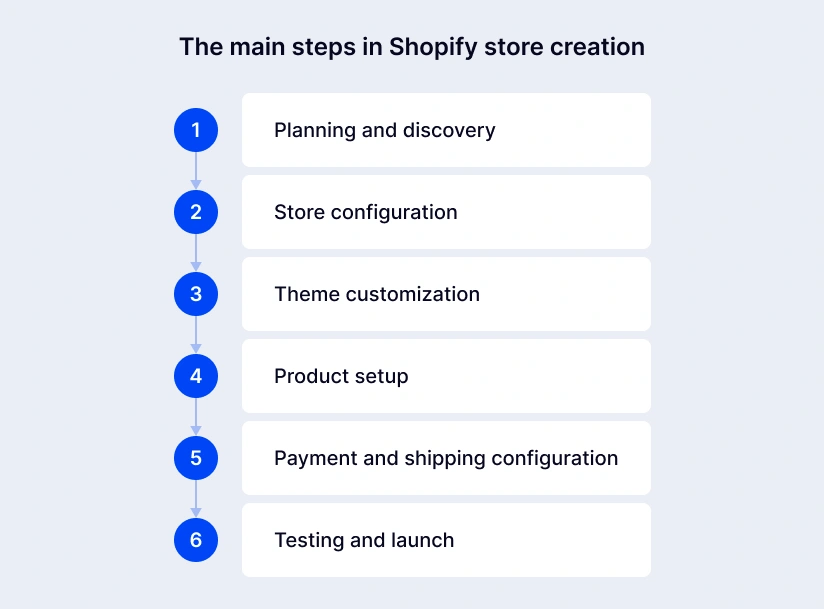
The main steps are planning, store configuration, theme customization, product setup, payment and shipping configuration, and testing before launch. This order keeps the project practical. Each stage provides the decisions or content needed for the next one. These steps give a comprehensive overview of how to create an online store with Shopify:
Planning and discovery
List the audiences, products, markets, features, integrations, content, and goals. Map the route from the landing page to product, cart, checkout, confirmation, and delivery. Separate launch needs from ideas that can wait.
Store configuration
Create the Shopify account and add the business name, address, currency, time zone, and contact details. Choose a plan that fits the required reports, user access, markets, and features. Pricing varies by country, so check the current Shopify pricing page. Then configure checkout preferences, policies, staff permissions, notifications, and basic customer settings.
Theme customization
A theme controls the storefront’s layout and visual behavior. Check whether a supported free or paid theme can handle the real catalog, filters, content, and promotions. Customize its colors, typography, navigation, page sections, product cards, cart, and footer. Preview everything with real content on both phones and computers.
Product setup
Add or import products and check every important field. Connect variants, enter inventory, assign collections, and add page titles and metadata. Descriptions should explain what the item is for, what is included, and how it is used.
Payment and shipping configuration
Choose payment methods that customers in the target market know and trust. Confirm availability, fees, currency support, payouts, fraud controls, and refunds. For shipping, define zones, rates, delivery estimates, package sizes, pickup options, and carrier or warehouse connections. The checkout promise must match what the fulfillment team can deliver.
Testing and launch
Test the store like a customer. Browse, search, use discounts, create an account, place successful and failed orders, and check taxes, shipping, emails, inventory, and analytics. Shopify recommends testing transactions, refunds, cancellations, and fulfillment before opening.
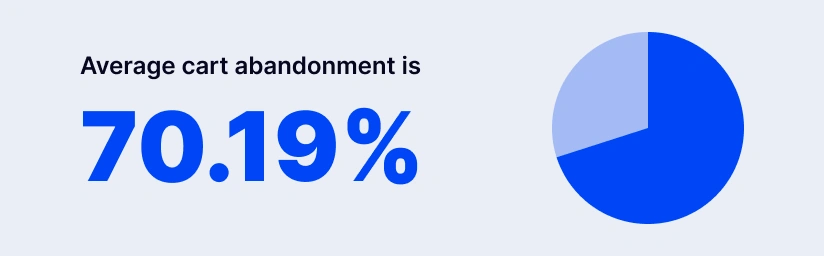
Thorough testing protects conversions. Baymard Institute’s long-running research puts average cart abandonment at 70.19%. Not every abandoned cart can be recovered, but hidden costs, broken payment options, or a confusing flow give ready-to-buy customers an avoidable reason to leave.
Which Shopify Features Should Be Configured Before Launch?
Before launch, every Shopify store should configure payments, checkout, taxes, shipping, the domain, customer accounts, inventory, notifications, and analytics. Exact settings vary by market and business model. But none of these areas should remain on an unreviewed default.
| Shopify feature | Purpose | Typical configuration tasks |
|---|---|---|
| Payments | Enable secure transactions | Activate gateways, connect payouts, review fees and fraud controls, and run tests |
| Checkout | Turn a cart into an order | Review contact fields, delivery options, discounts, consent, and order status pages |
| Taxes | Apply the right tax treatment | Add regions and registrations; review categories, exemptions, duties, and calculations |
| Shipping | Calculate delivery costs and options | Create zones and profiles, define rates, connect carriers, and configure pickup |
| Domain | Provide a branded web address | Buy or connect a domain, update DNS, set the primary version, and verify SSL |
| Customer accounts | Support sign-in and self-service | Choose login options, review account pages, permissions, and privacy settings |
| Inventory | Keep available stock accurate | Add locations, quantities, stock rules, and warehouse or ERP connections |
| Notifications | Keep customers and staff informed | Customize order, shipping, refund, account, and abandoned-checkout messages |
| Analytics | Measure traffic, sales, and conversions | Configure reports, connect GA4 or other tools, and test important events |
Payments
Activate payment methods only after confirming eligibility, currencies, fees, settlement time, disputes, and refunds. Offer the options your market expects rather than every available logo. Shopify is Level 1 PCI DSS compliant, and its stores are PCI compliant by default. Merchants must still protect staff accounts and assess connected apps.
Taxes
Add the regions where the business is registered to collect tax, then review product categories, shipping charges, exemptions, and cross-border duties. Automated calculations reduce manual work but do not decide where a company has tax obligations. Ask an accountant to confirm the setup when selling across jurisdictions.
Shipping
Create zones for the places you serve and define rates by weight, order value, carrier quote, or another suitable rule. Test heavy, oversized, discounted, and multi-location baskets. If Shopify connects to a warehouse or logistics provider, verify that orders, addresses, tracking, cancellations, and stock updates move correctly.
Domains
A custom domain replaces the temporary Shopify address with a recognizable branded address. Connect it, choose the primary version, verify DNS, and check the SSL certificate. During migration, retain valuable URLs where possible and redirect changed addresses to the closest relevant new page. Shopify includes URL redirects in its migration guidance.
Customer accounts
Accounts let buyers view orders, manage details, and use self-service features. Decide whether sign-in is optional or central to the journey, and do not force registration without a business reason. For wholesale sales, accounts may represent companies with several locations, buyers, catalogs, payment terms, and tax settings; Shopify outlines these elements in its B2B checklist.
When Is a Custom Shopify Store Better Than a Standard Theme?
A custom Shopify store is better when a standard theme cannot support the brand, buying journey, business rules, performance goals, or integrations without awkward workarounds. A standard theme is the wiser choice when it meets the real requirements, and fast launch, lower cost, and simple maintenance matter most.
Custom design makes sense when visual identity drives the sale, the catalog needs an unusual way to explore products, or research shows that standard layouts do not serve customers well. The result should still use familiar menus, buttons, forms, and checkout cues, with clear rules for mobile use and accessibility.
Custom development can support configurators, bundles, subscriptions, quotes, approval flows, automation, or special pricing. Compare an app, a small extension, and a custom solution. Too many apps may add fees, slow the site, or create overlapping data.
Integrations connect Shopify with ERP, CRM, product information management, warehouse, marketplace, and marketing systems. Before coding, decide which system owns each field, how often data moves, and what happens when a record fails. Clear rules prevent small data differences from turning into daily manual work.
How Long Does Shopify Store Development Take?
Shopify development commonly takes two to four weeks for a small theme-based store, six to twelve weeks for a professionally branded build, and three to six months or more for a complex Shopify migration, customization, or integration work. These are planning ranges rather than promises; content readiness, approvals, catalog quality, and testing often control the calendar.
| Project type | Typical planning range | Common scope |
|---|---|---|
| Small theme-based store | 2-4 weeks | Prepared catalog, light branding, standard payments, and shipping |
| Branded professional store | 6-12 weeks | Deeper theme work, apps, analytics, SEO, and structured QA |
| Custom or integration-heavy store | 3-6+ months | Custom UX, migration, business-system connections, and several markets |
The plan should include photography, data cleanup, legal review, payment-provider approval, warehouse preparation, and stakeholder feedback. These are project tasks, not last-minute extras.
What Factors Determine the Cost of Shopify Store Development?
Shopify development cost is determined mainly by store size, design originality, functionality, integrations, migration, localization, and testing. The subscription is only one budget item; themes, apps, content, transaction fees, development, and ongoing support also count.
| Cost factor | Lower development effort | Higher development effort |
|---|---|---|
| Store size | Small, clean catalog | Large multi-category catalog with complex variants |
| Design | Standard theme | Fully custom UI and UX |
| Functionality | Native Shopify features | Custom apps, configurators, and workflows |
| Integrations | None or basic | ERP, CRM, PIM, WMS, marketplaces, and payment systems |
| Data migration | Clean product import | Products, customers, orders, content, and redirects |
| Localization | One market | Several languages, currencies, taxes, and regional catalogs |
| Quality assurance | Standard checkout checks | Devices, markets, integrations, security, and regression testing |
Ask vendors to state their assumptions. “Shopify store” might mean 20 prepared products in a standard theme or an international platform connected to five systems. A useful estimate defines pages, data volumes, integrations, responsibilities, acceptance criteria, and post-launch support.
What Mistakes Delay a Shopify Store Launch?
The mistakes most likely to delay a Shopify launch are poor catalog preparation, incomplete SEO, incorrect payment configuration, and missing quality assurance. They often appear late because the storefront can look complete while its data and operational flows are not ready.
Poor catalog preparation
Missing images, duplicate SKUs, unclear variants, and incorrect weights affect design, filters, inventory, tax, shipping, and search. Give the catalog an owner, template, validation rules, and deadline. For migration, test a sample first; Shopify advises importing products before customers and historical orders so records can be linked correctly.
Incomplete SEO setup
Important pages need clear titles, useful copy, sensible headings, relevant keywords, descriptive metadata, internal links, and readable URLs. Also check image alt text, mobile use, speed, analytics, and the sitemap. During migration, map old URLs to new ones and add permanent redirects, or established traffic may reach error pages.
Incorrect payment configuration
A method may look active while live credentials, currencies, payouts, or fraud settings remain wrong. Test approved and declined transactions, discounts, taxes, shipping, emails, refunds, and accounting data. Confirm that each provider supports the target market and product type.
Missing quality assurance
Test phones, browsers, keyboard navigation, links, forms, search, filters, cart changes, accounts, emails, integrations, and analytics. Include awkward cases: an out-of-stock item, an invalid address, a failed payment, or a partial refund. Record defects, assign owners, and retest corrections before launch approval.
Ready to scale? Get a custom Shopify store built for growth by SaM Solutions’ experts.
In-House Shopify Store Development vs. Software Development Company
In-house development is often better when a company already has Shopify specialists and expects continuous product work; a software development company is usually stronger for a time-bound launch, migration, specialist integration, or rapid access to a complete team. A hybrid model can combine internal business knowledge with external design, development, and QA capacity.
| Decision area | In-house team | Software development company |
|---|---|---|
| Business knowledge | Deepens over time | Built through discovery and stakeholder work |
| Skills | Limited to current hires | Can combine analysis, UX, engineering, QA, and integration skills |
| Start time | Hiring may take months | An established team can often begin sooner |
| Control | Direct daily management | Managed through scope, demos, governance, and acceptance criteria |
| Cost | Salaries, benefits, tools, and management | Project, dedicated-team, or time-and-materials fees |
| Best fit | Continuous ownership and change | Launches, migrations, complex builds, and temporary capacity |
In either model, appoint an internal product owner who can answer business questions and approve priorities.
Why Choose SaM Solutions for Shopify Development?
SaM Solutions is a strong fit when a Shopify project needs more than visual setup: its services cover discovery, UX, custom development, migration, integrations, testing, launch, and ongoing improvement. One delivery team can therefore address both the storefront and the business processes behind it.
SaM Solutions’ approach includes:
- Business-led discovery: defining audiences, goals, operations, and constraints before selecting technology.
- Right-sized development: using native features where they fit and adding custom themes, apps, or functions where they create value.
- Integration and migration: connecting business systems and moving products, customers, orders, and content with clear validation.
- Dedicated QA: checking the storefront, checkout, integrations, devices, and operational workflows.
- Post-launch support: monitoring, troubleshooting, updating, and improving the store as the business grows.
The aim is a maintainable sales channel that employees can run and customers can trust.


Conclusion
Creating a Shopify store successfully requires a prepared business and catalog, careful configuration, a clear customer journey, real-order testing, and an operating plan for after launch. Keep the first release focused: once payments, shipping, inventory, fulfillment, analytics, and support work reliably, the team can add new markets, automation, and conversion improvements with less risk.
FAQ
Yes, you can preserve much of an existing store’s SEO value. Although no one can guarantee unchanged rankings. Keep valuable content and metadata, map old URLs to their closest new equivalents, add permanent redirects, update internal links, submit the sitemap, and monitor traffic after launch. Products, customers, content, and orders can be moved through CSV files, apps, APIs, or custom migration tools.