How to Build a Shopify App: A Step-by-Step Guide


(If you prefer video content, please watch the concise video summary of this article below)
Key Takeaways
- Building a Shopify app starts with choosing the right distribution model, identifying a real merchant need, and defining the app’s core functionality.
- The development environment typically includes a Partner account, a development store, and a suitable technology stack such as React Router, App Bridge, Polaris, and GraphQL.
- The core development process involves configuring authentication and permissions, integrating APIs, building the user interface, testing the application, and preparing it for deployment.
- Before launch, a public app must be tested thoroughly, meet App Store requirements, and pass the review process.
- After release, successful app development continues with performance monitoring, API version updates, security, scaling, and ongoing optimization.
Shopify development extends the platform with custom functionality, from workflow automation and ERP or CRM integrations to storefront features and commercial SaaS products.
If you want to understand how to create a Shopify app successfully, you need to consider secure authentication, relevant API permissions, reliable backend processes, Shopify-compliant UI, and preparation for App Store review.
What Should You Know Before Building a Shopify App?
Before learning how to build a Shopify app, you should understand which distribution model to choose, how the Shopify ecosystem works, and how to select an application idea that addresses a real merchant need.
Public vs. custom apps
The first decision is whether the application should serve many independent merchants or a specific business. Shopify currently calls these approaches public distribution and custom distribution. Public applications can be distributed or sold to multiple merchants through the App Store, while a custom-distribution application can be installed on one store or on multiple stores belonging to the same Shopify Plus organization. Shopify also warns that the chosen distribution method cannot normally be changed later, so the business model should be decided before production development begins.
| Criterion | Public Shopify app | Custom Shopify app |
|---|---|---|
| Primary audience | Multiple independent merchants | A specific merchant or organization |
| Distribution | App Store | Installation link |
| App Store review | Required | Not required for custom distribution |
| Monetization | Suitable for SaaS and recurring app revenue | Usually project, license, or internal operating cost |
| Typical use | Marketing, analytics, subscriptions, shipping, store management | ERP integration, proprietary workflows, internal automation |
| Installation scope | Many stores | One store or stores in the same Plus organization |
One important 2026 change is that developers should not rely on older tutorials showing new custom programs being created directly inside Shopify Admin. Shopify states that new admin-created custom applications can no longer be created; new custom applications should instead be created through the Dev Dashboard or CLI. Existing admin-created applications can continue operating.
Shopify app ecosystem
Shopify provides multiple extension points, including the GraphQL Admin API, Storefront API, webhooks, Functions, App Bridge, Polaris, and UI extensions for Admin, Checkout, Customer Accounts, and POS.
Developers should choose the surface that best fits each feature rather than building everything as a traditional embedded program. Newer extensions can also reduce the need for separate backend infrastructure in some cases.
Choosing an app idea
Deciding how to make a Shopify app should start with the problem you want to solve, not with a list of technologies or features. A good idea addresses a clear merchant problem rather than duplicating crowded categories such as analytics, shipping, discounts, or SEO.
Turn clicks into customers with expert Shopify development by SaM Solutions’ team.
What Is Required to Prepare a Shopify App Development Environment?
To prepare a Shopify application development environment, you need to create a Shopify Partner account, set up a development store, and choose the right technology stack for the application.
A Partner account gives developers access to programs, development stores, tools, logs, and metrics through the Developer Dashboard. The Partner Program is free to join. For companies, it is best to create the Partner organization at the company level, assign correct team roles, and enable required two-step authentication.
A dev store provides a safe environment for testing programs without risking production data. Developers can use it to test installation, authentication, billing, APIs, extensions, webhooks, and uninstall flows. Dev stores do not process real transactions, but Shopify provides test-payment options for development and QA.
For new embedded programs, Shopify currently recommends its React Router template with App Bridge, Polaris, and GraphQL. The backend can use Node.js, Java, .NET, Python, or another suitable stack. Keep Shopify-specific integrations separate from core business logic to simplify API updates and long-term maintenance.
How to Develop a Shopify App Step By Step?
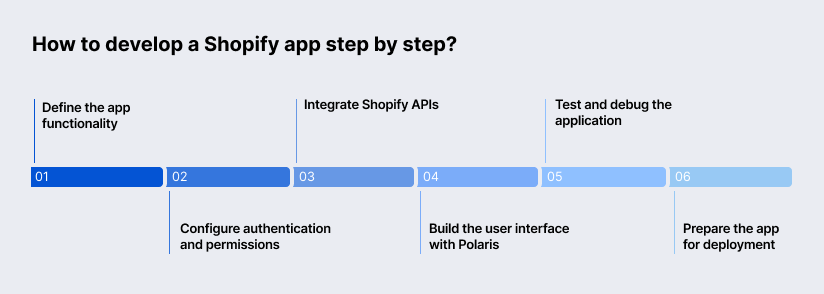
To develop a Shopify application step by step, you need to define its functionality, configure authentication and permissions, integrate APIs, build the interface with Polaris, test the program, and prepare it for deployment.
Start by defining merchant use cases, required data, triggers, integrations, and the surfaces where each feature belongs. Then reduce the idea to an MVP. Focus on the core workflow first and postpone secondary features such as advanced analytics until the main functionality is stable.
Request only the access scopes your program actually needs and use the supported authentication libraries and flows. For embedded applications, use session-token authentication, protect tokens server-side, validate requests, and avoid unnecessary access to sensitive customer data.
New public applications should use the GraphQL Admin API, as the REST Admin API is now legacy. Use the Storefront API for buyer-facing features and webhooks for event-driven updates. Process heavier synchronization tasks asynchronously to improve reliability and avoid blocking merchant workflows.
Use Polaris and App Bridge to create an interface that feels native to Shopify Admin. Follow Shopify’s components, layout patterns, and accessibility guidelines for forms, navigation, feedback, and keyboard use. A consistent UI improves usability and helps meet the quality expectations.
Test the full merchant lifecycle, including installation, authentication, permissions, billing, webhooks, API failures, large datasets, and uninstall behavior. CLI supports real-time testing in a dev store. Use the monitoring tools together with backend logs and alerts to identify and resolve issues quickly.
Use shopify app deploy for configuration and extensions, while deploying the hosted application separately. Maintain staging and production environments, secure secrets, backups, rollback procedures, and CI/CD to make releases reliable and repeatable.
What Does the Shopify App Publishing Process Include?
The Shopify application publishing process includes preparing the app for submission, meeting App Store requirements, completing final testing, submitting it for review, addressing reviewer feedback, and launching the application for merchants.


When Should You Build a Custom Shopify App Instead of Using an Existing Solution?
You should build a custom app when unique workflows, complex system integrations, demanding performance or security requirements, or long-term cost considerations make existing solutions too restrictive.
A custom application makes sense when the business process itself creates competitive value and cannot be represented cleanly by an off-the-shelf configuration. Examples include proprietary pricing workflows, complex B2B approvals, custom fulfillment routing, specialized loyalty logic, or automation involving internal business rules.
The decision should be based on the cost of the gap. When employees repeatedly export spreadsheets, re-enter information, or work around an existing application every day, a focused custom solution can eliminate operational friction while keeping functionality directly connected to Shopify.
Custom development becomes particularly valuable when Shopify must participate in a larger enterprise data architecture. ERP, CRM, PIM, WMS, marketplace, payment, and logistics integration often requires bidirectional synchronization, mapping rules, conflict resolution, retries, auditability, and business-specific orchestration rather than a simple connector.
SaM Solutions, for example, describes ecommerce integration work involving ERP, CRM, inventory, shipping, marketplaces, and other systems, supported by custom APIs and middleware. A dedicated integration layer can keep the storefront responsive while asynchronous backend processes handle complex enterprise data exchange.
A custom application is justified when the organization needs architectural control that a generic multi-tenant tool cannot provide. High-volume order processing, strict data residency, proprietary authorization, regulated information, specialized observability, or predictable scaling can all require dedicated infrastructure.
Security obligations are especially important when customer information is involved. Shopify’s protected customer data requirements emphasize data minimization, transparency, and security, while public apps must implement mandatory privacy compliance mechanisms. Architecture should therefore minimize stored personal information and isolate sensitive workflows instead of copying datasets by default.
The cheapest option depends on total cost over the expected operating period, not simply implementation price. Existing apps minimize initial development but create recurring license costs and process constraints; custom apps require greater upfront investment but provide ownership over functionality, integration logic, and scaling decisions.
| Cost factor | Existing Shopify app | Custom Shopify app |
|---|---|---|
| Initial cost | Usually low | Higher design and development investment |
| Recurring cost | Subscription and/or usage fees | Hosting, monitoring, maintenance |
| Customization | Limited to vendor options | Full control within the platform rules |
| Integration work | Prebuilt connectors where available | Can match proprietary ERP/CRM/PIM workflows |
| Vendor dependency | High | Lower at application level |
| Maintenance responsibility | Mostly vendor | Your team or outsourcing provider |
| Time to value | Usually faster | Longer initial implementation |
| Long-term fit | Best for standardized needs | Best for differentiated, stable workflows |
For straightforward requirements, existing solutions usually win. Custom development becomes economically stronger when several subscriptions can be consolidated, manual work is expensive, or business-specific integration creates enough operational value to justify ownership.
What Are the Best Practices for Successful Shopify App Development?
Successful Shopify app development requires strong security and compliance, continuous performance optimization, accessible and intuitive UX, and an architecture that can support AI-driven capabilities as the platform evolves.


Why Choose SaM Solutions for Shopify App Development?
SaM Solutions combines Shopify expertise with enterprise engineering capabilities. With 30+ years on the market, 1,000+ completed projects, 20+ Shopify experts, and 800+ IT specialists, we support custom development, integrations, QA, deployment, and maintenance. With extensive experience in the ecommerce space, we have a proven track record of delivering successful Shopify projects — including the seamless migration of the Brooklyn Soap Company’s online store.
Our expertise extends beyond Shopify to ERP, CRM, PIM, cloud, and legacy system integrations, supported by technologies such as Node.js, Java, .NET, PHP, Python, React, and Next.js. We offer flexible engagement models such as full outsourcing, dedicated teams, and staff augmentation.
Conclusion
Successful Shopify apps require careful planning, secure API integration, reliable testing, and ongoing maintenance as Shopify’s APIs and requirements evolve. Existing App Store solutions work well for standard needs, while custom development offers greater flexibility for proprietary workflows, enterprise integrations, automation, and specialized functionality.
FAQ