Spec-Driven Development with GitHub Spec Kit


Key Facts
- GitHub Spec Kit connects requirements, specifications, plans, tasks, implementation, and validation.
- A project constitution and shared artifacts align business rules, architecture, and engineering standards.
- Teams can use it for new or existing projects, supporting coordination and traceability.
- The free, MIT-licensed toolkit supports multiple agents and repository hosts; related services may cost extra.
- Specification checks complement human review, automated testing, and security assessments.
Using GitHub Spec Kit provides a structured framework for AI-assisted software engineering; however, how does one go about doing that? In this article, we will provide answers to some of the most frequently asked questions regarding this toolkit, covering everything from key concepts and workflow to compatibility, cost, and maintainability.
Spec-driven development using GitHub Spec Kit involves transforming software requirements into a chain of specifications, plans, tasks, implementations, and validations instead of using AI prompts as one-off instructions. The reason why it is important to make such a distinction lies in the fact that coding agents can generate the corresponding code rapidly; however, a lack of context along with speed may lead to increased ambiguity. GitHub’s Spec Kit helps maintain intent, architecture, expectations for testing, and business rules visible throughout the whole process.
What is spec-driven development?
Spec-driven development refers to software engineering that centers on specifications. It is a process in which the function of the software is defined before the way to develop it is decided.
With GitHub Spec Kit, specifications guide technical plans, tasks, and code validation. This systematic process eliminates any ambiguity, increases consistency, and provides traceability between business needs and the ultimate solution.
What is GitHub Spec Kit?
GitHub Spec Kit is an open source kit designed to help AI codebots develop in a systematic manner. The key workflow of GitHub Spec Kit is Specify -> Plan -> Tasks -> Implement -> Converge, which bridges the gap between requirements and implementation through various methods.
Core components and project artifacts
Spec Kit organizes development around several key artifacts:
- Project constitution: Defines engineering principles and project standards.
- spec.md: Contains feature requirements and acceptance criteria.
- plan.md: Describes architecture, dependencies, and technical realization.
- Artifacts that support: Research, data models, API contracts, and instructions for setting up.
- tasks.md: Divides development into tasks.
Other commands assist teams in defining requirements, validating consistency, and ensuring completeness of the implementation based on specifications.
“AI coding agents can generate code in seconds, but speed means little if the result doesn’t meet business requirements. Spec-driven development changes the focus from writing code faster to building the right solution. GitHub Spec Kit helps teams establish clear expectations before implementation begins, reducing misunderstandings and unnecessary rework.”
Andrey Kopanev — .NET developer, AI enthusiast
When should teams use GitHub Spec Kit?
Use GitHub Spec Kit to align AI-generated code with business requirements, plan complex features, coordinate developers or AI agents, and add functionality and consistency to existing systems. Shared specifications, plans, and tasks help teams trace requirements through implementation and testing.


How do you get started with GitHub Spec Kit?
Start with Python 3.11+, uv, and a compatible AI coding agent. Install the Specify CLI, initialize a new or existing project, define its constitution, and create your first feature specification. Clarify requirements and acceptance criteria before moving to technical planning.
Prerequisites check and select AI code writing agent
Select any one of the listed agents: GitHub Copilot, Claude Code, Gemini CLI, Codex CLI, or Cursor.
Install the Specify CLI
Install the CLI using uv:
uv tool install specify-cli
Verify the installation with specify version.
Initialize a new or existing project
For a new project with GitHub Copilot:
specify init my-project --integration copilot
cd my-project
For an existing repository:
specify init --here --force --integration <key>
Commit or stash existing changes before initialization.
Define the project constitution
Constitution should be drafted for the engineering standards, architectural principles, security policies, testing protocols, and maintenance rules.
/speckit-constitution should be used for that purpose.
Create your first feature specification
Use /speckit-specify to explain the feature’s purpose, business needs, and criteria for success.
Use /speckit-clarify to clarify any confusion and define specifications prior to technical planning.
“The biggest challenge with AI-assisted development isn’t code generation — it’s maintaining context. When multiple developers and AI agents work on the same project, requirements and architectural decisions can easily get lost. GitHub Spec Kit provides a shared foundation that keeps everyone aligned, from initial planning through implementation and validation.”
Andrey Kopanev — .NET developer, AI enthusiast
How does the GitHub Spec Kit workflow work?
GitHub Spec Kit follows Specify → Plan → Tasks → Implement → Converge: define requirements, design the solution, break it into tasks, build it, and validate the implementation against the specifications. A project constitution sets shared standards; optional clarification, checklist, and analysis steps strengthen automation and validation, while testing checks the resulting code.
| Stage | Purpose | Main result |
|---|---|---|
| Constitution | Define engineering and automation standards | constitution.md |
| Specify | Document requirements | spec.md |
| Clarify | Resolve ambiguities | Updated spec.md |
| Plan | Define technical approach | plan.md |
| Checklist | Check requirements quality, carry out validation processes | Checklists |
| Tasks | Break down development work | tasks.md |
| Analyze | Identify inconsistencies | Analysis findings |
| Implement | Execute tasks | Working code |
| Converge | Verify implementation completeness | Validated code or additional tasks |
The core workflow follows Specify → Plan → Tasks → Implement → Converge. Optional clarification and analysis steps provide additional validation.
Importantly, Spec Kit checklists assess requirements quality, while actual testing remains part of the development and CI/CD process.
“Specifications make AI-generated code more predictable, but they don’t guarantee quality. Teams still need code reviews, automated testing, and security checks. The real advantage of GitHub Spec Kit is that it makes development decisions traceable and gives engineers a clear reference for evaluating whether the final implementation actually delivers what was intended.”
Andrey Kopanev — .NET developer, AI enthusiast
What does a practical GitHub Spec Kit example look like?
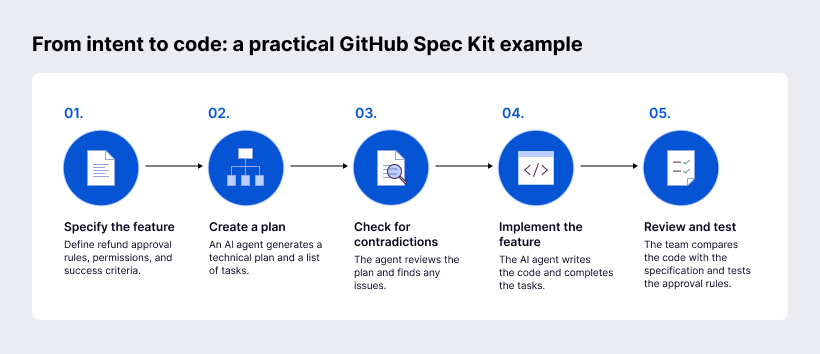
Let’s take this as an example: for an ecommerce refund approval feature, a team specifies approval thresholds, user permissions, and acceptance criteria. An AI agent creates a technical plan and tasks, checks them for contradictions, and implements the feature. The team then compares the code with the specification and tests the approval rules.
How can teams maintain quality with spec-driven development?
Treat Spec Kit items as engineering assets that need to be reviewed. Validate the specs, architecture, and tasks before implementation. Conduct the usual tests, reviews, and security assessments on the generated code.
Enforce the project standards through the constitution via the use of presets and local overrides. This will help maintain consistency, traceability, and quality without hindering the future updates of Spec Kit.
Finally, update carefully. The recommended manifest-aware path is to upgrade the CLI separately, inspect installed integrations, then run:
bash
Copy
specify integration upgrade <key>
specify extension update
According to GitHub, this path will not affect the feature specs, planning, tasks, project constitution, source code, and Git history in any way. In case any customizations have been made to managed integration files, the upgrade will recognize the changes and not overwrite them, unless it is a forced upgrade.
Final Thoughts
GitHub Spec Kit helps with structuring AI-assisted collaboration through linking the requirements, specifications, planning, tasks, and implementation. Human judgment is still needed for validation of choices and quality purposes.
FAQ
Is GitHub Spec Kit a free service? Are there any extra charges?
Yes. Spec Kit is free, open-source and MIT-licensed. Some possible extra charges may be for AI coding assistants, models, CI/CD, hosting and integrations.
Can GitHub Spec Kit be used without GitHub Copilot?
Can GitHub Spec Kit be used with repositories not hosted on GitHub?
Does GitHub Spec Kit work with other programming languages besides Python?
How can teams update GitHub Spec Kit without losing project customizations?