Umbraco Security: A Practical Guide to Protecting Your CMS


(Prefer videos? Watch a brief summary of this article below.)
Key Takeaways
- Umbraco security depends not only on the CMS core: keep the platform supported and patched, and secure its hosting, configuration, custom code, integrations, and third-party packages.
- Harden the application and infrastructure with HTTPS, security headers, CSP, WAF protection, secure secret storage, validated uploads, and protected backups.
- Make security continuous through logging, alerts, vulnerability scans, secure code testing, penetration tests, incident-response exercises, and a tested update-and-rollback process.
A secure content management system (CMS) protects far more than web pages: it safeguards customer data, brand reputation, revenue-generating digital experiences, and the continuity of online operations.
Umbraco CMS currently powers over 700,000 active websites worldwide, ranging from mid-sized businesses to Fortune 500 companies. Umbraco security provides a strong basis through built-in identity controls, configurable permissions, secure development practices, and ongoing vendor patches; however, real protection depends equally on how the CMS is configured, customized, hosted, and maintained.
Request SaM Solutions’ Umbraco implementation to speed up and optimize your content management workflows.
Is Umbraco Secure?
We can say that Umbraco CMS is one of the most secure open-source content management systems, provided that an organization runs a supported version, applies security updates in a timely manner, and puts the right controls around access, infrastructure, and custom code.
Technology executives tend to be skeptical of open-source software because they believe that the accessibility of source code makes it an easy target for hackers. However, the CVE (Common Vulnerabilities and Exposures) record of Umbraco is very low.
This content management system is based on ISO 27001-certified operational standards and automated static code analysis in release cycles. It is also backed by a dedicated Security Response Team that works with Microsoft’s .NET engineering community.
Built-in protection in Umbraco CMS
Umbraco CMS provides built-in controls for authentication, authorization, sessions, and sensitive configuration.
The shared responsibility model
Umbraco security is a shared responsibility: the CMS vendor secures and patches the product, while the organization and its development partner secure the deployed solution.
Security differences between CMS versions
Upgrading from legacy builds to modern releases like Umbraco 17 on .NET 10 fundamentally hardens your web application by eliminating obsolete runtime vulnerabilities and legacy attack surfaces.
Umbraco 13 will reach its End-of-Life (EOL) on December 14, 2026, while Umbraco 7 and 8 are already without official vendor support.
Key security enhancements in modern versions
- Identity and access control: Integration with Microsoft Entra ID (Azure AD) enables secure SSO protocols.
- Reduced attack surface: Umbraco 14+ removes legacy macros and replaces TinyMCE with TipTap.
- API and data hardening: Updated APIs separate saving from publishing, reducing unintended exposure.
- Modern .NET 10 infrastructure: TLS 1.3 support, hardened memory isolation, and non-root containerized execution in Docker or Kubernetes.

What Are the Most Common Umbraco Security Risks?
Umbraco provides authentication, authorization, file-validation, and hardening capabilities, but vulnerabilities can still emerge through legacy versions, insecure extensions, weak administrative access, custom integrations, and server misconfiguration.
| Security risk | Potential impact | Mitigation |
|---|---|---|
| Outdated Umbraco CMS versions or packages | Exploitation of known vulnerabilities, unauthorized data access, service disruption, or possible server compromise | Maintain supported versions, apply CMS and package patches promptly, and test upgrades in a staging environment |
| Weak administrator credentials | Backoffice takeover, unauthorized publishing, malicious configuration changes, and data exposure | Enforce strong password policies, MFA/2FA, SSO where appropriate, and access reviews |
| Excessive user permissions | Privilege abuse, accidental content deletion, and access to data beyond a user’s business role | Apply least-privilege roles, separate editorial and administrative duties, and audit permissions regularly |
| Vulnerable custom code and exposed endpoints | API abuse, injection risks, data leakage, or unauthorized actions through integrations | Conduct secure code reviews, test APIs, validate input, enforce authorization, and scan dependencies |
| Misconfigured servers and file access | Exposure of configuration files, credentials, uploads, backups, or administrative interfaces | Harden the hosting environment, restrict file-system permissions, protect secrets, and limit backoffice access |
Outdated CMS versions and packages
It is seldom the case that an outdated Umbraco installation is merely an inconvenience in terms of maintenance. Any vulnerabilities that have been disclosed are exploitable when security support is discontinued. For example, Umbraco’s August 2026 advisory identified four issues, including one high-severity vulnerability, but end-of-life versions 14–16 received no patch.
Weak administrator credentials
A weak or recycled backoffice password can hand an attacker control over content, user roles, customer information, and core CMS operations. Accounts are more likely to be exposed when shared across teams, when former employees retain active credentials, or when password management is inconsistent across the organization.
Excessive user permissions
Not every editor needs to access every feature, language or website. Too broad permissions make things brittle, giving users access to content and administrative functions outside their responsibilities, increasing the chance of accidental changes and the damage that can be done by compromised accounts. Strict least-privilege access is particularly important for large, multilingual, multi-brand Umbraco environments.
Vulnerable custom code and exposed endpoints
Umbraco may be secure at its core while custom extensions quietly create gaps around it. APIs, forms, plugins, and third-party connectors become liabilities when authentication, authorization, or input validation is incomplete. Integrations with PIM, ERP, CRM, payment, and identity platforms widen the attack surface further, especially when secrets are poorly stored, external input is trusted, or endpoints are exposed without a clear business need.
Misconfigured servers and file access
Much more than intended can be exposed by a poorly configured hosting environment. Overly permissive file permissions, legacy TLS configurations, publicly accessible development tools, verbose error messages, or open backoffice access can expose administrative interfaces, configuration files, backups, uploaded content and cryptographic keys. Even a secure CMS cannot compensate for an insecure server beneath it.
Which Built-In Security Features Does Umbraco Provide?
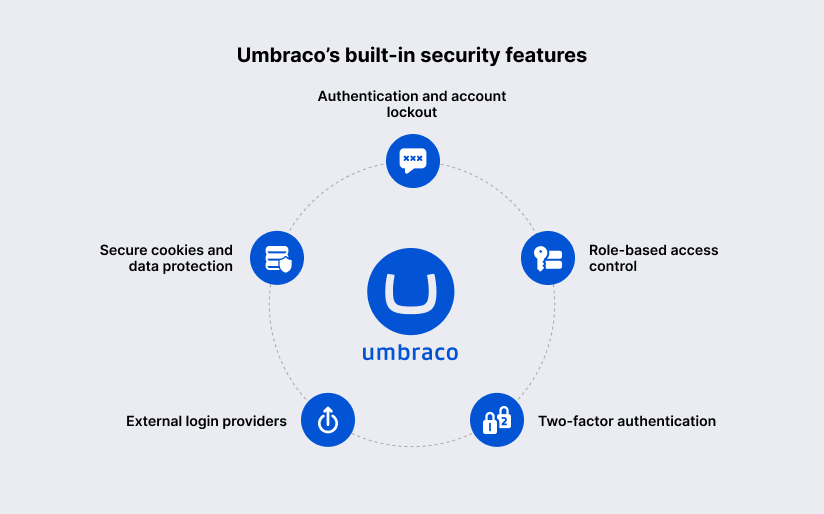
Umbraco security focuses on authentication, access control, external identity integration, cookies, and data-protection mechanisms.
Authentication and account lockout
Umbraco has separate password policies for backoffice users and website members. It can lock accounts after failed login attempts. The default lockout period is 30 days.
Role-based access control (RBAC)
Administrators can define user groups and restrict backoffice permissions to specific content areas and actions such as editing, publishing, translating or managing content.
Two-factor authentication
Umbraco offers configurable two-factor authentication for backoffice users and website members, including time-based one-time password apps like Microsoft Authenticator and Google Authenticator.
External login providers
Umbraco supports OAuth and OpenID Connect external login providers for both backoffice users and website members. Organizations can connect identity services such as Microsoft Entra ID, IdentityServer, Google, or Facebook.
Secure cookies and data protection
Umbraco uses cookies to support authenticated backoffice sessions, preview functionality, antiforgery validation, and visitor sessions.
How Should an Umbraco Installation Be Hardened?
You can do it through layered controls that limit access, protect sensitive files, encrypt traffic, and reduce the amount of information exposed to attackers.
- Restrict backoffice access: Limit /umbraco access by IP range, VPN, or an identity-aware gateway.
- Protect configuration and system files: Keep secrets, keys, backups, and configuration outside public paths; apply least-privilege file and production access.
- Enforce HTTPS: Serve all public and backoffice traffic over HTTPS and redirect HTTP requests.
- Configure security headers: Use headers that mitigate browser-based attacks and reduce technology disclosure.
- Implement a Web Application Firewall (WAF): Block malicious requests, including XSS, SQL injection, automated scans, and abusive traffic, before they reach Umbraco.
- Implement a Content Security Policy (CSP): Restrict where the browser can load scripts, styles, images, frames, and other resources.
- Disable unnecessary development features: Remove detailed errors, diagnostic endpoints, test integrations, sample content, and unused APIs from production.
How Can the Umbraco Backoffice Be Secured?
Backoffice security best practices include strong authentication, limited permissions, controlled sessions, network restrictions, and quick account removal.
Strong password policies
Set long, unique passwords for all Umbraco backoffice users, and set lockout thresholds to slow repeated attempts. Umbraco allows administrators to set password length and complexity rules separately for backoffice users and website members, and also the number of failed attempts before a user is locked out.
Least-privilege user groups
Assign each user to an Umbraco group with only the permissions that person needs to do their job. Least privilege is the practice of giving users only the minimum rights necessary to do a specific job, reducing the effects of an account compromise or human error.
Session and account lifecycle management
Limit session lifetime, and do not implement persistent login behavior unless there is a documented business requirement to do so. The secure lifecycle process should include who approves access, how long the supplier or temporary accounts are valid, and how quickly access is removed after a job change.
IP restrictions and trusted networks
If the operating model of the organization permits, restrict access to the /umbraco backoffice to approved IPs, corporate networks or users connected via VPN. Umbraco recommends restricting access to the Umbraco folder to specific IP addresses or ranges, so the administrative interface is not exposed to every internet-connected device.
Deactivating user accounts
Remove or disable Umbraco accounts for employees, contractors, agencies or temporary contributors when they don’t need access anymore. Microsoft offers helpful signals such as sign-in activity and timestamp of last attempted sign-in to help you identify accounts you don’t need.
How Can Custom Code, APIs, and Integrations Be Protected?
A secure Umbraco solution validates every request, authorizes every sensitive operation, limits browser-based attack paths, and keeps dependencies and secrets under active control.
- Input validation and output encoding: Validate all server-side input, including forms, URLs, APIs, webhooks, and uploads; encode output to prevent browser execution.
- API authentication and authorization: Authenticate non-public endpoints and authorize requests by role, tenant, content scope, and action.
- Cross-site scripting prevention: Encode output, sanitize HTML or rich text, and limit allowed browser scripts.
- Cross-site request forgery protection: Secure state-changing actions such as publishing, updates, approvals, and permission changes.
- Secure dependency and package management: Review and update Umbraco packages, NuGet libraries, JavaScript dependencies, and SDKs to reduce supply-chain risk.
- Secrets and configuration management: Store credentials and keys in a secrets-management system, separate production secrets from dev/test values, and rotate exposed credentials promptly.
How Should Umbraco Updates and Security Patches Be Handled?
Umbraco updates should follow a controlled lifecycle that identifies supported versions, evaluates security advisories, validates changes before release, automates routine patches, and preserves a tested recovery path.
| Stage | Main action | Expected outcome |
|---|---|---|
| Version governance | Maintain an inventory of CMS, .NET, package, and integration versions with support end dates | Clear visibility of upgrade deadlines and unsupported components |
| Advisory monitoring | Subscribe to Umbraco security advisories and assess relevance, severity, and exposure | Prompt, risk-based patch decisions |
| Pre-production testing | Apply updates in a representative staging environment and run regression tests | Verified compatibility before production release |
| Production deployment | Use approved CI/CD workflows, release windows, backups, and post-release checks | Consistent, auditable deployment with less operational risk |
| Recovery readiness | Document and test rollback and restoration procedures | Faster recovery if an update causes an unexpected issue |
Tracking supported CMS versions
Maintain a live inventory of the Umbraco CMS version, .NET runtime, installed packages, custom integrations, and each component’s support status.
Monitoring security advisories
Monitor official Umbraco security advisories and assess each notice against the exact versions and products used in the organization’s environment.
Testing patches before deployment
Always test each Umbraco patch in a staging environment that mirrors production as closely as possible before pushing to live systems. The bigger the upgrade, the more important it is to stage it, because Umbraco migrations can change the CMS schema and data.
Umbraco also notes that moving across major versions may require upgrading through the nearest LTS major, rather than jumping to the latest release.
Creating automated update workflows
Automate routine patch delivery using CI/CD pipelines for repeatable, traceable updates and less reliance on manual changes in production.
Preparing rollback procedures
Before you deploy to production, you need to have rollback procedures in place. It may not be possible to roll back the database migrations and package changes safely by redeploying the previous build of the application.
How to Protect Content, Media, and Personal Data?
Secure upload handling, encryption, retention rules, recoverable backups, and access restrictions are key to protecting marketing content, member profiles, form submissions, product assets, customer documents, and commercially sensitive drafts.
- Access controls for sensitive content: Grant access only to named users and roles with a documented need; use Umbraco’s Sensitive Data group for protected member properties.
- Secure media uploads: Store uploads in a controlled, dedicated location and treat files as untrusted until server-side checks pass.
- File type and size validation: Check extension, MIME type, size, filename, and file signatures where needed; do not rely solely on client-side restrictions.
- Encryption and data retention: Use HTTPS for data in transit and protect sensitive stored data, keys, and secrets with appropriate encryption and storage controls.
- Backup protection and restoration: Encrypt backups, restrict administrator access, separate credentials, store copies securely, and test restoration regularly.
- Data minimization and privacy controls: Collect only necessary data and regularly audit forms, analytics, member fields, integrations, and media metadata.
How Is Umbraco Security Monitored and Tested?
An effective program combines centralized logging, automated alerts, routine scanning, secure-development testing, independent penetration testing, and rehearsed incident response.
| Security method | What it detects | Recommended frequency |
|---|---|---|
| Application and access logging | Failed logins, privilege changes, publishing actions, API errors, and unusual administrator activity | Continuous collection; daily review of high-priority events |
| Suspicious activity alerts | Brute-force attempts, impossible travel, repeated authorization failures, and abnormal traffic spikes | Continuous monitoring with real-time alerts |
| Vulnerability scanning | Known weaknesses in servers, CMS components, packages, containers, and dependencies | Weekly; additionally after major changes or new advisories |
| Static code analysis | Insecure coding patterns, exposed secrets, unsafe dependencies, and flaws before deployment | Every pull request and CI/CD build |
| Dynamic code analysis | Runtime issues such as authentication gaps, injection risks, XSS, and insecure headers | Before each release and after material changes |
| Penetration testing | Exploitable attack paths across the application, infrastructure, APIs, and integrations | At least annually; after major releases or architecture changes |
| Incident response exercises | Gaps in escalation, communications, decision-making, containment, and recovery processes | At least annually; quarterly for higher-risk environments |
Application and access logging
Collect and centralize application, authentication, authorization and infrastructure logs to enable quick investigation of security-relevant events.
Suspicious activity alerts
High priority alerts should contain multiple failed backoffice logins, successful logins after lockouts, unanticipated privilege escalations, changes to authentication settings, large data exports, unusual API error rates, and modifications to critical configuration files.
Vulnerability scanning
Conduct authenticated vulnerability scans of the Umbraco application, hosting environment, operating system, network services, containers and exposed dependencies (weekly for internet-facing production systems).
Static and dynamic analysis of code
Perform static application security testing (SAST) before deployment to identify source-code issues such as hard-coded secrets, insecure APIs and vulnerable dependencies. Use dynamic application security testing (DAST) to detect vulnerabilities in the production application like missing security headers, broken access control, exposed endpoints, injection vulnerabilities and XSS.
Penetration testing
Penetration testing must be performed at least once a year. Also do it after major changes to uncover attack paths that automated tools might miss.
Incident response exercises
Test the organization’s incident response plan through scenario-based exercises. A tabletop exercise can simulate an Umbraco backoffice compromise, leaked API key, ransomware event, vulnerable package disclosure, or customer-data exposure.
What Should an Umbraco Security Checklist Include?
An Umbraco security checklist should turn security requirements into repeatable actions before launch, during routine operations, after changes, and during an incident.
Checks before website launch
- Run Umbraco Health Checks and remediate critical findings
- Confirm the CMS, .NET runtime, and packages are supported and patched
- Enforce HTTPS, HSTS, security headers, and a tested CSP
- Enable MFA and least-privilege backoffice roles
- Protect secrets, data-protection keys, configuration, and backups
- Validate upload rules, APIs, integrations, logging, and alerts
- Test backup restoration and the incident-response process
Routine maintenance checks
- Review Umbraco security advisories and apply patches
- Check privileged users, inactive accounts, and permission changes
- Review failed logins, unusual access, API errors, and configuration changes
- Scan dependencies, infrastructure, and exposed endpoints
- Re-run Health Checks after meaningful changes
- Test backup recovery and incident contacts on a defined schedule
Checks after installing a package
- Verify publisher reputation, maintenance status, compatibility, and dependencies
- Scan the package for known vulnerabilities and exposed secrets
- Test it in staging before production deployment
- Review new APIs, permissions, scripts, cookies, and data flows
- Re-run Health Checks and regression tests after installation
- Document the package owner, version, update path, and rollback steps
Actions after a suspected compromise
- Contain the issue: disable affected access, revoke sessions, and block malicious IPs where appropriate
- Preserve logs, alerts, configuration snapshots, and other evidence
- Rotate exposed passwords, tokens, API keys, and secrets
- Assess affected data, users, integrations, and systems
- Patch the root cause, restore from a verified backup if needed, and validate the environment
- Document the incident and update controls, procedures, and monitoring rules
Is Umbraco Development by SaM Solutions Secure?
With SaM Solutions you get secure Umbraco development, as our experts integrate security into solution architecture, development, QA, deployment, and support services. Our teams build scalable web applications and APIs, perform full manual and automated testing, and provide post-launch updates, monitoring and optimization.
Summing Up
Securing an Umbraco CMS installation is a multi-layered task including authentication, infrastructure configuration, maintenance of core software, and reliable development practices. A well-thought-out Umbraco security strategy is the first line of defense for content-heavy corporate platforms or ecommerce ecosystems that keeps critical operational data and financial transactions out of malicious hands.
FAQ
Is Umbraco more secure than WordPress?
Neither CMS is inherently secure in every deployment; security depends on version maintenance, hosting, access controls, custom code, and third-party extensions. Read our guide on Umbraco vs. WordPress.
How does Umbraco security support enterprise website requirements?
What role does hosting infrastructure play in the security of Umbraco?
What is the impact of headless architecture on Umbraco security?