Shopify Headless Commerce: Benefits, Architecture, and Implementation


Key Facts
- Shopify headless commerce is a system that creates separation between the frontend and backend of a business, giving companies an opportunity to build customized storefronts.
- Advantages of headless commerce are design flexibility, fast performance, omnichannel capability, and separate development and deployment of the frontend.
- Hydrogen and Oxygen are tools for headless commerce provided by Shopify, whereas Next.js and Vue.js are examples of other frameworks.
- Server-side rendering and edge caching can optimize the performance of a storefront.
Shopify headless commerce gives businesses more control over their online stores by separating the frontend from the backend. This approach enables greater design flexibility, performance optimization, and integration capabilities, but also introduces additional development complexity. In this guide, we learn how Shopify headless works, its benefits and challenges, implementation steps, costs, and when it makes sense for your business.
Create your ecommerce system with SaM Solutions – and enjoy easy maintenance, longer customer dwell time, and an increased conversion rate.
What is Shopify headless commerce?
Headless commerce with Shopify is an approach whereby the frontend (also called the presentation layer) of the online store is separated from the backend. In essence, you build a custom storefront app via Shopify’s APIs to use for all commerce functionalities. As explained by Shopify, headless commerce is an approach that separates your storefront’s frontend from its backend.
How does headless Shopify compare with a traditional Shopify storefront?
Traditional platforms offer simpler development and maintenance, while headless ones offer greater design flexibility, performance control, and integrations at a higher cost.
| Aspect | Headless platform | Traditional platform |
|---|---|---|
| Design flexibility and customization | Any frontend technology can be used by developers to create their own layouts and interactions. (Headless eliminates Liquid/theme limitations.) | Teams personalize within theme limitations using the theme editor, Liquid, and apps. |
| Performance optimization | The developers manage caching, server-side rendering, and CDNs to improve speed (like in Oxygen’s edge caching). | Hosting and infrastructure are managed by Shopify, while themes are optimized, yet have limited customization options. |
| Content management | You have the ability to connect any CMS or content system through an API. | Content management within the backend (pages, blogs, etc.) is achieved through native features. |
| App compatibility and integrations | There are many apps that require Shopify themes and Liquid, which won’t function right away and need to be built through APIs. | Large marketplace connects to themes and the administrator control panel. |
| SEO implementation | SEO should be taken care of at the frontend level through SSR or pre-rendering techniques. Hydrogen Oxygen follows best SEO practices but needs to integrate meta tags and sitemaps on your end. | Shopify’s themes automatically create search engine-friendly HTML code and handle basic SEO (title tags, sitemap, and redirects). |
| Development and maintenance complexity | Needs substantial developer knowledge for maintenance (you own the software, updates and fixes). | Maintenance is easier: Shopify performs updates and provides hosting services. Admin panel deals with themes and apps. |
| Total cost of ownership | Greater initial build cost and dev time. No additional licensing for the platform, but headless shops “cost more to build and maintain than a theme.” | Lower start-up development cost (themed and applications); recurring costs include application fees and theme fees. |
What are the benefits of Shopify headless commerce?
Shopify headless commerce offers greater design flexibility, performance optimization, omnichannel consistency, and independent frontend development and deployment.


However, businesses should evaluate whether this flexibility addresses their actual needs rather than adopting headless technology simply because it offers more customization, explains Dzmitry Verasau, Tech Lead at SaM Solutions:
“Headless commerce gives businesses more freedom to create unique shopping experiences, but flexibility alone isn’t a reason to adopt it. The real value comes when a custom storefront helps solve specific business challenges, such as complex integrations, international expansion, or omnichannel selling.”
How does Shopify headless architecture work?
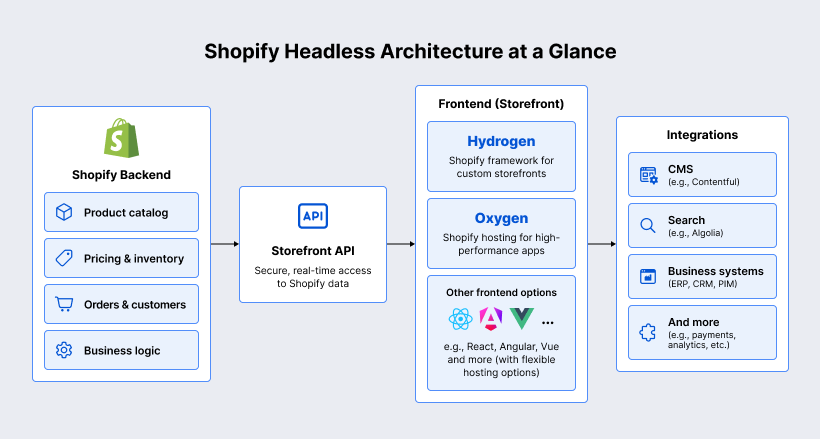
Shopify headless connects a custom frontend to its backend through APIs, using Hydrogen and Oxygen or alternative technologies, with support for third-party integrations.
The commerce data like product data, collections data, cart data, and any other type of data are provided by the backend through the Storefront API. It is a GraphQL API and can be used to access commerce data on the frontend. For example, whenever one wants to access product data, the Storefront API is queried for the same. The Storefront API along with the Customer Account API drives “every headless storefront”.
Shopify provides Hydrogen (its official React-based frontend framework) and Oxygen (Shopify’s global and serverless edge hosting service for Hydrogen applications). The Hydrogen framework includes pre-existing components and data hooks for Shopify-specific functions (such as carts, customers’ accounts, ShopPay, etc.). The Oxygen manages the hosting at the edge, environment variables, caching and CDN management. This creates an end-to-end solution where you build your application using Hydrogen and deploy it to Oxygen. (Please note that Oxygen comes at no cost if you are using any subscription plan, Hydrogen can also be deployed elsewhere such as Vercel and Netlify.)
You don’t have to use Hydrogen. You can use any modern front-end framework (such as Next.js, Vue/Nuxt, Astro, mobile React Native, etc.) that makes requests to the API. Developers can “bring their own stack” through Shopify’s Storefront API directly implemented into the chosen frontend of their choice. The downside is that you’ll do more of the implementation on your own, compared to Hydrogen which offers several ready-made solutions (such as cart management, SSR set-up, etc.). In other words, Hydrogen/Oxygen is the suggested headless setup but you can make your own stack using Storefront API.
As headless technology allows separating the frontend and backend, any other business systems can be integrated into either one of them. So you can use the content management system to feed marketing information into the frontend, pull information about the products from the PIM, get information about stock from ERP, and combine everything in your own frontend. This is specifically stated by Shopify in this way: “Decoupling allows you to connect other business systems, such as a content management system (CMS), CRM, ERP, or PIM”.
What challenges should you consider before going headless?
The main challenges of Shopify headless commerce include higher development and maintenance costs, compatibility issues with Shopify apps, API versioning and security, and more complex content management workflows. Businesses must regularly update API integrations, protect access tokens, and ensure reliable performance. They also need dedicated preview and staging environments so content editors can review changes before publishing.


A successful headless implementation requires more than building a custom storefront. Companies must also consider the reliability of the underlying architecture and integrations, warns Dzmitry Verasau, Tech Lead at SaM Solutions:
“One of the biggest mistakes in headless development is focusing too much on the frontend and overlooking the integrations behind it. API reliability, data synchronization, SEO, and ongoing maintenance should be part of the architecture from the beginning, not addressed after launch.”
When is Shopify headless commerce the right choice?
Headless suits businesses with complex storefronts, multiple markets or channels, and sufficient development resources. Simpler stores typically benefit more from traditional Shopify.
Companies that require complicated storefronts (interactive elements, editorial design and unique purchase experience) will be able to gain from headless. This is especially the case of luxury brands and direct-to-consumer brands such as Allbirds and Gymshark that require headless in order to enhance their user interface and editorial content. Likewise, businesses requiring decoupled frontends due to complicated pricing and ordering process are in the need of decoupled frontend because they can’t do it through the default logic of themes.
When you have multiple retail locations, overseas markets, or omni-channels (mobile applications, kiosks, and others), you can centralize your commerce business logic and customize the user interface based on the channel. Similarly, when you need to implement a new sales channel unsupported by Shopify themes, this is where headless comes in handy.
As a result of their complexity, headless stores require a skilled development team (agency or funds to hire one). Those organizations that possess in-house engineers well-versed in React/Node (or any other stack you use) will find it easier to run a headless store. Otherwise, for small and poorly-resourced teams, a non-headless theme would be preferable.
When what you require can be done by the default tools – for instance, you just want to run a single-store website with normal traffic, basic theming, and no fancy integrations – then you probably don’t need a headless implementation. The Shopify company itself claims that if your store has “stable growth” and is limited to one core store, then it may not be necessary to develop a custom frontend at all.
How do you implement a headless Shopify storefront?
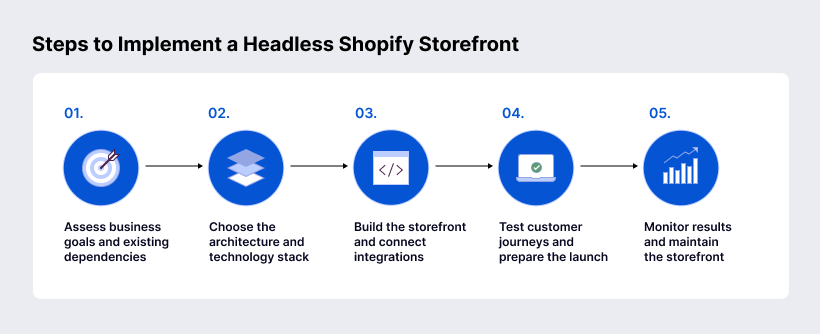
To implement a headless Shopify storefront, start by assessing business goals and existing integrations. Next, choose a front-end framework such as Hydrogen or Next.js and a suitable hosting platform. Build the custom storefront, connect Shopify APIs and third-party systems, and test key customer journeys before launch. After deployment, monitor performance, conversion rates, and API reliability while maintaining and optimizing the storefront.
Assess business goals and existing dependencies
In other words, first explain the reasons for going headless. You should understand what your business goals are (speed, new channels, specific user experience), what your current technology stack looks like, and what customizations are already done. Enumerate the list of current apps, code in your themes, and the back-office that needs to work after the implementation of headless. It is recommended as a best practice to begin with a review of your current technology stack and technical debt. Define mission-critical functionality (such as the checkout process and integrations).
Choose the architecture and technology stack
Now choose your front-end framework and hosting environment. Will you be using Hydrogen along with Oxygen, or will you use some other front-end framework such as Next.js/Gatsby? Will you be hosting on Shopify’s Oxygen, Vercel, AWS, or some other hosting platform? Make a choice based on team competence and performance requirements. For example, SaM Solutions suggests performing an assessment of a “core back-end API strategy,” and then picking up the appropriate modern front-end framework. Install the necessary sales channel (Headless/Hydrogen) to get API tokens.
Build the storefront and connect integrations
Build the custom storefront app. Add components/pages to get the data from the Storefront API (GraphQL queries) and render the products, collections, carts, and other information. Integrate the third-party systems that you have identified previously, for instance, a headless CMS for content management, PIM for the product information, or an external search engine. With Hydrogen, take advantage of the built-in functionality for the cart and analytics; otherwise, you may need to develop those features independently. Make sure to implement the customer authentication (Customer Account API) and checkout processes. In the process of development, think about progressive enhancement techniques such as dynamic pricing by Shopify.
Test customer journeys and prepare the launch
Do QA testing for the new website. Ensure that everything is tested including navigation (product searching and filtering), adding to the cart, checkout, login pages, and other interactive functionalities. Check how the new website compares with the old one to ensure that the content, as well as the SEO metadata (titles, descriptions, URLs), is not lost in the process. Shopify headless migration guides suggest doing this through phases to preserve SEO and to prevent any drop in traffic. Make sure to sync up product data and inventory before going live.
Monitor results and maintain the storefront
Once launched, constantly monitor the performance and behavior of the app. This includes monitoring page performance indicators (Lighthouse scores, Core Web Vitals), conversion funnels, and API call frequencies. The gathered information should be used to optimize the app iteratively – you might want to fine-tune the caching strategy or use lazy loading for some parts of the page that are less important for performance. Make sure that you have planned for the regular maintenance of the app – this includes updating the version of APIs and your app dependencies.
How much does Shopify headless commerce cost?
Shopify headless commerce typically costs between $50,000 and $300,000 to develop, depending on complexity. Additional costs include ongoing maintenance, third-party integrations, and hosting if Oxygen is not used. No separate headless license is required.
What should you evaluate when choosing a Shopify headless development partner?
When choosing a Shopify headless development partner, evaluate their expertise in Shopify APIs, GraphQL, Hydrogen, frontend frameworks, and third-party integrations. Look for proven experience with storefront development, testing, migration, and ongoing support. A reliable partner should also demonstrate successful projects, strong communication, and the ability to deliver scalable solutions that meet your business requirements.
SaM Solutions is a trusted Shopify development partner with over 30 years of software engineering experience. Our expertise covers custom storefront development, headless and composable architectures, API integrations, and modern frontend technologies such as React, Next.js, and Vue.js. We offer end-to-end Shopify services, from consulting and UI/UX design to development, migration, QA, and ongoing support. With proven Shopify projects across retail industries, we help businesses build scalable, high-performing ecommerce solutions tailored to their needs.
Conclusion
With headless Shopify, flexibility and performance opportunities are limitless since the frontend will be separated from the backend. This platform will be beneficial for companies that require highly customized storefronts or true omnichannel solutions. The suggested Hydrogen+Oxygen stack will serve you well, but you may also go for any other tools depending on your needs. The downside will be additional complexity: the headless approach requires a professional development team, meticulous planning (migration, SEO optimization, integration), and more funding. With a headless platform, you’ll be able to get new opportunities only in certain situations (such as managing B2B catalogs, building global multi-channel brands, growing DTC business). For other scenarios, the built-in theme system will suffice.
FAQ
Do you need Shopify Plus to build a headless storefront?
No, it is required only when you want to customize checkout using the Checkout UI Extensions feature. All versions of the platform have support for the Storefront API and headless development, including the Oxygen plan.
Can a headless storefront use Shopify’s hosted checkout?
Can you run a headless storefront alongside an existing Shopify theme?
Can you switch back to a traditional Shopify storefront after going headless?