Upgrading from Umbraco 13 to 14: Our Journey from Build Errors to Breakthroughs


(If you prefer video content, please watch the concise video summary of this article below)
Key Takeaways
- The biggest challenge is the Umbraco 13 to 14 jump. Most breaking changes occur at this stage (macros removal, API changes, content structure updates). Once completed, further upgrades become significantly smoother.
- Macros migration is the critical blocker. Since macros are removed in Umbraco 14, converting them to blocks (often via custom migration jobs) is essential to preserve existing content.
- Preparation and strategy save time. Upgrading .NET in advance, creating backups, freezing content, and using a local-first migration approach help reduce risks and speed up the process.
- Incremental upgrades are more reliable than skipping versions. Even if targeting newer versions like Umbraco 17, you’ll likely need to handle the same core challenges introduced in version 14.
Umbraco CMS is a widely used and rapidly evolving .NET-based content management system. At SaM Solutions, we also rely on Umbraco for our internal corporate portal. However, the platform’s fast pace of development has a downside: new versions frequently introduce breaking changes, and upgrades are not always seamless.
Our team has been working with Umbraco since version 9. At the time we started planning the upgrade, our corporate portal was running on Umbraco 13, which is scheduled to reach its end of life on December 14, 2026. Many community members recommend skipping version 16 entirely (its EOL is June 12, 2026) and waiting for Umbraco 17, which has a longer support window until November 27, 2028.
There is logic in that advice. However, our experience showed that the most difficult migration step occurs earlier, when moving from Umbraco 13 to 14. The following upgrades from version 14 to 15 and then to 16 are significantly smoother. In practice, anyone upgrading directly to version 17 will most likely still need to overcome the same obstacles.
This article shares our real-world Umbraco 13 to 14 upgrade experience, including the problems we faced and how we solved them.
Request SaM Solutions’ Umbraco implementation to speed up and optimize your content management workflows.
Initial System Architecture
Before starting the upgrade, our portal had the following technical setup.
Platform and framework
- .NET 8
- Pages and components (partially migrated to Next.js with headless) but prod is still on Razor Pages
- Hangfire for background job processing
Umbraco ecosystem
- Umbraco CMS 13.8.1
- uSync for content synchronization
- Examine Search
- Azure AD authentication for the Umbraco backoffice and for all users of the Umraco portal, with automatic user creation in the portal
Background jobs
Our portal relied heavily on automated background jobs interacting with Umbraco content.
We had roughly six jobs, including:
- Content validation jobs triggered on content updates that make some changes to it (checking fields, setting the author, etc.)
- Jobs for content translation across cultures based on a cron schedule
- Import jobs that fetch content from external services
One of the more complex jobs translated content between cultures based on a cron schedule. This functionality is described in more detail in another article about our internal AI-powered translation system.
It Should Be Noted
If you try to upgrade to version 16 right away and run it, you will get something like this:
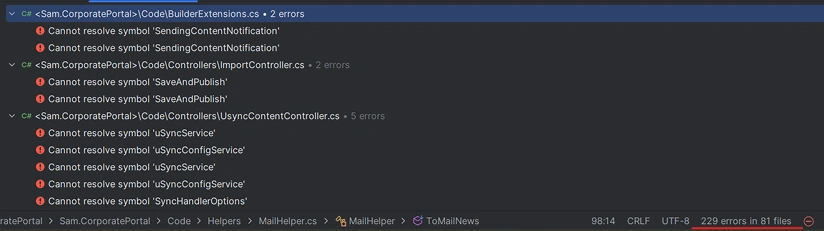
That’s why we decided on the incremental migration, starting with upgrading Umbraco 13 to 14.
Custom Macros that Blocked the Upgrade
One of the biggest blockers when upgrading to Umbraco 14 was the removal of macros. The thing is that our content managers used several custom macros when creating news articles on the portal.
The most important ones included:
- ExternalIframeBlock for displaying external iframe content
- IframeMediaWrapper for displaying media inside an iframe based on a link
- ScaleImage for resizing images dynamically
- SliderImages — a custom image slider
Unfortunately, macros were completely removed in Umbraco 14 and replaced by blocks. To preserve existing content without rewriting thousands of articles manually, we decided to migrate the macros with the help of coding and turn them into blocks.
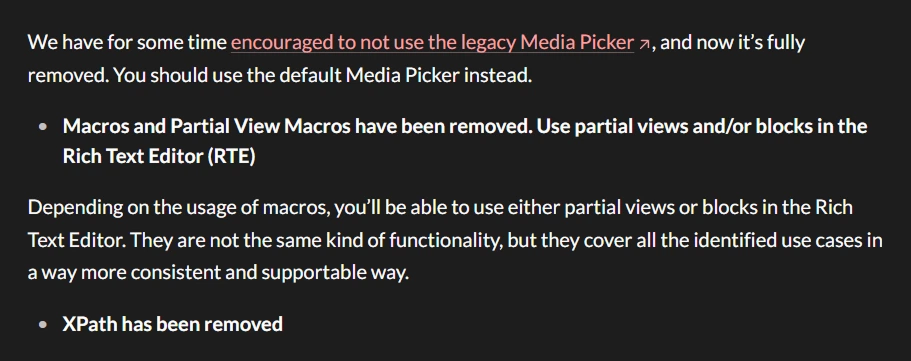
Source: Umbraco documentation
Umbraco Migration Strategy
To speed up the upgrade process and be able to deploy only the final version, we decided to perform the entire migration locally on a single machine.
The workflow looked as follows:
- Restoring the database from the production environment to a local machine. We created a local copy of the production database to ensure that the migration process would run against real content and real data structures. This helped us detect potential issues early, especially those related to content serialization, macros, and custom blocks.
- Introducing a code and content freeze on production until the final deployment. Because the upgrade process was large and involved multiple breaking changes, we temporarily froze both code changes and content updates in the production environment. In theory, content editing could still continue during the migration if content authors were willing to manually repeat those changes after the upgrade. However, to avoid inconsistencies and additional overhead, we chose to freeze the content until the final deployment. We know this is an unusual approach, but in our circumstances we could afford it.
- Performing the entire migration locally and restoring the database after the upgrade was complete. Once all migration steps were finished and the upgraded application worked correctly locally, we manually restored the updated database to the target environment and deployed the final version of the portal.
Alternative scenario
In a more traditional scenario, the migration could have been performed incrementally using intermediate environments (for example, development → staging → pre-production) and deploying each intermediate upgrade step along the way.
However, we intentionally chose a local-first migration approach to accelerate the process. Many issues were easier to fix only after reaching the target version (Umbraco 16), so repeatedly deploying intermediate versions would have slowed down the overall workflow.
Another factor that made this approach feasible was our project setup. Technical Product Owner was actively involved in the upgrade process and was able to execute the migration steps directly on their local machine. This significantly simplified coordination and allowed us to move through the upgrade stages faster than a typical multi-environment deployment pipeline would allow.
This approach works best if staging and production databases are identical and if you can follow the same steps like we did in terms of security policy (when Technical Product Owner is involved).
After restoring the database in staging, some environment-specific configurations (like user permissions) had to be reconfigured.
Branching Strategy for the Umbraco Upgrade
During the migration we created separate Git branches for each final Umbraco version:
- upgrade-to-14
- upgrade-to-15
- upgrade-to-16
This strategy turned out to be extremely helpful. Whenever something broke (which happened quite often) we could simply:
- restore a fresh Umbraco 13 database backup
- rerun the upgrade path
- quickly compare results
We also strongly recommend creating database backups after each successful intermediate upgrade.
Preparing the Upgrade
Before upgrading Umbraco itself, we completed several preparatory steps.
At the very beginning, we recommend doing everything that can be done in advance. In our case, that meant writing a migration job, testing it, and updating to .NET 9. At the time of our migration from Umbraco 13, version 16 was the latest available, and it required .NET 9. This way, when you first upgrade to version 14 and encounter a bunch of errors, you can at least rule out those related to the .NET version.
The upgrade itself went fairly smoothly and, in most cases, was resolved by simply updating NuGet packages, though it definitely didn’t work perfectly on the first try.
Next, we upgraded Umbraco to 13.10 and uSync to 13.3, because that’s when blocks were introduced, the very ones we needed to migrate our macros to.
Migrating macros to blocks in Umbraco
After that, we updated the existing content and added a draft version of the blocks we wanted to migrate to (apparently, we copied the macro logic with a few small modifications).
Then we started developing the job for migrating macros to blocks, something we had to write ourselves, and it turned out to be one of the most important parts of the migration process.
Check out our version of the job, it can serve as a good starting point, though in your case you might need to cover more conditions.
Details of this migration job:
In the end, there weren’t any major difficulties (though that’s after we figured everything out). During the process, we had to understand how Umbraco stores its data internally to know how to properly convert macros into blocks.
Essentially, our task was to replace each macro in the content with a corresponding block. For example:
News text
MACRO_WITH_IMAGE
More news text
What we did:
- Scanned content for macros using regular expressions
- Identified macro occurrences
- Created corresponding block components
- Replaced macro markup with block references
For creating new data types, we could use built-in Umbraco types, which made the work easier. We just had to be careful to follow the correct structure. The job also required that all the necessary custom blocks were already created at the site level to enable conversion.
Our macros were fairly simple, displaying an image, embedding a video in an iframe, or showing multiple images. One advantage of migrating to a newer Umbraco version was that some of these custom blocks became unnecessary, since the new Rich Text Editor already included built-in components for them.
The migration itself was needed mainly to preserve old content.
After that, we ran the migration job. Once it was completed, we reviewed the list of pages that had contained macros and tested them to ensure everything worked correctly. If all looked good, we treated that as a successful upgrade checkpoint.
Migration of Nested Content to BlockList and Grid to BlockGrid
The next step was to install the package uSyncMigrations in the local environment via NuGet.
Next, we followed this sequence of steps:
- Go to Settings → uSync → Everything → Clean Export.
This helps avoid situations where uSync files and the current database version are out of sync.
- Then go to Settings → uSync Migrations → Convert Site and select the migration plan “Nested to BlockList and Grid to Block…”.
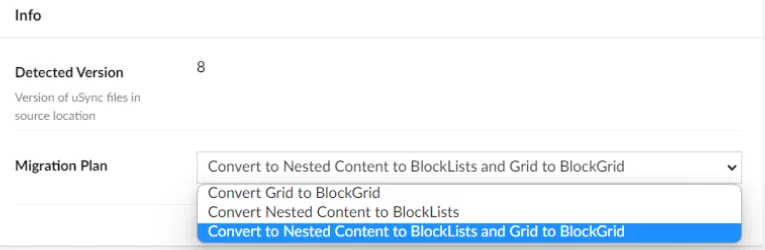
This starts the migration process itself. It runs entirely based on uSync files — it takes the existing files and converts them to the new format.
Once the migration finishes, perform an Import to apply the changes to the database. In our case, the process generated about 4,000 files.
After that, go to uSync → Everything → to import all migrated content into DB (BlockLists and BlockGrid).
Upgrading to Umbraco 14
To update the Umbraco NuGet package to version 14, you first need to temporarily disable the uSync package, otherwise, the main Umbraco package would not upgrade. Or change the package version manually in all csproj files or Directory.Packages.props in case you use CentralPackageManagement.
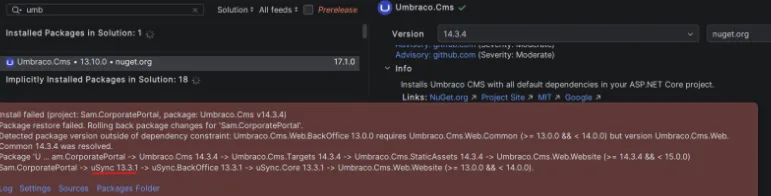
After the update, reinstall version 14 of uSync and start addressing any errors to get the project running again.
You also need to remove @inject Smidge.SmidgeHelper SmidgeHelper from _ViewImports.
@await Umbraco.RenderMacroAsync(macroAlias, parameters)
What Broke During the Umbraco 13 to 14 Upgrade
Notification API changes (SendingContentNotification removed)
SendingContentNotification no longer exists, which means all related handlers have to be rewritten. We decided to use the newer ContentSavingNotification approach and were able to refactor our handlers accordingly.
The main difference is that handler logic is now culture-dependent, and the structure of some objects has changed slightly.
Example:
V13
public class SomeMagicContentNotificationHandler(UmbracoHelper umbracoHelper)
    : INotificationHandler<SendingContentNotification>

  foreach (var variant in notification.Content.Variants)
{
.....
}
Final version (v16)
public class SomeMagicContentNotificationHandler(
	IAppoinmentTimeZoneService appoinmentTimeZoneService,
	UmbracoHelper umbracoHelper)
	: INotificationHandler<ContentSavingNotification>
  foreach (var content in notification.SavedEntities)
   {
   	if (!ValidationIfItemTemplateIsDesired(content))
       	continue;
	foreach (var culture in content.AvailableCultures)
 	{
.....
}
}
In reality, there weren’t many changes but they still needed to be made.
Incompatible classes after migration
We also removed our MacrosMigrationJob, since its mission was complete. It was only needed for the migration from version 13 to 14. Once we moved to version 14, several incompatible classes appeared that would have prevented the project from building.
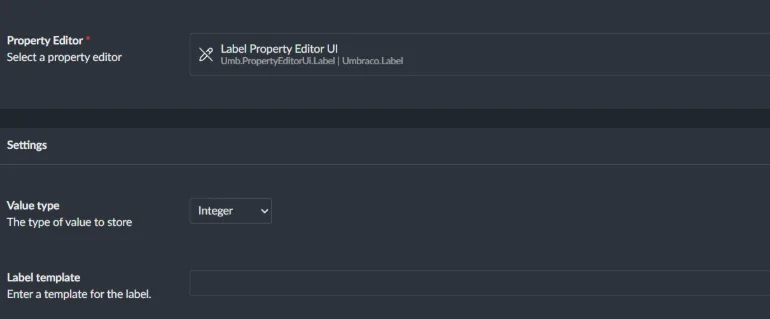
Label type changes in published models
Next, there was an issue with labels. We had Umbraco.Label types, and when we migrated to version 14, our published models changed the types to string. Although they should have been int and DateTime.
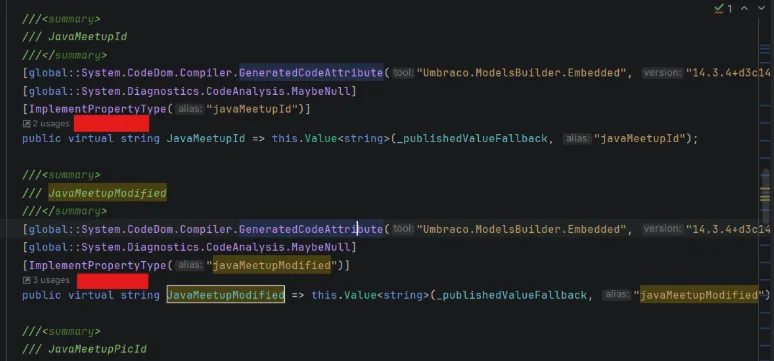
We handled the parsing manually but that’s actually unnecessary. In later Umbraco versions, this functionality will start working correctly again, and the models will return the proper type. It’s easier to just comment it out temporarily until you upgrade to the final version.
In the future, Umbraco will allow this to be configured directly at the platform level, so you’ll be able to specify a custom Label type if it differs from string.
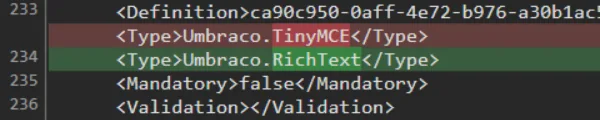
Rich Text Editor migration (TinyMCE → TipTap)
During the upgrade to version 14, we also switched our editors from TinyMCE to TipTap.
This change didn’t cause any issues, but it made future updates easier, since in later versions, TinyMCE was removed entirely.
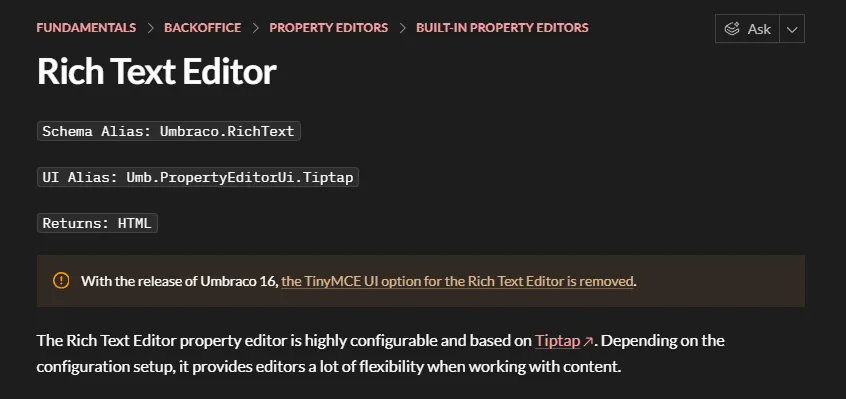
Source: Umbraco documentation
Content serialization issues after macro migration
Next, we needed to create another migration job. You can find our version here. In version 13, when we migrated macros to blocks, the properties were serialized in uppercase, which isn’t compatible with what’s expected in version 14 and later. To fix this, we wrote a small job that re-serializes all the created content where these macros or blocks were used.
This step is only necessary if you previously used custom macros. If not, Umbraco will handle everything automatically during the update.
To Sum Up
From our experience, this was the most difficult part of the entire Umbraco upgrade process. The transition from Umbraco 13 to 14 introduced the majority of breaking changes, and once we successfully passed this stage, the rest of the migration (14 → 15 → 16 → 17) became significantly faster and more predictable.
The main pain points were migrating macros to blocks and migrating nested types, which in our case also required changes in how we work with models at the code level (we will discuss it in more detail in the following article Upgrading from Umbraco 14 to 17).
It is also worth mentioning that during the upgrade we intentionally commented out certain parts of the code to unblock the process and move forward. Many of these fixes were completed only after reaching the final version. So if you don’t see a specific issue or fix described here, it most likely appears in the second part of this guide.

If you’re preparing to move from Umbraco 13 to newer versions, a well-structured migration strategy can save you weeks of rework and prevent critical issues with content and functionality.
Vadim Birkos, Senior Full-Stack .NET Developer, AI Enthusiast